6
IV. ADMINISTERING THE TEST
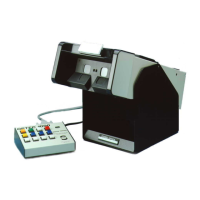
Turn the power on by depressing the red power switch. Depress
the two eye switches--orange and green, being sure the white switch
(day/night) is NOT
depressed but in the raised position. Pull off the first
headrest tissue so there is a clean tissue available for the subject.
Have a subject step forward and adjust the height of the
instrument. Have the subject hold the instrument with both hands, one on
each side, looking into the lenses. The subject's forehead should press
against the headrest trigger. The green ready light on the control panel
should light.
Depress the switch marked TEST #1 and administer the test.
Check your score key for correct answers. Depress switch marked TEST
#1 again so it will turn off. Proceed to switch marked TEST #2 for the next
test. Continue this process until all testing is completed.
PERIMETER TESTING
Ask the subject to look straight ahead. Use the top line of the
center column of an acuity test as a fixation point. Turn left eye off (switch
raised). Press the switches in the middle row of the control panel in any
sequence. Ask the subject to point to where they see a light flashing. Once
you have gone through all four positions, turn the left eye on and the right
eye off, following the same procedures.
IMPORTANT CHECKPOINTS:
• Be certain the instrument is plugged into a 110-120V AC outlet.


 To Next Page