Output short circuit or overload.
Overheating.
Low battery.
Dangerous battery voltage.
A battery with higher voltage than allowed.
Check to make sure the speaker cables are properly
isolated. Verify minimum impedance.
Make sure the equipment is installed in a well-ventilated
location.
When used for long periods, the battery will run down.
Recharge the battery.
Have the battery and/or alternator checked by a
professional.
Curto circuito ou sobrecarga na saída.
Temperatura excessiva.
Bateria descarregada.
Tensão de bateria perigosa.
Bateria com tensão maior que o máximo permitido.
Verifique se os cabos do alto-falante estão bem isolados.
Observe a impedância mínima.
Verifique se o aparelho está instalado em local arejado.
É normal o consumo de bateria por período prolongado.
Faça a recarga da bateria.
Procure uma auto-elétrica para verificar o sistema
alternador / bateria.
Caso ocorra algum problema, o amplificador irá desligar e o LED VERMELHO/PROT irá piscar. Conforme o problema ocorrido, o LED
VERMELHO/PROT irá piscar um determinado número de vezes. Assim teremos um diagnóstico conforme a tabela abaixo:
In the eventuality of any problems, the amplifier will power down and the RED LED/PROT light will begin to blink. Depending on the problem, the
RED LED/PROT light will flash a certain number of times. The following table summarizes the diagnostics:
DIGITAL LINEDIGITAL LINEDIGITAL LINEDIGITAL LINEDIGITAL LINEDIGITAL LINE
NÃO LIGA:
- Os cabos não estão conectados corretamente (terminais “+” +BAT, “-” GND e REM). Assegure-se que todas as conexões têm contato elétrico e
mecânico.
- Os fusíveis/disjuntores estão com defeito ou queimados. Efetue a troca, atenção no valor correto dos novos!
SEM SOM:
- Os cabos dos alto-falantes ou plugs RCA não estão conectados corretamente.
- Verifique se o controle LEVEL não está no mínimo.
- Verifique os ajustes dos filtros do amplificador.
SEM SOM / LED VERMELHO DE PROTEÇÃO PISCANDO:
- Vide “SISTEMA DE DIAGNÓSTICOS”.
- Os alto-falantes ou cabos estão com defeito, deste modo cheque os alto-falantes, cabos e conexões.
QUALIDADE DE SOM POBRE (DISTORÇÕES):
- Os alto-falantes estão sobrecarregados, diminua o nível e refaça o ajuste de nível (vide item 3 “DESCRIÇÃO GERAL”).
GRAVES FRACOS:
- Cabos de falantes (+) e (-) estão trocados, alto-falante fora de fase (vide item “INSTALAÇÃO DAS SAÍDAS DE ALTO-FALANTES”). Verifique o ajuste
do controle BASS (6).
RUÍDO DO MOTOR, BUZINA, PISCA, ETC:
- Utilize cabos supressivo nas velas de ignição.
- Utilize condensadores no alternador, buzina e ignição.
- Passe o cabo blindado de entrada longe de qualquer outro cabo, pois ele é mais sensível a interferências.
- Faça a ligação de alimentação (+12V) separada para o sistema de som. Utilize um fusível/disjuntor a 30 cm da bateria para proteção.
- Faça um bom aterramento do amplificador. Para isto remova a tinta do chassi do veículo no ponto desejado. Parafuse o fio utilizando um terminal terra.
Para proteger de oxidação, isole com tinta.
- Não faça loop com terra. Evite utilizar vários terras. Prefira a ligação estrela, com todos os terras partindo de um único ponto.
NO POWER
- The power cables are not connected correctly (terminals +BAT, GND and REM). Verify that all the connections have electrical and mechanical contact.
- The fuse/circuit breakers are defective or blown. Replace them, making sure that the replacements are the correct ones!
NO SOUND
- The speaker cables or RCA plugs are not connected correctly.
- Verify that the LEVEL control is at the lowest setting.
- Check the amplifier filter controls.
NO SOUND. RED LED PROT BLINKING:
- See diagnostic guide
- The speakers or cables are defective, so check speakers, cables and connections.
POOR SOUND QUALITY (DISTORTIONS):
- The speakers are overloaded. Decrease and readjust the volume level (see entry 3, “General Description”)
WEAK BASS:
- Speaker cables (+) and (-) are switched or the speaker is out of phase (see entry “Installing Speaker Output”). Also check BASS control adjustment.
ENGINE, HORN, TURN SIGNAL INTERFERENCE:
- Use suppressing/insulated cables on the spark plugs.
- Use capacitors on the alternator, horn and ignition.
- Run the shielded input cable away from any other cables, as they are particularly prone to interference.
- Install a separate power source (+12V) for the sound system. Use a fuse/circuit breaker 30 centimeters from the battery as the best precaution.
- Ground the amplifier properly. Remove paint from the chassis at the selected point, and connect the wire using a grounded terminal. In order to prevent
rust, insulate it with paint.
Do not loop the ground. Avoid using multiple grounds. If possible, use a star connection, in which all the grounds run from a single point.
COMO PROCEDER EM CASO DE DEFEITO / TROUBLESHOOTING
SISTEMA DE DIAGNÓSTICO DE PROBLEMAS / DIAGNOSTIC GUIDE
OBS: Caso o led VERMELHO/PROT pisque continuamente, desconecte os alto-falantes e religue o aparelho.
Se o problema persistir, procure a assistência técnica STETSOM.
NOTE: In the event that the RED LED/PROT light is flashing continuously, unplug the speakers and turn the equipment back on. If the problem
persists, contact STETSOM tech support.
PISCADAS / NUMBER OF FLASHES PROBLEMA / PROBLEMA
SOLUÇÃO / SOLUTION
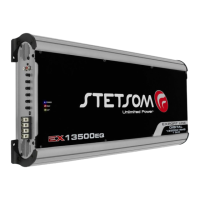
EX13500EQ
EX13500EQ
EXPORT LINEEXPORT LINEEXPORT LINEEXPORT LINEEXPORT LINEEXPORT LINE
GUARANTEE CERTIFICATECERTIFICADO DE GARANTIA
MANUAL DE INSTRUÇÕES / INSTRUCTION MANUAL
19987_R1_MANUAL_EX13500EQ__PT-ING
ESPECIFICAÇÕES TÉCNICAS / TECHNICAL SPECIFICATIONS
MODELO / MODEL:
Número de Canais / Channels:
Potência / Power @ 14.4V Mono 1 Ohm (RMS):
Potência / Power @ 14.4V Mono 2 Ohms (RMS):
Potência / Power @ 14.4V Mono 4 Ohms (RMS):
Potência / Power @ 12.6V Mono 1 Ohm (RMS):
Potência / Power @ 12.6V Mono 2 Ohms (RMS):
Potência / Power @ 12.6V Mono 4 Ohms (RMS):
Impedância Mín. de Saída / Min. Output Impedance:
Impedância de Entrada / Input Impedance:
Sensibilidade Mínima de Entrada / Input Sensitivity:
Distorção Harmônica Tot. / T.H.D.:
Relação Sinal Ruído / Signal to Noise Ratio:
Resp. Freq. / Freq. Resp. (-3dB) @ 2 Ohms:
Crossover Low Pass:
Crossover High Pass:
EQ - BASS @ 45Hz:
EQ - MID BASS @ 270 Hz:
EQ - MID HIGH @ 2KHz:
Over Clip (Potência / Power):
Tensão de Alimentação / Power Supply:
Consumo Musical / Consumption Music(12,6V):
Consumo BASS / Consumption BASS (12,6V):
Dimensões / Dimensions (A x L x C):
Peso / Weight:
1
14200W
10100W
6100W
13500W
9450W
5400W
1 OHM
25K OHMS
0,6V
< 0,9% THD
>90dB
10Hz ~ 10KHz
50Hz ~ 10KHz
10Hz ~ 700Hz
±10dB
±10dB
±10dB
15%
9,5 ~ 15Vdc
5,1 ~ 665A
5,1 ~ 1330A
77x290x614mm
9,6Kg
EX13500EQ – 1Ω
comercial@stetsom.com.br

 Need help?
 General


 To Next Page