Auxiliary equipment
Actuating the windscreen wipers
and windscreen washers (var-
iant)
Pressing the softkey switches between the op-
erating stages in the sequence shown below.
Press softkey Operating stage
Off
First time On
Second time Intermittent
Third time Off
Hold (possible in all
operating stages)
Washer
Front windscreen wiper and washer
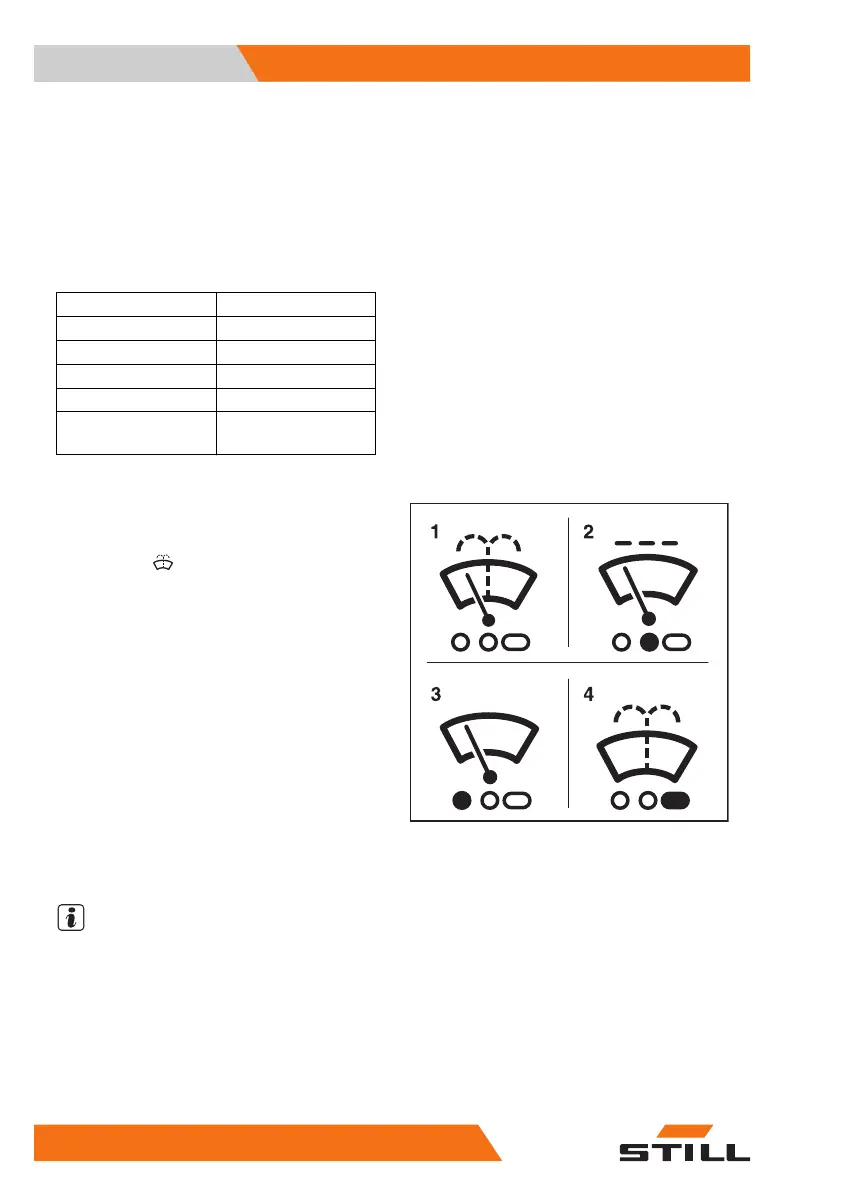
– To activate the "On" operating stage, press
the softkey
(1).
The "On" operating stage is activated. The
symbol (3) appears.
– To activate the "Intermittent mode" operat-
ing stage, press the softkey again.
The symbol(2) is shown with an orange back-
ground.
– To activate the "Washer" operating stage,
press and hold the softkey.
The "Washer" operating stage is activated.
The symbol(4) is displayed for as long as the
softkey is pressed.
– Once the window is clean, release the soft-
key.
NOTE
If the truck has a roof panel, activation of the
"washer" operating stage for the windscreen
simultaneously activates the wiper/washer
function for the roof panel.
The previous operating stage is reactivated.
– To switch this operating stage off, press the
softkey repeatedly until the symbol(1) ap-
6219_003-069_V2
Operation
4
Auxiliary equipment
328 57378011527EN-12/2023 - 07



 To Next Page