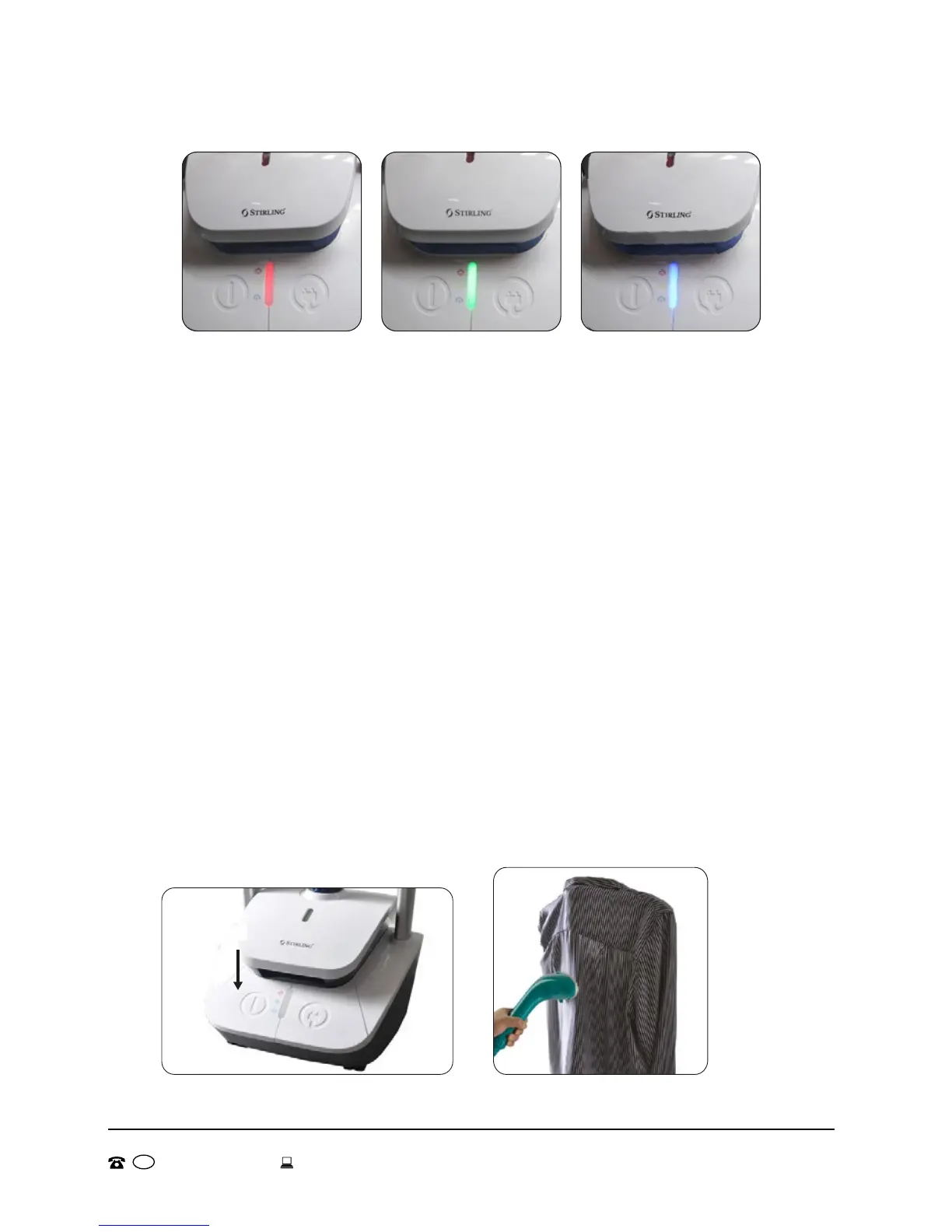
3. The garment steamer has 3 heat settings, low, medium and high.
Each setting is indicated by a different indicator light (Fig.15, 16
and 17).
4. To adjust the heat setting, press the power/steam setting button
(12) once to cycle to the next setting. To turn off, press the power/
steam setting button (12) until there is no light showing (Fig.18).
5. Check the care label of the clothes to make sure that the garment
can be steamed.
6. If you are unsure, test an unobtrusive area of the garment you want to
steam to make sure that no damage will occur.
7. Do not hold the steamer in one place for long periods of time as
this may cause damage to your clothes.
8. Hang or attach the clothes to be steamed to the clothes hanger (3)
or the pants hanger (4) (Fig.19).
9. Point the steam head (1) in the direction of the clothes and move it
slowly up and down, the length and breadth of your clothes.
! CAUTION: Steam can cause burns, do not point the steam head
towards yourself or other people.
10. Gently steam your clothes to assist in removing any wrinkles and
refreshing your clothes.
Fig.15: Red - High Fig.16: Green - Medium Fig.17: Blue - Low
Fig.18
Fig.19
AFTER SALES SUPPORT
MODEL: GS511 PRODUCT CODE: 53559 07/20161300 554 124 info@gstrading.com.au
AUS
15


 To Next Page