16
AUS
AFTER SALES SUPPORT
MODEL: STR-E15BGD PRODUCT CODE: 708548 10/2022
1300 112 534
tempo.org/support
Getting Started (Cont.)
5. Open the lid of the bean hopper and pour in the fresh coffee beans.
6. Insert the preferred filter (single shot or double shot) into the portafilter. Please
take care when putting the filters into the portafilter as it takes a bit of strength.
7. Press the CUP button to select the corresponding cup size (i.e. if you have
inserted the single filter, you should select 1 cup, for the double filter, select 2).
8. The screen will show default grinding time (as per the selected filter size). This is
based on a grinding level of 3 (the default for a single cup is 12 seconds, and for
a double cup is 17 seconds). You can adjust this (from 2-14 seconds for a single
shot and 2-20 seconds for a double shot) by rotating the START/STOP knob.
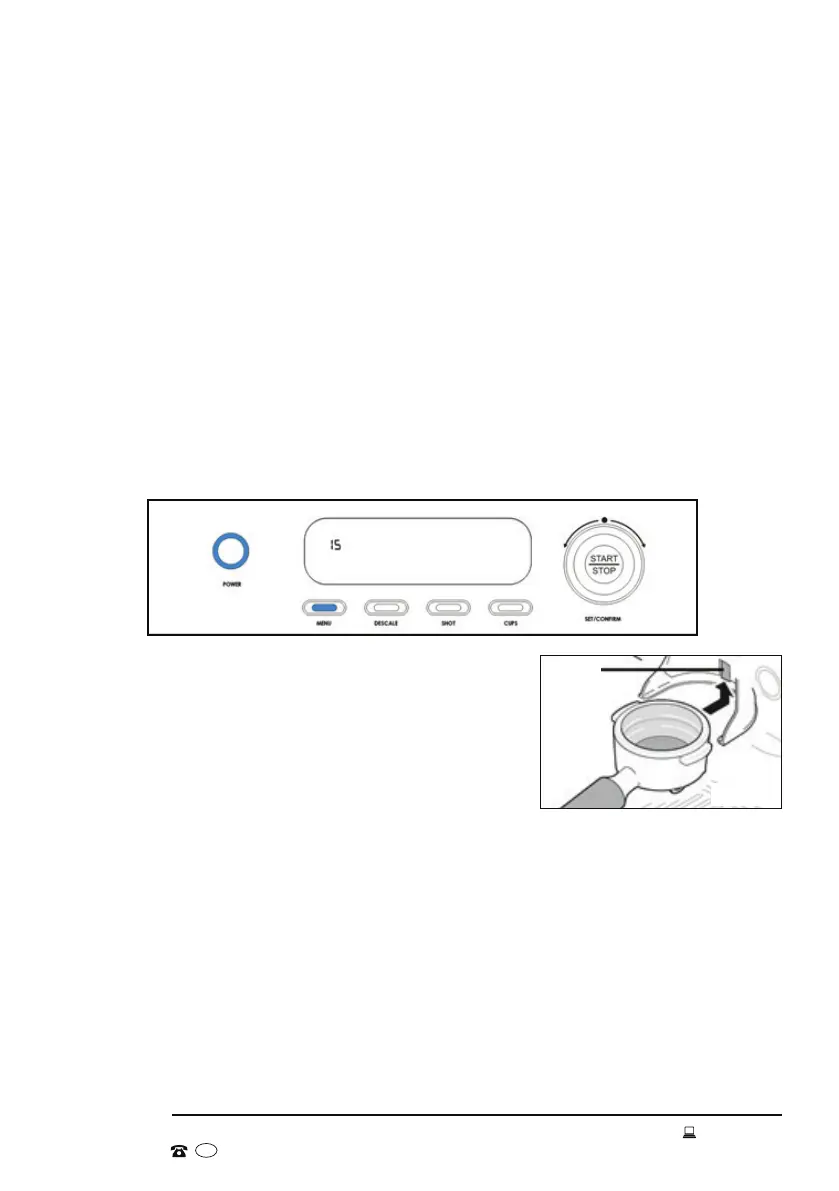
NOTE: The default grinding time can be adjusted by repeatedly pressing the menu
button until only the grinding time for single/double cups is shown (Fig. 9), and then
rotating the START/STOP knob (this time can be adjusted from 2-30 seconds). The
machine will remember this new default grinding time.
9. Slide the portafilter (with the attached filter) into
the holder under the grinder outlet. Tilt the handle
of the portafilter downwards to press the edge of
the filter against the grinder switch (Fig. 10).
10. Coffee grounds will pour into the portafilter. The
grinder will continue to produce grounds until
the default grinding time ends, or the grinder switch is released (by raising the
portafilter).
Alternatively, to use the grinder, you can press the MENU button until the LCD
screen only displays the grinding time. Slide the portafilter (with the attached
filter) into the holder under the grinder outlet. Tilt the handle of the portafilter
downwards to press the edge of the filter against the grinder switch. You can
then release the switch and the grinder will keep grinding. To stop the grinder,
engage and press the switch again, or wait until the grinding time has ended.
Switch
Fig. 9
Fig. 10


 To Next Page