Product Overview (Cont.)
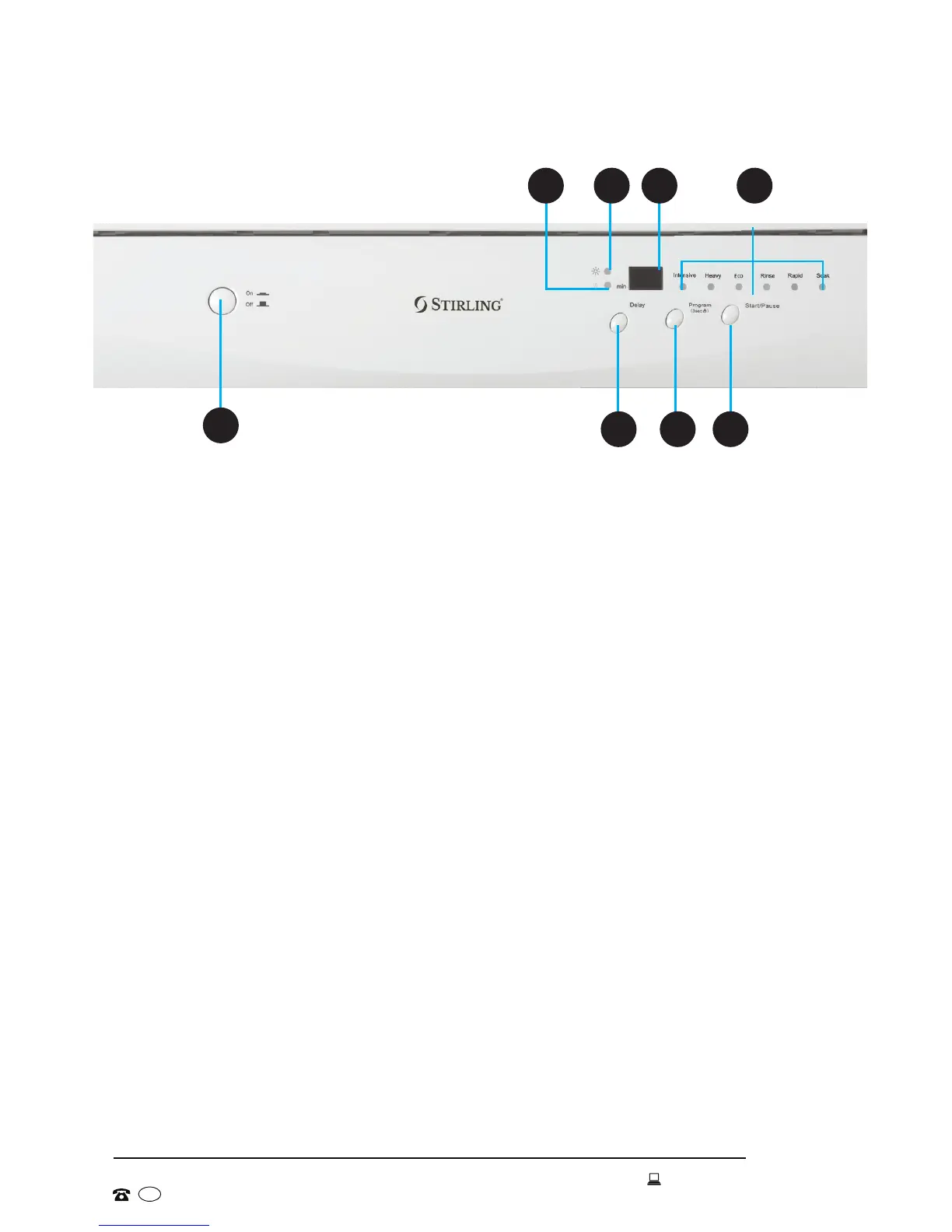
1
43
2
5 6
7
8
Control panel
1 ON/OFF: Press this button to turn the power supply on or off.
2 DELAY: Press this button (repeatedly) to delay the start time of the selected wash
cycle for up to 19 hours.
3 PROGRAM/LOCK: This button has two functions.
* Program: Press briefly (repeatedly) to scroll through the wash programs: the
light below/next to the wash program/cycle will indicate the current selection.
* Lock: Press and hold for 3 seconds to enable the child lock function: “LO” will
show on the display. To unlock the control panel, press and hold the button
again.
4 START/PAUSE: Press this button to start or pause the dishwasher: the indicator
light will come when the wash program is starting.
5 Drying Indicator: This light will come on during the drying cycle.
6 Low Rinse Indicator: This light will come on when rinse aid needs refilling.
7 Display: This will display the set delay time, error codes or the estimated time left
for the program to run.
8 Program Indicators: These lights indicate which wash program has been
selected/is in progress.


 To Next Page