V 11/17
41
When you select cool mode, the air conditioner will run in cool mode. The indicator will
illuminate on the display. Press "▲" or "▼" to adjust the set temperature. Press the "FAN"
button to adjust the fan speed. Pressing the "SWING" button will allow you to adjust the angle of
airflow.
When you select dry mode, the air conditioner will run at low speed in dry mode. The
indicator will illuminate on the display. The fan speed cannot be adjusted in this mode. Pressing
the "SWING" button will allow you to adjust the angle of airflow.
When you select fan mode, the air conditioner will operate only the fan, blowing air without
cooling or heating. All the indicators will switch off. Press the "FAN" button to adjust the fan
speed. Pressing the "SWING" button will allow you to adjust the angle of airflow.
When you select heat mode, the air conditioner will run in heat mode. The indicator will
illuminate on the display. Press "▲" or "▼" to adjust the set temperature. Press the "FAN"
button to adjust the fan speed. Pressing the "SWING" button will allow you to adjust the angle of
airflow.
N.B.:
To prevent blasts of cold air from being blown into the room, there will be a delay of 1 – 5
minutes after selecting heat mode before operation begins. (The actual delay will depend on
the indoor ambient temperature).
The temperature can be set between 16 – 30°C and four fan speeds are available: automatic,
low, medium and high.
3. FAN button
Pressing this button will allow you to cycle through and set the fan speed: automatic (AUTO),
low ( ), medium ( ) or high ( ). When turning on the unit, the AUTO ventilation
speed is activated automatically. With automatic speed, the unit automatically selects the fan
speed best suited according to the factory settings. In DRY mode (dehumidification), only the
low ventilation speed can be set.
4. ▲/ ▼ button
Press "▲" or "▼" once to increase or decrease the set temperature by 1°C. (The temperature
cannot be adjusted in automatic mode).
When setting the TIMER ON, TIMER OFF, press "▲" or "▼" to adjust the time.
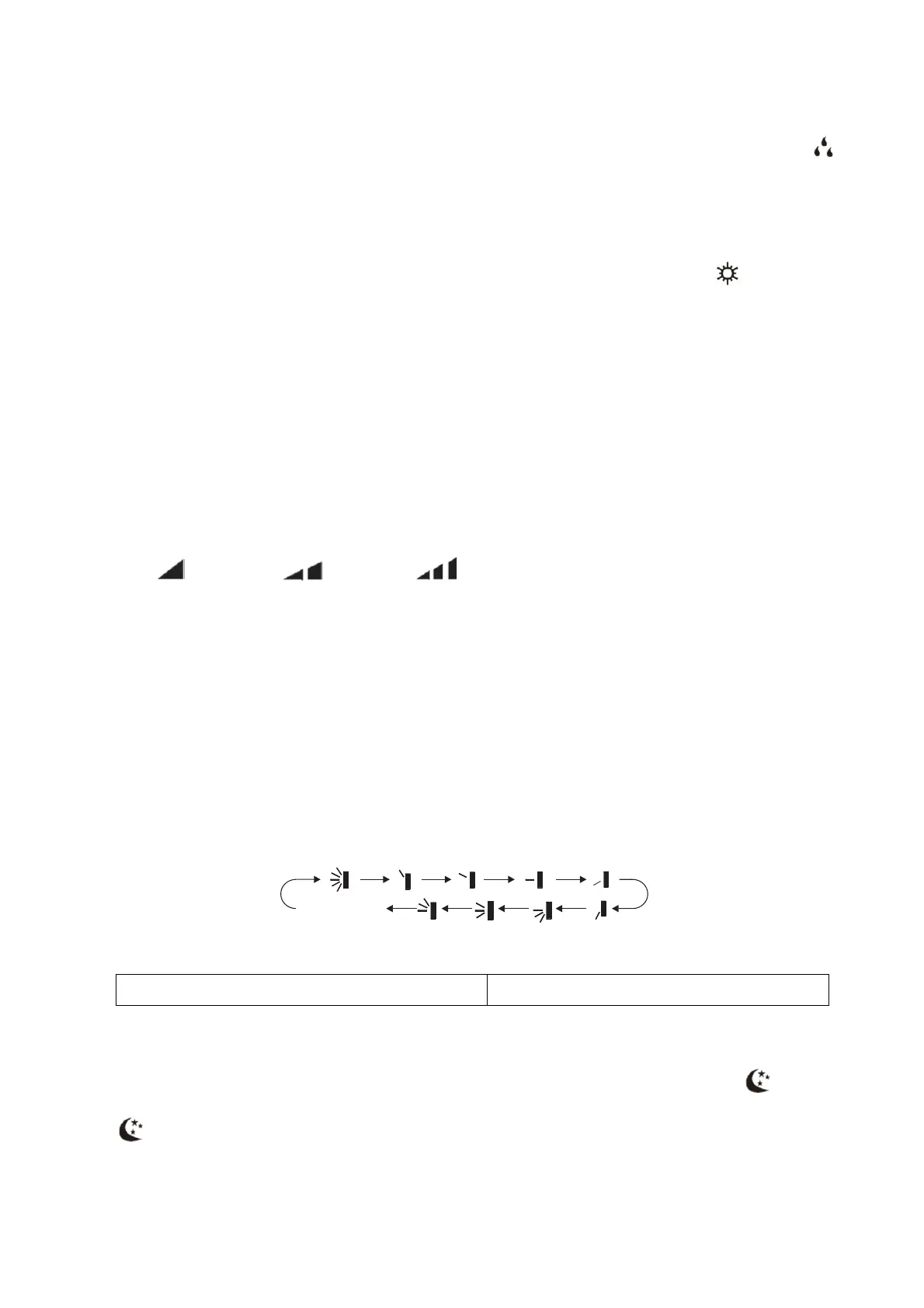
5. SWING button – vertical oscillation
Press this button to set the swing angle (up/down). You can cycle through and set the fan's
angle of airflow as shown below:
nessunavisualizzazione(ildeflettoreorizzontalesiarrestanella
posizionecorrente)
nodisplay(thehorizontalflapstopsinthecurrentposition)
6. SLEEP button
In cool, heat or dry mode, press this button to start the SLEEP function. The icon will
appear on the remote control display. Press the button again to exit the SLEEP function. The
icon will disappear from the display.
The temperature will increase or decrease by 2 degrees over two hours according to the
function selected (cool/heat).
nessuna
visualizzazione
(il deflettore orizzontale si arresta
nella posizione corrente)



 To Next Page