Installation Guide CD80/CD80AE Processor Retrofit Kit
6 Installation
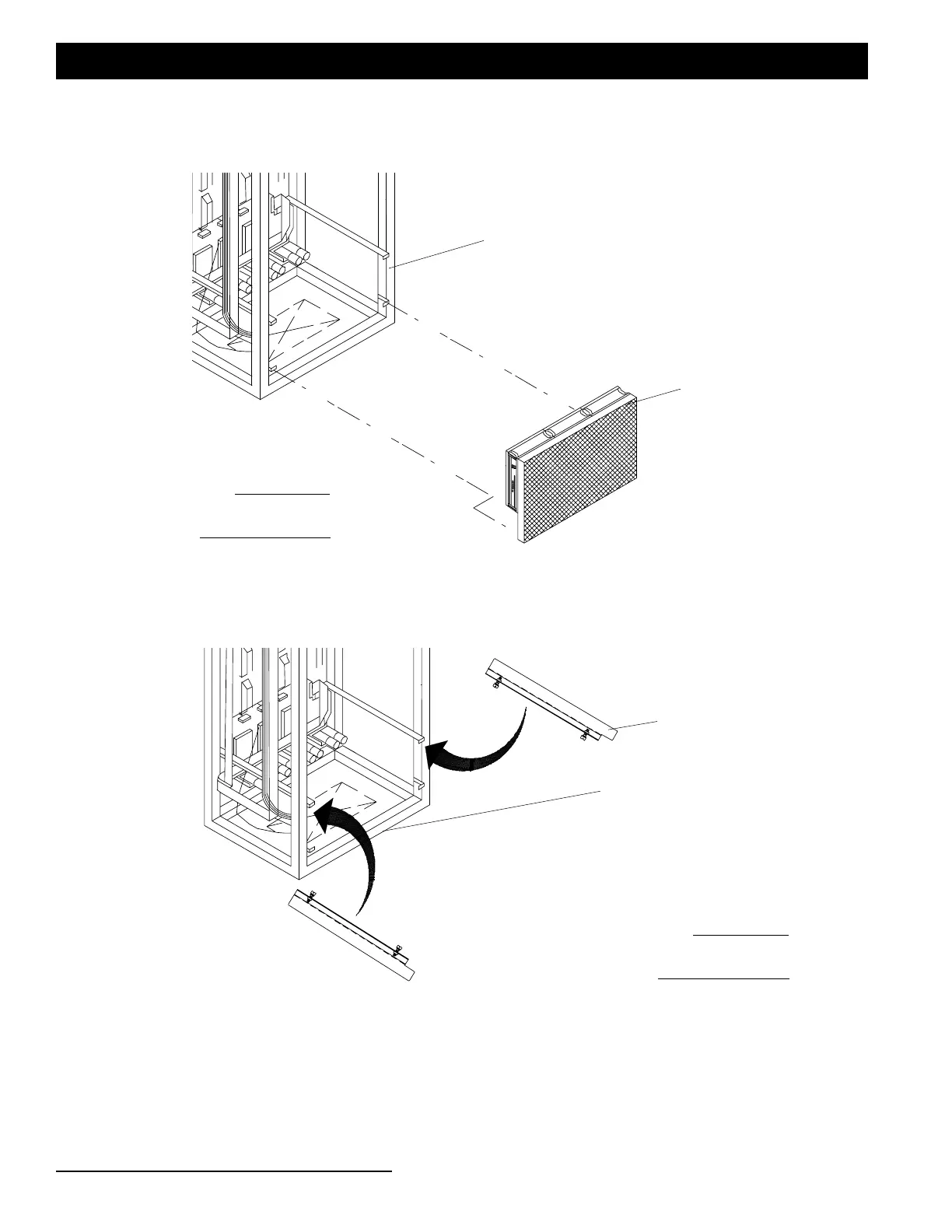
Step 3. If there is sufficient clearance, connect fan power connector and mount the fan assembly as shown in Figure
2.
Figure 2: Retrofit Fan Assembly Installation
Step 4. Attach the airflow baffles, as illustrated in Figure 3, to dimmer rack upper processor guide rails Note, the
thumb screws will face inwards.
Figure 3: Air Baffle Installation
Step 5. At rack, connect original round female processor power connector to new-style power adapter connector.
Step 6. Install new temperature sensor PCB as follows:
a. Remove the old temperature sensors
b. Uncoil temperature sensor wire at back of processor and route up left side of dimmer rack
.
Existing CD80/CD80AE Dimming Rack
Retrofit Fan Assembly
Note:
Some components not
shown for clarity.
Existing CD80/CD80AE
Airflow Baffle (2 EA)
Note:
Some components not
shown for clarity.
Dimming Rack


 To Next Page