EasyManua.ls Logo

Strasbaugh 6DS-SP - Page 317

Strasbaugh 6DS-SP
1562 pages
Print Icon
To Next Page IconTo Next Page
To Previous Page IconTo Previous Page
Loading...
Strasbaugh Troubleshooting
Version 4.0 - February 1998 5 - 59
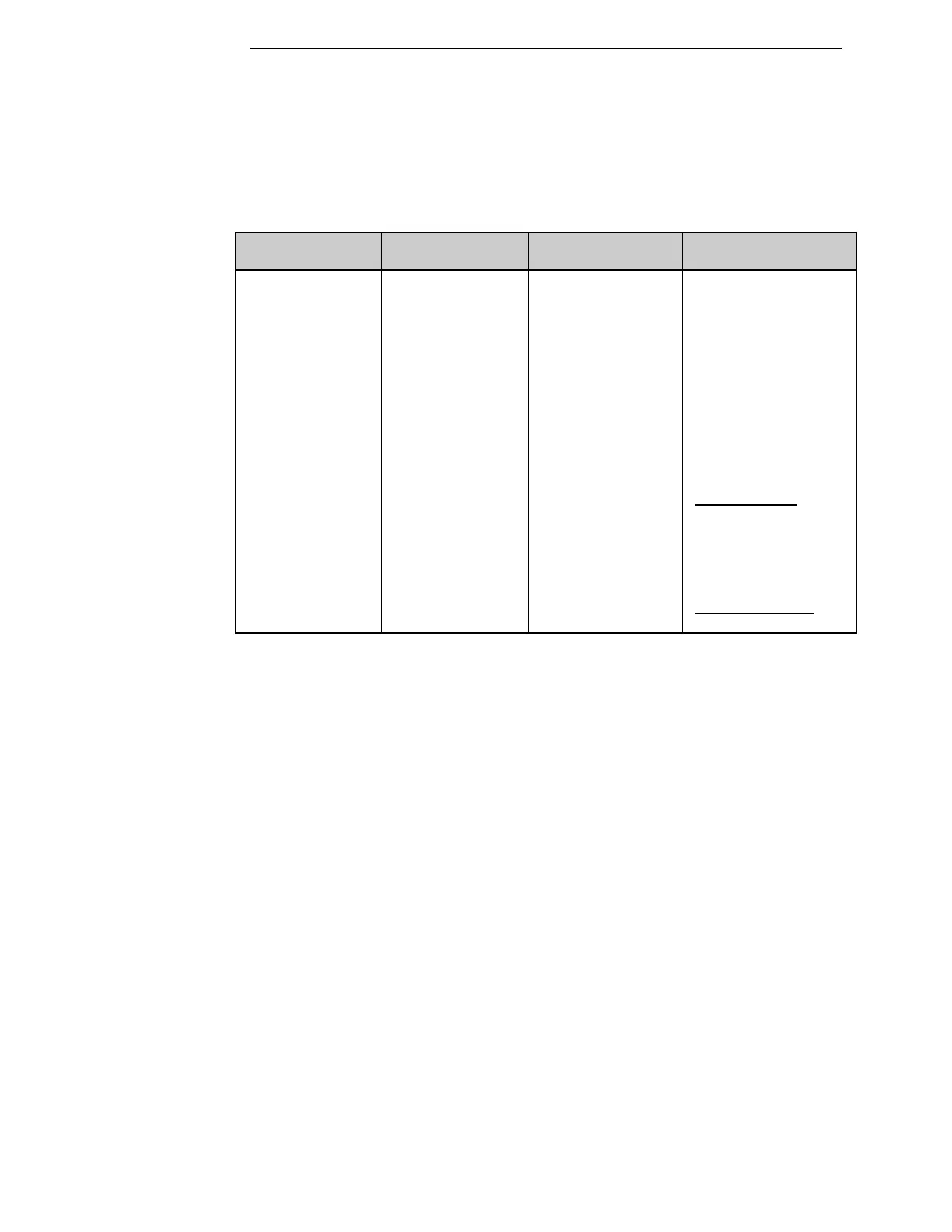
“LEFT SPINDLE VACUUM NOT FOUND” - # 156
“RIGHT SPINDLE VACUUM NOT FOUND” - # 157
Problem
Indicator
Problem
Location
Component/ Cause
Resolution
ERROR
MESSAGE
Control
Computer
Screen
(1) Carrier not
installed.
or
(2) Mismatch
between the setting
at Machine
Parameters Menu
and carrier(s)
installed.
(3) Vacuum switch
error.
(1a) Install carrier for
affected spindle.
(2a) Change parameter
2 (Active Carriers) at
the Machine
Parameters menu to
match the carriers
installed (Left, Right,
or Both).
OPERATIONS
(3a) If the problem still
persists, adjust the
spindle vacuum switch.
MAINTENANCE

Related product manuals