2. Terminals and Connections.
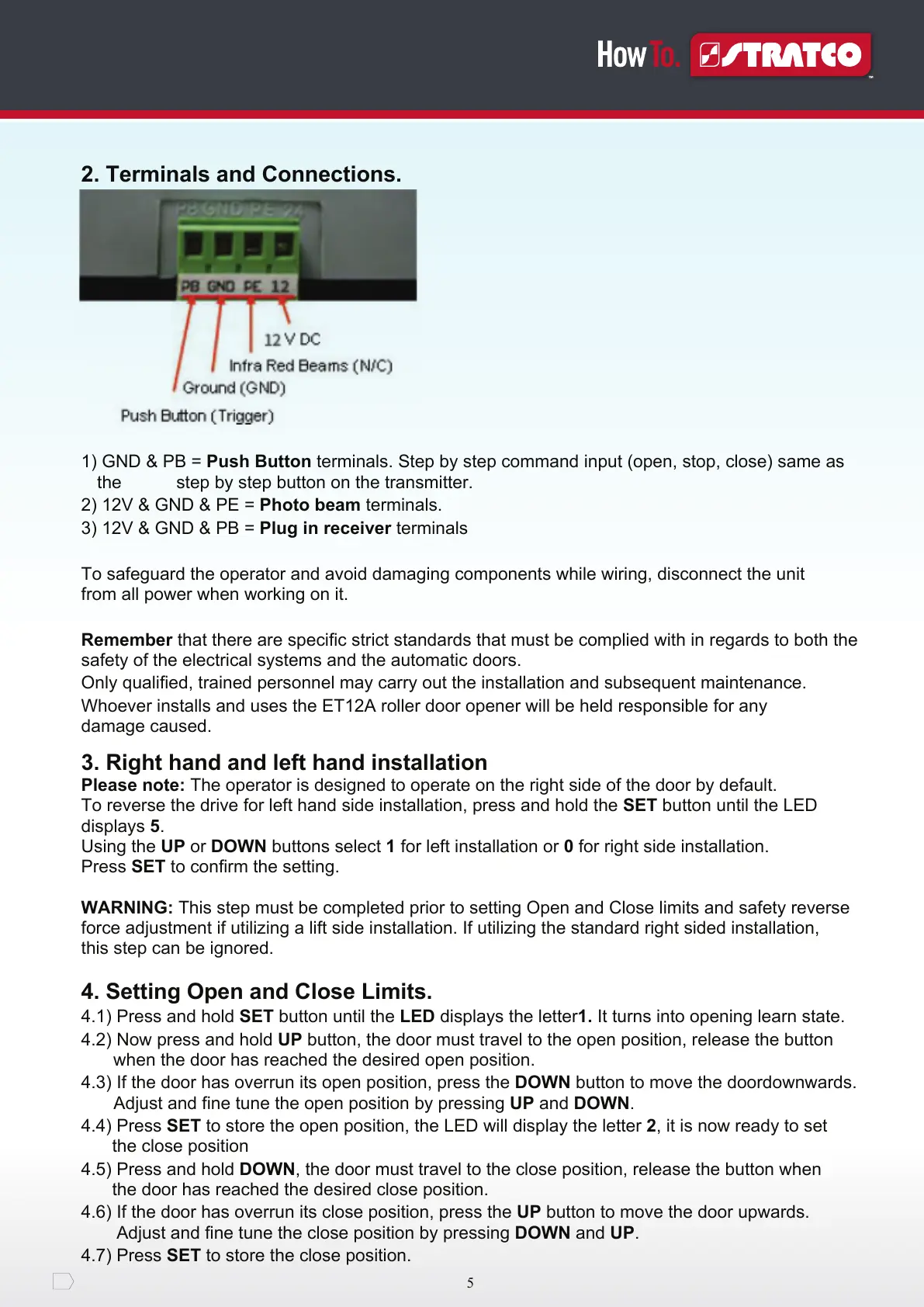
1) GND & PB = Push Button terminals. Step by step command input (open, stop, close) same as
the step by step button on the transmitter.
2) 12V & GND & PE = Photo beam terminals.
3) 12V & GND & PB = Plug in receiver terminals
To safeguard the operator and avoid damaging components while wiring, disconnect the unit
from all power when working on it.
Remember that there are specific strict standards that must be complied with in regards to both the
safety of the electrical systems and the automatic doors.
Only qualified, trained personnel may carry out the installation and subsequent maintenance.
Whoever installs and uses the ET12A roller door opener will be held responsible for any
damage caused.
3. Right hand and left hand installation
Please note: The operator is designed to operate on the right side of the door by default.
To reverse the drive for left hand side installation, press and hold the SET button until the LED
displays 5.
Using the UP or DOWN buttons select 1 for left installation or 0 for right side installation.
Press SET to confirm the setting.
WARNING: This step must be completed prior to setting Open and Close limits and safety reverse
force adjustment if utilizing a lift side installation. If utilizing the standard right sided installation,
this step can be ignored.
4. Setting Open and Close Limits.
4.1) Press and hold SET button until the LED displays the letter1. It turns into opening learn state.
4.2) Now press and hold UP button, the door must travel to the open position, release the button
when the door has reached the desired open position.
4.3) If the door has overrun its open position, press the DOWN button to move the doordownwards.
Adjust and fine tune the open position by pressing UP and DOWN.
4.4) Press SET to store the open position, the LED will display the letter 2, it is now ready to set
the close position
4.5) Press and hold DOWN, the door must travel to the close position, release the button when
the door has reached the desired close position.
4.6) If the door has overrun its close position, press the UP button to move the door upwards.
Adjust and fine tune the close position by pressing DOWN and UP.
4.7) Press SET to store the close position.


 To Next Page