EasyManua.ls Logo

Streetwize SWGH - User Manual

Streetwize SWGH
4 pages
Print Icon
To Next Page IconTo Next Page
Loading...
Suction/Vent Mount
Gadget Holder
With Built-In Picture Frame (SWGH)
Information for Use
Streetwize: Ashburton Road West,Trafford Park, Manchester, M17 1RY www.streetwizeaccessories.com
For product support:
E: support@streetwizeaccessories.com
T: +44 (0)161 447 8597
For trade enquiries:
E: sales@streetwizeaccessories.com
T: +44 (0)161 447 8580
For spare parts:
E: spareparts@streetwizeaccessories.com
Question and Answer IconNeed help?

Do you have a question about the Streetwize SWGH and is the answer not in the manual?

Summary

Gadget Holder Usage Guide

Product Components

Lists the main components included with the gadget holder for user reference.

Vent Mount Installation

Detailed steps for attaching the gadget holder to a vehicle's air vent.

Windscreen Mount Installation

Instructions for securing the gadget holder to a vehicle's windscreen.

Device Mounting Procedure

Steps to properly insert and secure a device into the holder's grip.

Picture Frame Integration

Guide on how to insert a picture into the built-in photo frame.

Mount Removal Instructions

Procedure for safely detaching the mount from the main gadget holder unit.

Technical Specifications

Summary

Gadget Holder Usage Guide

Product Components

Lists the main components included with the gadget holder for user reference.

Vent Mount Installation

Detailed steps for attaching the gadget holder to a vehicle's air vent.

Windscreen Mount Installation

Instructions for securing the gadget holder to a vehicle's windscreen.

Device Mounting Procedure

Steps to properly insert and secure a device into the holder's grip.

Picture Frame Integration

Guide on how to insert a picture into the built-in photo frame.

Mount Removal Instructions

Procedure for safely detaching the mount from the main gadget holder unit.

Technical Specifications

Overview

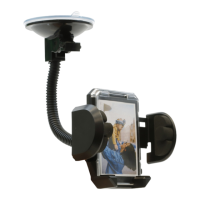
The Streetwize Suction/Vent Mount Gadget Holder (SWGH) is a versatile accessory designed to securely hold mobile phones, smartphones, and Sat Navs in a vehicle. This gadget holder offers dual mounting options, allowing it to be attached either to the windscreen via a suction mount or to the vehicle's air vent using a clip attachment. A key distinguishing feature of this holder is its built-in picture frame, which allows users to personalize their device mount with a photograph.

Function Description:

The primary function of the Streetwize Gadget Holder is to provide a stable and adjustable platform for electronic devices within a vehicle, ensuring they are easily accessible and viewable for navigation or hands-free communication. It accommodates devices with widths ranging from 40mm to 110mm, making it compatible with a wide array of modern smartphones and GPS units. The holder features a 360-degree rotation capability, enabling users to position their device in either vertical (portrait) or horizontal (landscape) orientation, optimizing viewing angles for different applications. The integrated picture frame adds a unique aesthetic and personalization element, allowing users to display a cherished photo while their device is mounted.

Important Technical Specifications:

  • Product Name: Streetwize Gadget Suction/Vent Mount Holder With Built-In Frame
  • Supplier Code: SWGH
  • Adjustable Width: 40mm to 110mm (for holding devices)
  • Picture Frame Size: 67mm x 43mm
  • Mounting Options: Suction mount for windscreen, Vent clip attachment for air vents
  • Rotation: 360-degree rotation for vertical or horizontal device orientation

Usage Features:

Mounting Options:

The SWGH offers two distinct mounting methods:

  1. Vent Mount:

    • Assembly: The vent clip attachment needs to be slid into the base of the gadget holder.
    • Attachment to Holder: The assembled vent clip mount attachment is then connected to the gadget holder, ensuring it is securely clipped in.
    • Installation in Vehicle: The gadget holder is mounted to the vehicle's air vent by securing the vent clip around the vent bars.
    • Device Placement: Once the holder is securely mounted, the device can be placed into the grip.
  2. Windscreen Mount:

    • Attachment to Holder: The suction mount attachment is connected to the back of the gadget holder, similar to the vent mount attachment, ensuring a secure clip.
    • Release Trigger Lock: Before mounting, the trigger lock located on the base of the suction mount must be released by pulling its lever.
    • Positioning: The suction mount is then positioned onto the vehicle's windscreen.
    • Securing: The trigger lock is engaged to securely fasten the mount to the windscreen.
    • Device Placement: After securing the mount, the device can be placed into the grip.

Device Placement and Adjustment:

  • Opening the Grip: To place a device, a button on the holder must be pressed and held, which expands the grip to the desired width.
  • Securing the Device: Once the desired width is achieved, releasing the button sets the grip, and the device is placed inside. The width can be adjusted for a secure fit.
  • Angle and Orientation Adjustment: After the gadget holder is in place and the device is mounted, the angle of the device can be adjusted, and it can be rotated 360 degrees to view content horizontally or vertically.

Built-In Picture Frame:

  • Inserting a Picture:
    1. Hold the gadget holder upside down.
    2. Slide the picture frame cover downwards.
    3. Insert a picture of size 67mm x 43mm into the frame.
    4. Slide the picture frame cover back onto the frame.

Removing the Mount from the Holder:

  • To remove either the vent mount or suction mount attachment from the gadget holder, simply push the attachment towards the top of the main unit. This action disengages the attachment, allowing for easy removal or swapping between mounting types.

Maintenance Features:

The manual does not explicitly detail specific maintenance features such as cleaning instructions or part replacement. However, the modular design, allowing for easy attachment and detachment of mounting components, suggests a degree of user-serviceability for swapping parts if needed. The contact information provided for product support and spare parts indicates that assistance and replacement components are available from the manufacturer, implying that certain parts may be replaceable to extend the product's lifespan. Regular inspection of the clips and suction cup for wear and tear would be advisable to ensure continued secure mounting.

Streetwize SWGH Specifications

General IconGeneral
BrandStreetwize
ModelSWGH
CategoryAutomobile Accessories
LanguageEnglish

Related product manuals