Need help?
Do you have a question about the Streetwize OBDII Premium Reader and is the answer not in the manual?
Essential safety guidelines for operating the OBDII scan tool and working with vehicles.
Explains the OBD II system's function in monitoring vehicle emission control and engine components.
Details Diagnostic Trouble Codes (DTCs), their structure, and meaning.
Describes the location of the vehicle's 16-cavity Data Link Connector (DLC) for scan tool interface.
Explains OBDII Readiness Monitors and their role in emissions testing readiness.
Details how OBD II systems indicate completed component testing status for inspections.
Provides definitions for key OBD II terminology such as PCM, MIL, DTC, Enabling Criteria, OBD Drive Cycle, and Freeze Frame Data.
Introduces the ten modes of operation for OBD II diagnostic requests and data retrieval.
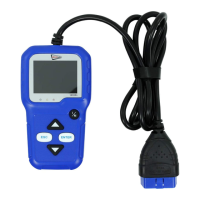
Identifies and describes the OBD II connector, LCD display, LED indicators, navigation buttons, and USB connector.
Describes the one-click button for checking emissions readiness and drive cycle verification.
Details technical specifications, included accessories, navigation characters, and keyboard care.
Guides users through powering the tool, setting language, units, beep, and performing device self-tests.
Details the vehicle coverage of the scan tool, including support for OBD II compliant vehicles.
Initiates diagnostic operations by connecting the scan tool to the vehicle's DLC and turning on the ignition.
Reads and displays current, pending, and permanent Diagnostic Trouble Codes (DTCs) from the vehicle's ECU.
Clears emission-related diagnostic information, including DTCs and freeze frame data, after repair.
Checks emissions system readiness and monitor status to determine if the vehicle is ready for inspection.
Displays live vehicle data, allowing users to view all items, select specific items, or view data graphically.
Retrieves and displays freeze frame data, which captures vehicle operating parameters at the time of an emission-related fault.
Displays the results of the vehicle's last O2 sensor test, providing insights into fuel system performance.
Allows users to read results from on-board diagnostic monitoring tests for specific vehicle components and systems.
Initiates an EVAP system leak test by signaling the vehicle's on-board computer.
Retrieves and displays vehicle identification information, including VIN, Calibration ID, and Calibration Verification.
Enables users to look up definitions for Diagnostic Trouble Codes (DTCs) by inputting the code.
Allows reviewing and deleting recorded DTCs, data streams, and freeze frame data.
Provides access to tool information, help topics, and performs a battery voltage check.
Explains the meaning of the Green, Yellow, and Red LEDs, indicating system status and readiness.
Interprets audio tones in conjunction with LED lights to indicate I/M readiness status.
Allows printing of diagnostic data and customized test reports using the scan tool and a PC.
Guides users through updating the scan tool software and DTC library via a computer.
States that the OBD reader checks faults related to the engine light only, not airbags or braking systems.
Details the 12-month manufacturer warranty covering technical faults, excluding accidental damage.
 General
| Display | LCD |
|---|---|
| Connectivity | Wired |
| Connection | OBDII port |
| Operating Temperature | -20°C to 60°C |
| Storage Temperature | -30°C to 70°C |
| Features | Freeze frame data |
| Compatibility | OBDII compliant vehicles |
| Supported Protocols | CAN, ISO9141, KWP2000, J1850 VPW, J1850 PWM |
| Power Supply | 12V from vehicle OBDII port |
| LED Indicators | Power |

 To Next Page