16 17
1) Current DTCs:
2) Pending DTCs:
Pending DTCs are also referred to as
“maturing codes” or “continuous monitor
codes”. They indicate problems that the
control module has detected during the
current or last driving cycle but are not
considered serious yet.
Pending codes will not turn on the
malfunction indicator light (MIL). If the fault
does not occur within a certain number of
warm-up cycles, the code clear from memory.
3) Permanent DTCs: Permanent DTCs are
codes that are “confirmed” and are retained
in the non-volatile memory of the computer
until the appropriate monitor for each codes
has determined that the malfunction is no
longer present and is not commanding the
MIL on. Permanent codes shall be stored in
non-volatile memory and may not be erased
by any diagnostic services or by disconnecting
power to ECU.
4) Record DTC: Record DTC are also known
as “hard codes “, which are fault codes
, or trouble codes that have been stored
in the vehicle computer memory because
the faults have reoccurred of more than a
specified amount of key-cycles. These codes
will cause the control module to illuminate
the malfunction indicator light (MIL) when
emission-related fault occurs.
4.1.2 Erase Codes
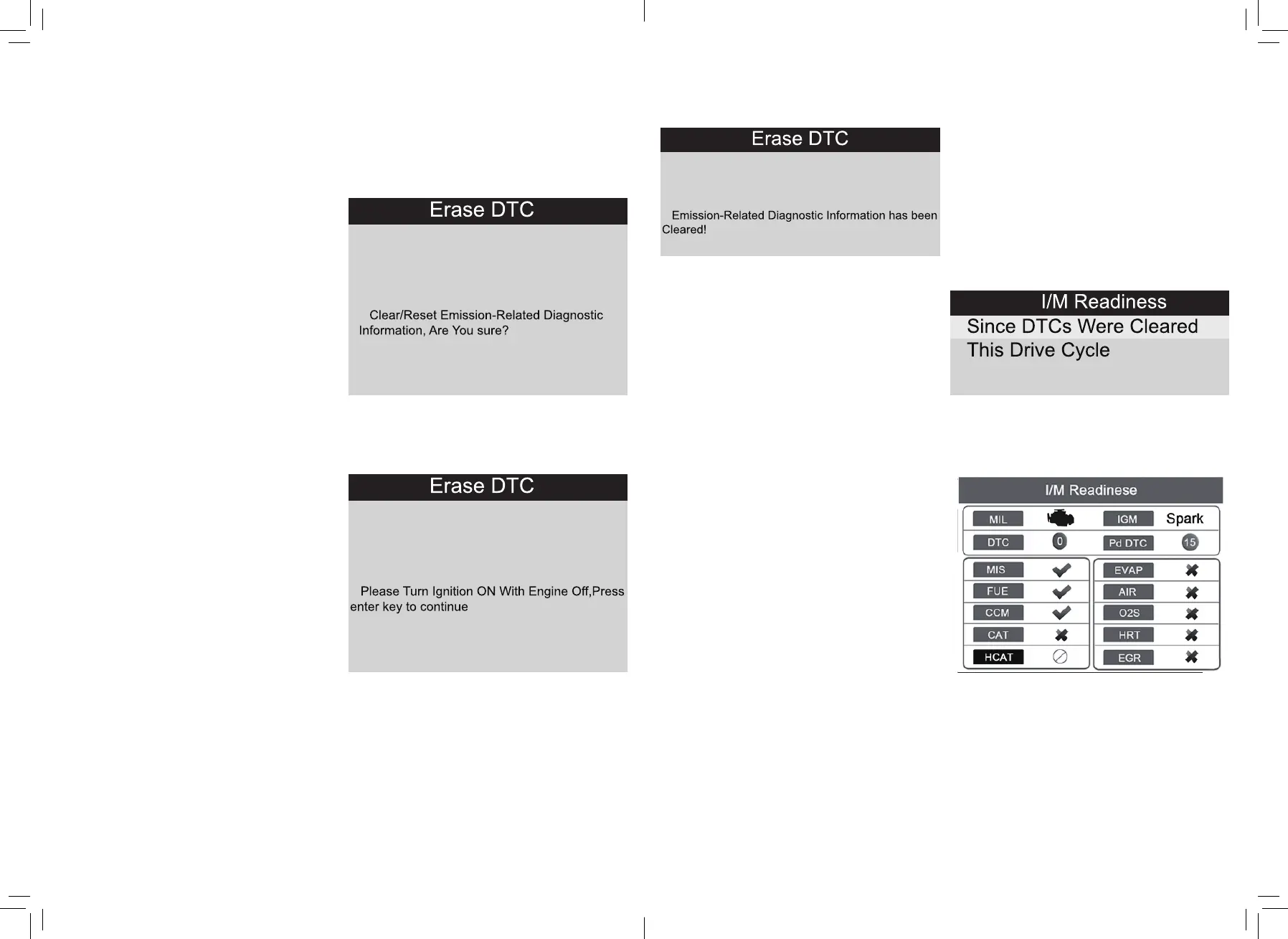
Select [Erase Codes], the screen will display
the interface as shown above.
Press OK to erase DTC’S, and the screen will
display the interface as shown below:
According to the above figure to press
OK button and the screen will display
the interface as shown.
Notes:
• Before performing this function make sure
to retrieve and record the trouble codes.
• After clearing, you should retrieve trouble
codes once more or turn ignition on and
retrieve codes again. If there are still
some trouble codes in the system, please
troubleshoot the code using a factory
diagnosis guide, then clear the code and
recheck.
4.1.3 I/M Readiness
I/M refers to Inspection and Maintenance
that is legislated by the Government to meet
federal clean air standards。I/M Readiness
indicates whether or not the various
emissions-related systems on the vehicle
are operating properly and are ready for
inspection and Maintenance testing.
The purpose of the I/M Readiness Monitor
Status is to indicate which of the vehicle’s
monitors have run and completed their
diagnosis and testing (as described in
chapter 2.5), and which ones have not yet
run and completed testing and diagnosis of
their designated sections of the vehicle’s
emissions system.
The I/M Readiness Monitor Status function
also can be used (after repair of a fault has
been performed) to confirm that the repair
has been performed correctly, and/or to
check for Monitor Run Status.
Select [I/M Readiness] and press OK
button^ the screen will display the interface
as shown below:
You can use UP/DOWN button to select and
press OK button, the screen will display the
interface as shown below:
Press ESC to return to Diagnostic Menu.
N/A means not available on this vehicle, INC
means incomplete or not ready, OK means
Completed or Monitor OK.


 To Next Page