10 11
Mode $09 - Reports vehicle information. This
information includes vehicle VIN number and
calibration information stored in the vehicle
ECUs.
Mode $0A - Request Emission-Related
Diagnostic Trouble Code with Permanent
Status. This presence of permanent DTCs
at an inspection without the MIL illuminated
is an indication that a proper repair was not
verified by the on-board monitoring system.
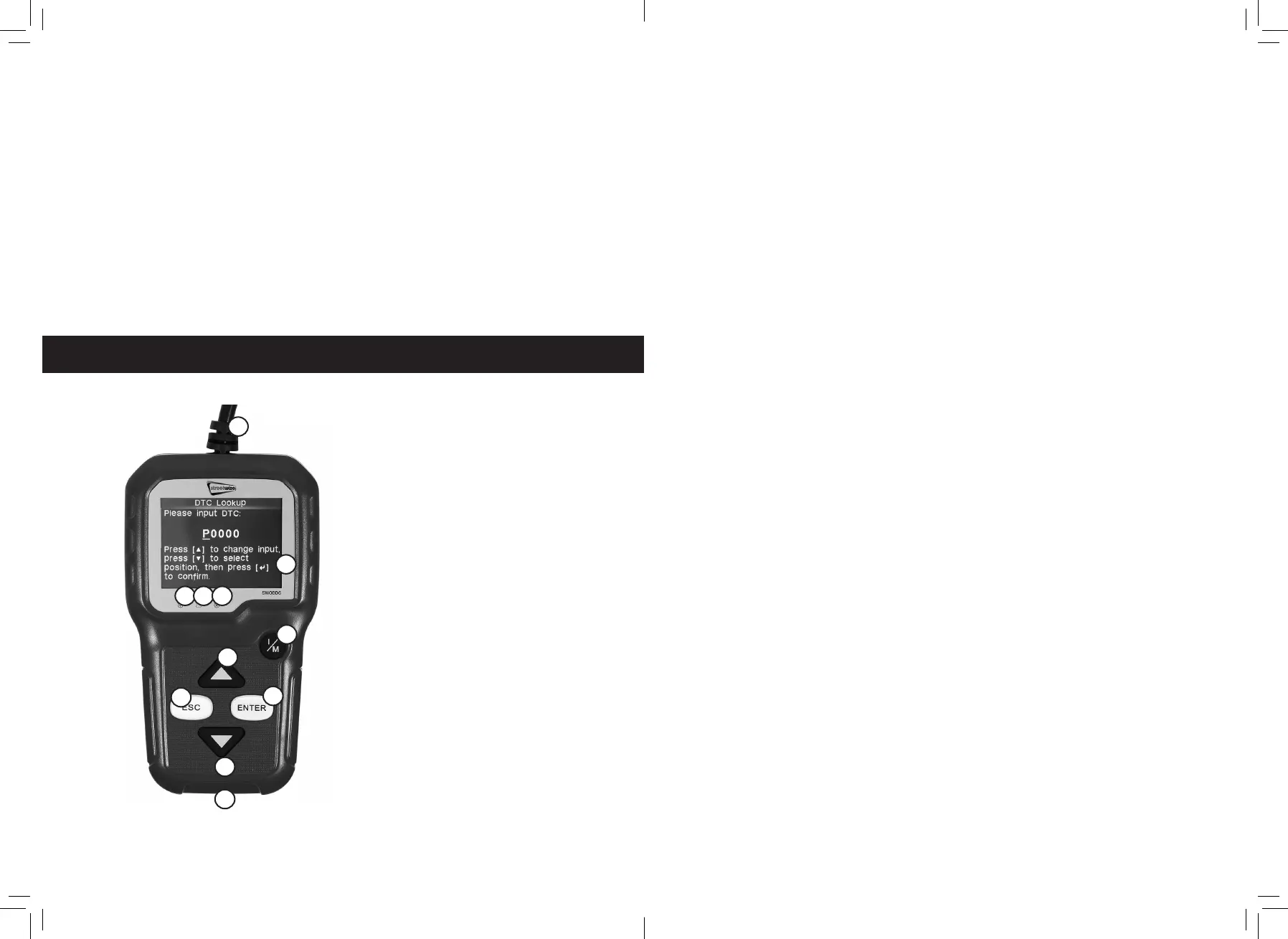
1. OBD II Connector
2. LCD Display
3. Green LED
4. Yellow LED
5. Red LED
6. One Click 1/M Readiness
7. ESC Button
8. Enter Button
9. Up Scroll Button
10. Down Scroll Button
11. USB Connector
3. Using The Scan Tool
1
2
3 4 5
6
9
7
8
10
11
1. OBD II Connector
Connects the scan tool to the vehicle’s
data link connector (DLC).
2. LCD Display
Displays menus and test results.
3. Green LED
Indicates that engine systems are running
normally (The number of monitors on the
vehicle which are active and performing
their diagnostic testing is in the allowed
limit and no DTCs are present).
4. Yellow LED
Indicates there is a possible problem. A
“pending” DTC is present and/or some of
(he vehicle’s emission monitors have not
run their diagnostic testing.
5. Red LED
Indicates there is a problem in one or
more of the vehicle’s systems. The red
LED is also used to show that DTCs are
present., DTCs arc shown on the Scan
Tool’s emission monitors have not run their
diagnostic testing.
6. One Click 1/M Readiness Button
Checks State emissions readiness and
drive cycle verification.
7. ESC Button
Returns to previous menu.
8. Enter Button
Confirms a selection (or action) from a
menu list.
9. Up Scroll Button
Move cursor up for selection.
10. Down Scroll Button
Move cursor down for selection.
11. USB Connector
Connects the scan tool to the PC for
printing and upgrading.


 To Next Page