EN-21
Enhancement Buttons
The enhancement buttons increase or decrease picture sharpness. There are 16
levels of enhancement. The current enhancement level will be displayed briefly on
the monitor.
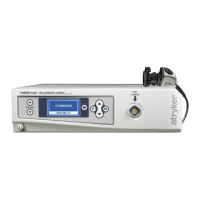
Surgical Specialty Button
The Surgical Specialty button selects one of nine pre-established camera settings.
Each camera setting optimizes camera performance for a specific surgical
application. The nine settings are:
•Arthroscopy
•Cystoscopy
•ENT
•Flexi-Scope
•Hysteroscopy
•Laparoscopy
•Laser
•Microscope
•Standard
The front panel LCD will display the current specialty.
Selecting the Display Language
The 1188HD has the capability of displaying text in the following languages:
To select a particular language, perform the following steps:
1. Hold down the Light/Zoom Up and Down buttons on the console until
the current language identifier appears.
2. Use the Enhance Up button to scroll through the available languages.
3. Hold down the Light/Zoom Up and Down buttons to lock in the
selected language. The LCD screen will then revert to the current
specialty setting.
Danish German Polish
Dutch Greek Portuguese
English Italian Simplified Chinese
Finnish Japanese Spanish
French Korean Swedish




 To Next Page