EasyManua.ls Logo

Stryker 1688610122 - User Manual

Stryker 1688610122
68 pages
Print Icon
To Next Page IconTo Next Page
Loading...
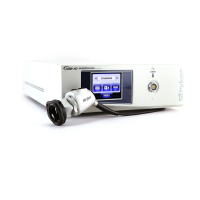
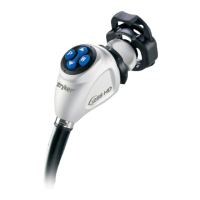
1688 4K Camera System
1688010000
1688210105
1688310130
1688610122
1688710105
with Advanced Imaging Modality

Questions and Answers

  • A
    Anthony HerreraSep 9, 2025
    What does Stryker Digital Camera E-04 error code (“Warning Occurred”) mean?
    • S
      Sharon OrtizSep 9, 2025
      If your Stryker Digital Camera displays the error code E-04 (“Warning Occurred”), try turning off the console, waiting 3 seconds, and then turning it back on. If the problem persists, contact Stryker.
  • P
    Patrick FitzgeraldAug 23, 2025
    What to do if my Stryker 1688610122 picture is too bright?
    • J
      jacob94Aug 23, 2025
      If the picture from your Stryker Digital Camera is too bright, you can try to: * Decrease the camera Brightness level. * Decrease the light source output.
  • K
    Keith HarrisAug 25, 2025
    How to fix Stryker Digital Camera foggy picture (loss of definition and clarity)?
    • R
      reedzacharyAug 25, 2025
      To address a foggy picture with loss of definition and clarity on your Stryker Digital Camera: * Refocus the coupler. * Disassemble the scope, coupler, and camera head, then clean and dry all windows on these components.
  • T
    Timothy RobinsonAug 26, 2025
    What to do if my Stryker 1688610122 has no video picture when the camera head is plugged in?
    • J
      Justin GibbsAug 27, 2025
      If you're not getting a video picture from your Stryker Digital Camera when the camera head is plugged in: * Check to ensure that all devices in the video system are plugged in and powered on. * Check the connector on the camera-head cable for broken pins. * Detach the camera head from the console and reconnect. * Turn off the console, wait 3 seconds, and turn it back on.
  • L
    Lisa FullerAug 28, 2025
    How to resolve Stryker 1688610122 Digital Camera incorrect picture color?
    • D
      David FloydAug 28, 2025
      To correct the picture color on your Stryker Digital Camera: * Perform the White Balance test. * Check the color settings on the display monitor.
  • C
    Christian PearsonAug 29, 2025
    How to fix Stryker 1688610122 blurry picture?
    • M
      Monique GuzmanAug 29, 2025
      If you're experiencing a blurry picture with your Stryker Digital Camera, try the following: * Ensure the coupler or C-mount scope is in focus. * On the Home screen, ensure the surgical specialty is not set to FLEXI-SCOPE unless you are using a flexible scope. * Disassemble the scope, coupler, and camera head, and clean and dry all windows on the components.
  • P
    Pamela ReyesSep 18, 2025
    What does Stryker 1688610122 Digital Camera “System Error” message (Light blue background) mean?
    • S
      Samantha MedinaSep 18, 2025
      If your Stryker Digital Camera shows a “System Error” message with a light blue background, it indicates that no video was detected. After sterilization, ensure the camera head has cooled down before connecting it to the console. If the problem persists, return the system for repair.
  • W
    wriggsSep 19, 2025
    What does Stryker Digital Camera “White Balance Fail” message on display monitor mean?
    • M
      Michael PrattSep 22, 2025
      If your Stryker Digital Camera displays a “White Balance Fail” message on the display monitor, use the camera head to click the Start button on the display monitor to repeat the White Balance test. Ensure there is sufficient light and the camera head is pointing at something white. Alternatively, use the camera head to click the Skip button to accept the current White Balance settings.
  • J
    Joanna MorrisSep 8, 2025
    What does Stryker 1688610122 Digital Camera E-04 error code (“Error Occurred”) mean?
    • J
      Jay WillisSep 8, 2025
      If your Stryker Digital Camera displays the error code E-04 (“Error Occurred”), try turning off the console, waiting 3 seconds, and then turning it back on. If the problem continues, contact Stryker.
  • R
    Robert HarrisonSep 4, 2025
    What does Stryker Digital Camera E-02 error code (“Console Overheating” warning) mean?
    • E
      Eric WillisSep 4, 2025
      If your Stryker Digital Camera displays an E-02 error code (“Console Overheating” warning), make sure the console is in a ventilated area. You can also try turning off the console, waiting 3 seconds, and then turning it back on. If the issue continues, contact Stryker.

Summary

Warnings and Cautions

General Safety Precautions

Covers general cautions for device safety and important operational warnings.

SPY Mode Specific Warnings

Safety notices and guidelines specific to laser radiation during SPY mode operation.

Light Source Operation Safety

Warnings to prevent injury or damage when using the system's light source.

Setup Procedures

Initial System Setup Steps

Outlines the three primary steps for setting up the 1688 Video Camera system.

Console Connection and Configuration

Detailed instructions for connecting and configuring the camera console.

Camera Head Connection

Step-by-step instructions for connecting the camera head to the console.

Operation and Usage

Console Power Management

Steps for powering the camera console on and off and performing initial system checks.

White Balance Calibration

Guide to performing the white balance test for accurate color representation.

Troubleshooting Common Issues

Error Code Resolution

Solutions for common error codes like Video Error, Overheating, and Software Mismatch.

Image and White Balance Problems

Addresses issues with picture color, white balance quality, and image brightness.

Reprocessing Procedures

Camera Head Reprocessing

Detailed guide for cleaning, disinfecting, and sterilizing the camera head according to medical standards.

Maintenance and Care

Stryker 1688610122 Specifications

General IconGeneral
BrandStryker
Model1688610122
CategoryDigital Camera
LanguageEnglish

Related product manuals