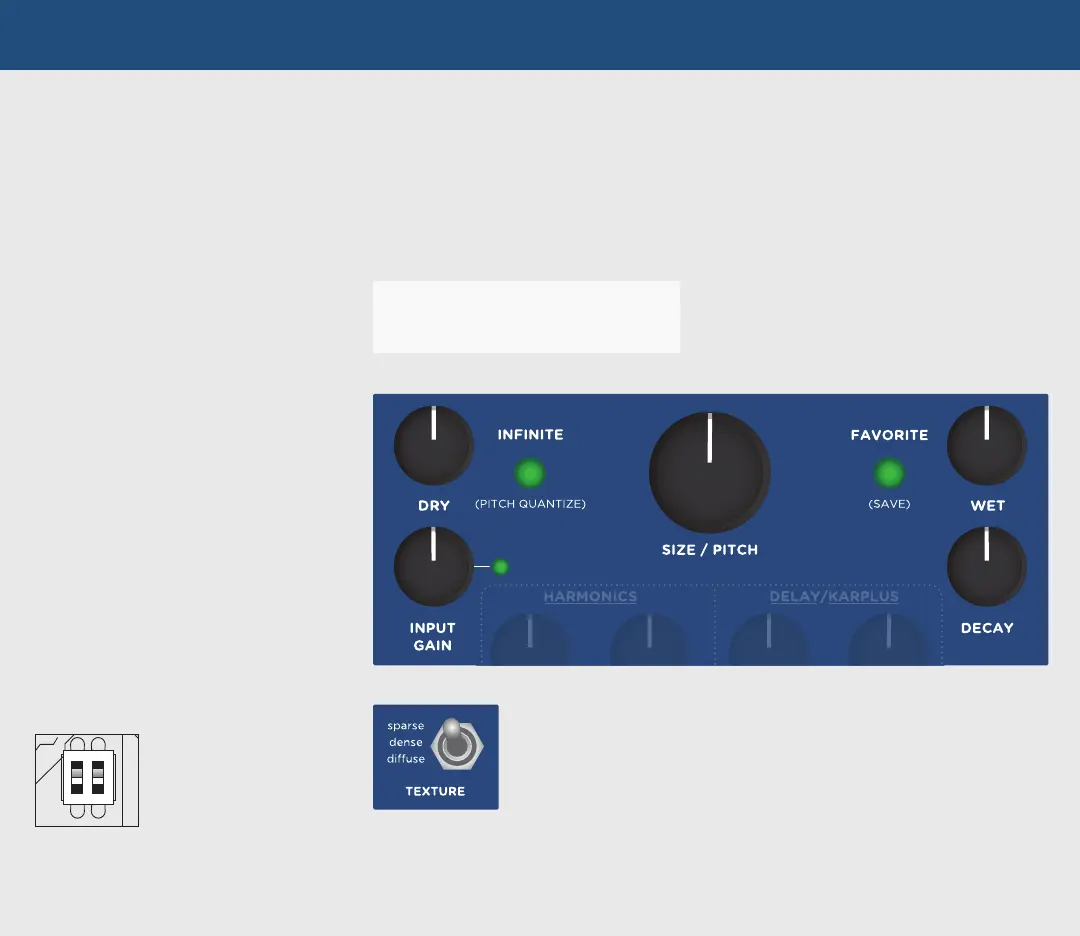
DRY
Sets the level of unprocessed input signal
sent to the output.
WET
Sets the overall reverberated signal level sent
to the output.
SIZE / PITCH
Changes the process rate and size of the reverb
structure while maintaining the integrity of the reverb
audio. Turning clockwise increases the size and lowers
the pitch of any regenerating audio in the reverb
structure. Pitch ranges from -1 octave at minimum to
+1 octave at maximum. Size ranges from one-half size
at minimum to double the size at maximum.
INFINITE
PRESS: Holds the current audio input to the
reverb while allowing new audio to continue
being processed by the reverb. Great for
generating ambient pads.
HOLD: Press and hold for 2 seconds to enter
PITCH QUANTIZE mode. SIZE/PITCH values
are restricted to the selected scale. Scales can
be selected via the SIZE/PITCH Quantize Scale
secondary function. See complete manual for
in-depth detail.
FAVORITE
Recalls the currently selected Favorite preset.
(See PRESET FUNCTIONS section for additional
information.)
TEXTURE
Selects one of three different reverb structures.
sparse: Granular-sounding reverb that can create interesting effects with staccato
inputs, or produce a clean reverb with sustained inputs.
dense: Plate-like reverb with a fast response and dense reflections that can venture
into ambient territory at high decay times.
diffuse: Slow-building, atmospheric wash that excels at ambient, swell, and even
reverse-like textures.
REVERB CONTROLS
INPUT GAIN
Controls the gain of the input signal fed to the
reverb structure through a soft clipping input
stage. LED indicates signal level from GREEN
for clean reverb to RED for soft-clipping
distortion.
DECAY
Adjusts the amount of time for the reverb to
fade out. At higher DECAY settings, decay time
may be impacted by the FILTER settings.
TIP: You can “play” the SIZE/PITCH knob by
sending 1V/octave to the SIZE/PITCH CV.
Spillover: Enables effect
spillover between the
Favorite presets and the
manual setting of the
module by setting rear dip
switch 1 to ON.



 To Next Page