Rev. 2.0
9
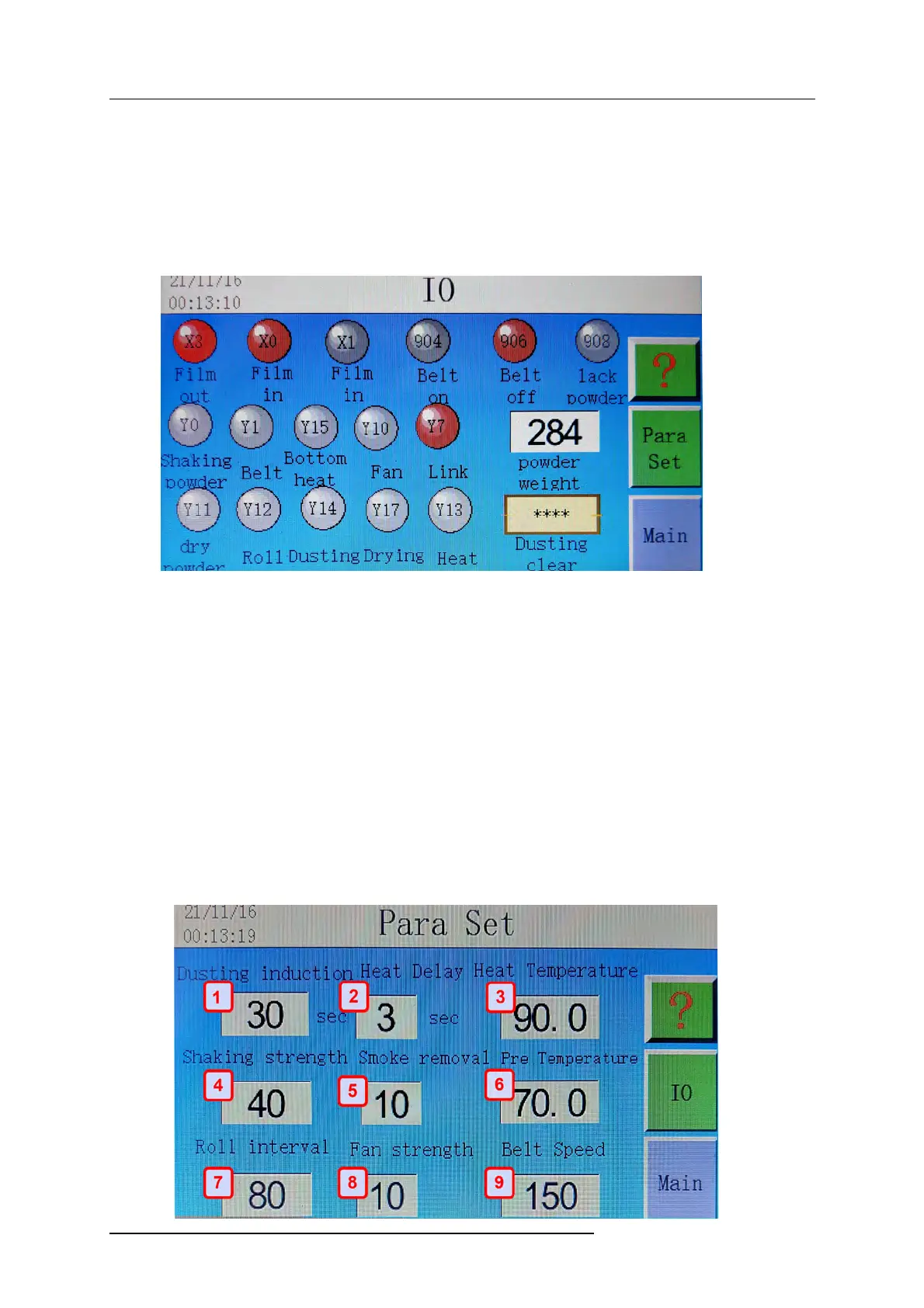
(11) IO allows the user to enter the monitoring interface
(12) Para set allows the user to enter the parameters settings
4.3 Monitoring Interface
(1) X0 denotes the operation of the sensor under the preheating platform stays white when it
senses media feeding, and
turns red when it does not sense media. The white and red lights are
standard throughout the IO Interface where white is off and red is on.
(2) X3 denotes the operation of the sensor when the film has passed through the shaker to the
take up reel
(3) 906 whether the belt is working, the red light is on. The white light will show when it is off
(4) 904 belt on, or 906 belt off refers to the mesh conveyor belt operation. Red denotes on and
white denotes it is off
(5) Essentially the red on and white off shows the user what systems are currently engaged and
those that are not. If the unit is in auto mode it will turn on and off systems depending on
operating characteristics.
(6) Powder weight - Calibrate to 19-21 with no powder using slight pressure on the scale.
When in operation be sure that powder weight is above 170 to pull PET film through the
system. Add powder if below 170 or the system will not activate vacuum cylinder roller.
4.4
System Parameters


 To Next Page
 Loading...