- 20 -
Cont ...
8.15 Control module:
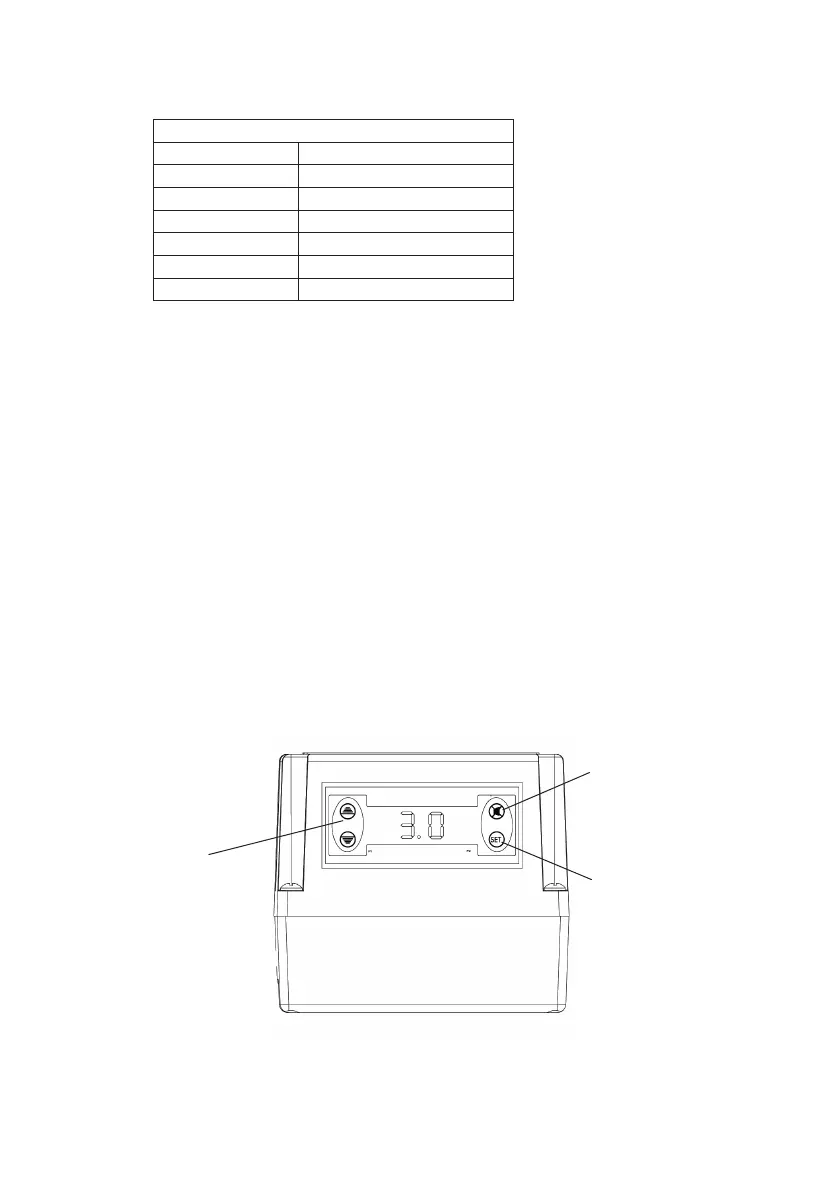
The control module has been factory pre-set to the following conditions.
Should the parameter need changing follow these steps.
z The pump parameters are displayed in the following sequence:
Set point (SP),
Differential (DIFF),
Low pressure trip (LPR),
High pressure trip (HPR),
Pump run timer (PRT),
Pump Number (NPM),
Relay setting (CRE),
Number of alarms (NAL1/NAL2),
Hours run (HR1/HE2).
z Press and hold the set button for 5-7 seconds. (This gains access to the
pump parameters).
z Press the up/down arrows to change the selected parameter(s) to the desired
value.
z After changing the required parameter(s) press the set button twice in quick
succession to lock the new value into the controller memory.
z It is possible to scroll through all the pump parameter values by simply
pressing the set button once after each parameter value has been displayed.
Settings as per factory preset:
Set point SP: 3 bar
Diff pressure DIFF: 0.5 bar
Low pressure LPR: 0.2 bar
High pressure HPR: 4.5 bar
Pump run timer PRT: 180
Pump number NPM: 2 (do not tamper)
CRE setting 0
Fig. 27
Up/down arrows
allow changes to
pump parameter
values
Alarm mute button
Set button enables
access to pump
parameter values


 To Next Page