E-6
POWER SOURCE (AC ADAPTOR ONLY)
The SB3500 is powered by an external AC-DC adaptor with an output of DC 5V
1.5A
.
The unit is also equipped with a battery back-up system for the clock that is powered by
2 x AAA batteries (Not included).
POWERCONNECTION
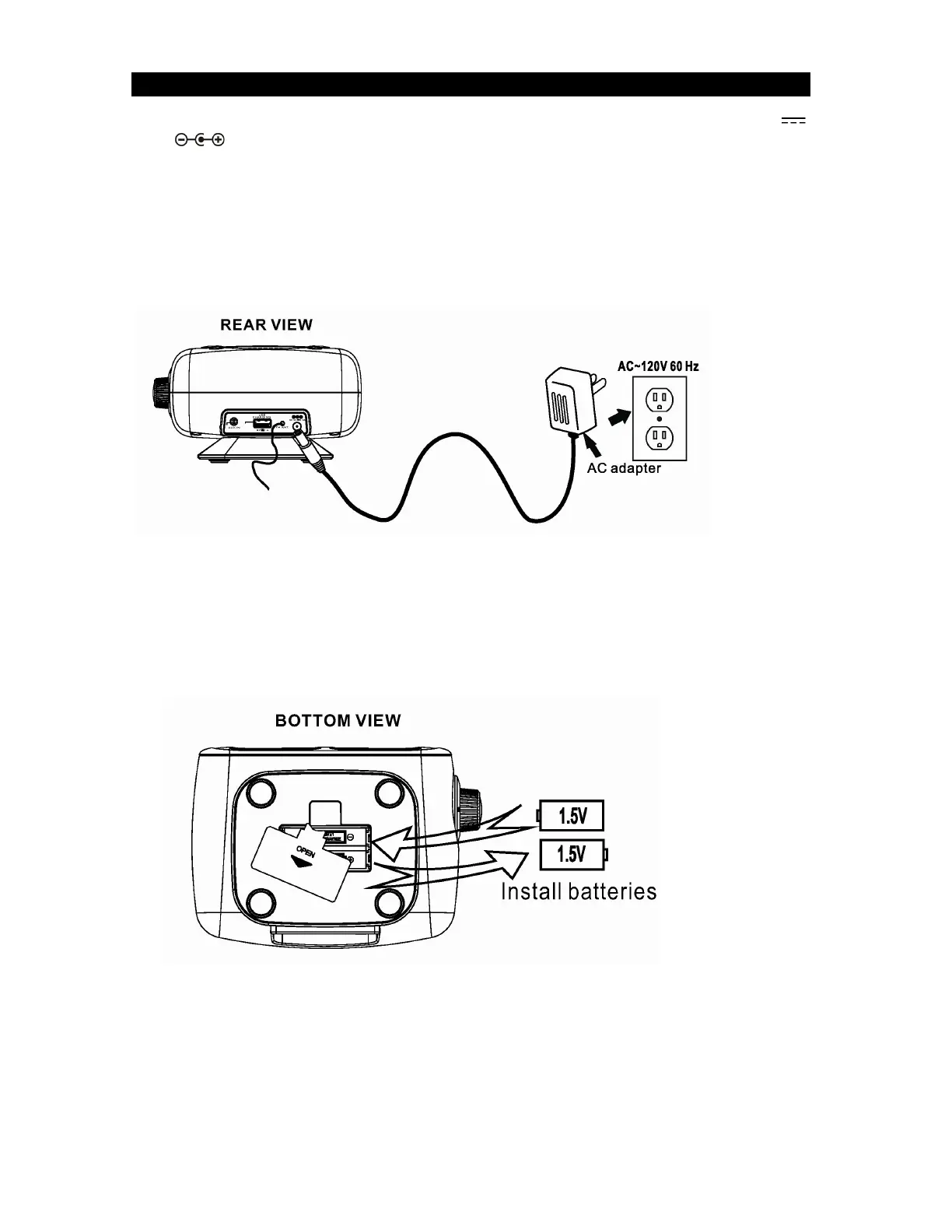
1. Connect the cord of the power adaptor to the DC IN JACK (#14) at the back of the
SB3500.
2. Plug the power adaptor into a household wall socket. The unit is powered up and in
standby mode when you see the display turn on and blink.
Battery Back-up system
The radio is equipped with a battery back-up system. It requires 2 x AAA batteries
(Not included).
Open the BATTERY DOOR (#15) on the bottom of the unit. Insert the batteries into
the battery compartment and make sure the positive and negative (+ or -) sides of
the batteries are in contact with the corresponding terminals in the battery
compartment. Replace the BATTERY DOOR (#15).
If a power outage occurs, the unit automatically switches to the battery power
supply and keeps the clock settings.
When replacing the battery, do not disconnect the power adaptor. Otherwise, all
clock and alarm settings will be lost.
Note:
The unit will still operate without the batteries installed, but the time and alarm settings
will be lost and have to be reset in the event of a power interruption or failure.


 To Next Page