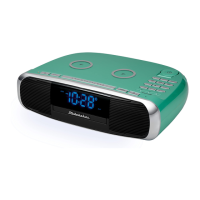
E-8
ALARM OPERATION
The SB3500 features a dual alarm clock.
Setting the alarms:
1. In standby mode, press and hold the ALARM 1 BUTTON (#6), the AL1 icon will
light and the hour of the alarm time will blink.
2. Tap the SKIP BACKWARD
BUTTON (#3) or SKIP FORWARD BUTTON
(#9) to set the hour. Press and hold the buttons for fast advance/reverse setting.
3. Tap the ALARM 1 BUTTON (#6) to confirm the hour setting, the minutes digits will
blink to prompt for input.
4. Tap the SKIP BACKWARD
BUTTON (#3) or SKIP FORWARD BUTTON
(#9) to set the minute. Press and hold the button for fast reverse/advance setting.
5. Press the ALARM 1 BUTTON (#6) to confirm the minute setting, the alarm sound
icons will show on the LCD DISPLAY (#10).
(bb – Alarm sound, F – FM radio, A – AM radio)
6. Tap the SKIP BACKWARD
BUTTON (#3) or SKIP FORWARD BUTTON
(#9) to select the wake up option (ALARM, FM Radio or AM Radio).
7. Press the ALARM 1 BUTTON (#6) to confirm and complete the alarm setting.
8. The ALARM 2 setting procedures are same as ALARM 1.
Wake to Radio (AM or FM)
Make sure your radio station is set to the one you want to wake up to. The unit will
play the last radio station you listened to when the wake time is reached. The
VOLUME CONTROL (#8) need to set to the desired sound level.
The Radio will automatically turn on when the alarm time is reached. The
corresponding AL1 or AL2 icon will blink.
The alarm will sound for 60 minutes and then turn off automatically if the SNOOZE
BUTTON (#5) is not pressed.
To stop the radio sound immediately, tap the POWER
/SOURCE
BUTTON (#1).
Wake to Beeping Alarm
The Beeping Alarm will automatically turn on when the alarm time is reached. The
VOLUME CONTROL (#8) need to set to the desired sound level.
The corresponding AL1 or AL2 indicator will blink.
The beep alarm will sound for 60 minutes and then turn off automatically if the
SNOOZE BUTTON (#5) is not pressed.
To stop the beep alarm sound immediately, tap the POWER
/SOURCE
BUTTON
(#1).
Turning the alarms ON or OFF
At standby mode, tap the ALARM 1/ALARM 2 BUTTONS (#6/#7) once to enable the
corresponding alarm. Tap the ALARM 1/ALARM 2 BUTTONS (#6/#7) twice to disable
the corresponding alarm. The corresponding AL1/AL2 icons will light when the alarm is
enabled. The corresponding AL1/AL2 icons will turn off when the alarm is disabled.
Review the Alarm setting
At standby mode, tap the ALARM 1/ALARM 2 BUTTONS (#6/#7) once. The
corresponding alarm icon and alarm time will show on the LCD display (#10). It will
return back to display time after 5 seconds.
Notes:
For setting a one-day alarm, just set the desired alarm time one day before.
The alarm will sound at the time set the day prior. After having switched off the
alarm sound, tap the corresponding alarm button twice to disable the alarm (the
alarm icon will off).
To set another one-day alarm, just repeat the above steps.


 To Next Page