1
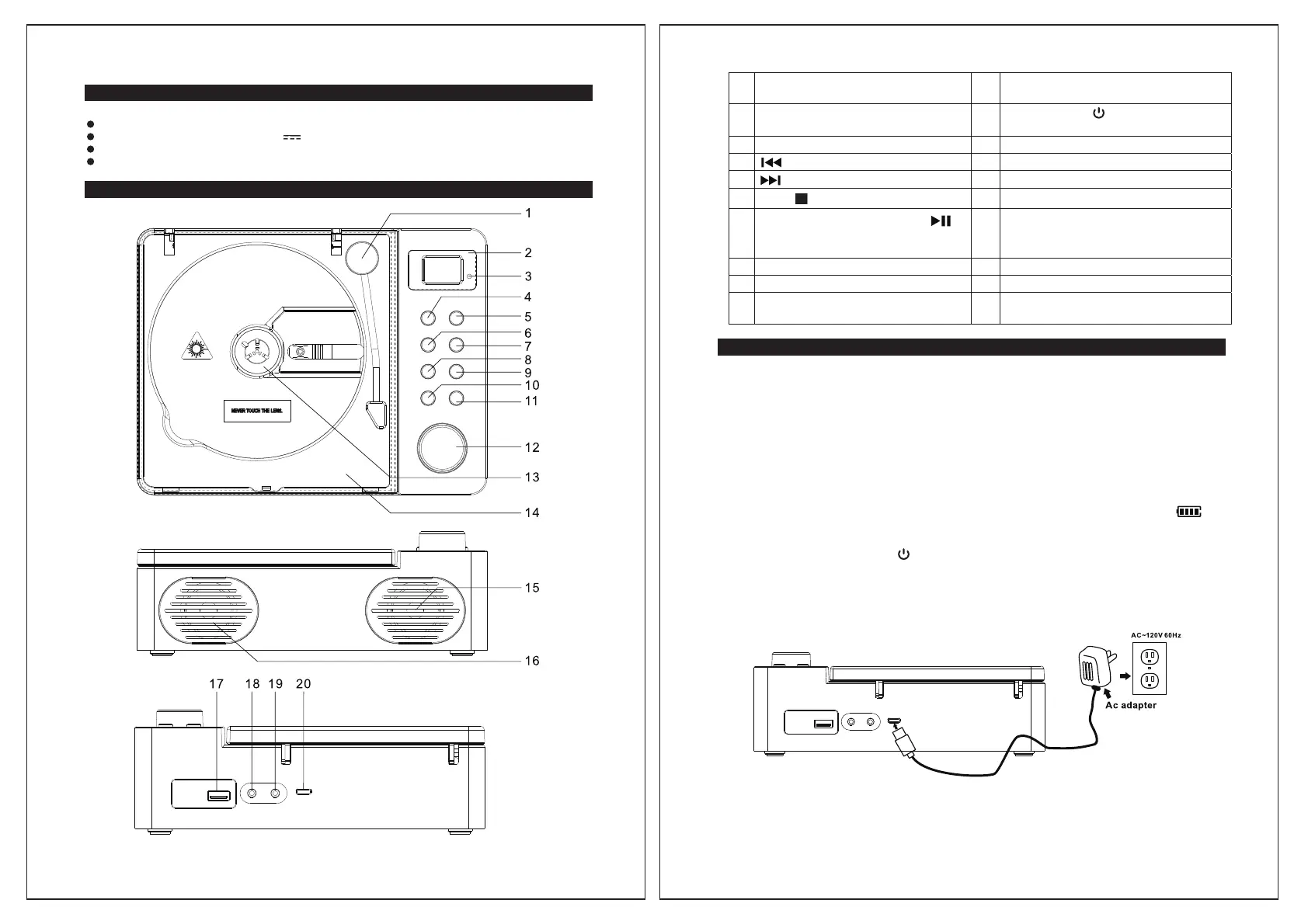
DECORATION TONE ARM 11
FUNCTION MODE BUTTON
(CD/USB/Bluetooth/FM Radio/AUX)
CONTENTS OF YOUR PRODUCT
2
LCD DISPLAY
12
POWER ON/OFF BUTTON;
ROTARY VOLUME KNOB
Main Unit
USB-A power adapter (DC 5V
USB-A to type C charging cable
User Manual
X 1
1A) X 1
X 1
3
POWER INDICATOR 13
CD COMPARTMENT
X 1
4
SKIP/FAST BACKWARD BUTTON
14 CD DOOR
5
SKIP/FAST FORWARD BUTTON
15
RIGHT SPEAKER
LOCATION OF CONTROLS
6
STOP BUTTON
16 LEFT SPEAKER
7
CD/USB/BT MODE; PLAY/PAUSE
FM MODE: AUTO SCAN;
BLUETOOTH PAIR BUTTON
;
17 USB PORT (PLAYBACK)
8
REPEAT BUTTON 18
HEADPHONE JACK/RESET BUTTON
9
+10 BUTTON 19
AUX IN JACK
10
MEMORY(PROGRAM) BUTTON;
FM PRESET+ (UP) BUTTON
20
DC INPUT JACK (USB type C)
POWER SOURCE
This unit can be operated using either AC power, the built-in Lithium-ion rechargeable
battery.
AC POWER OPERATION
USB-A to USB type C Power Adapter with the output of DC 5V, 1A (included) is required for
operating the main unit when using AC power mode. To connect the USB Power Adapter to
the unit and 120V~ 60Hz AC Outlet:
1. Plug the USB-A plug of the included charging cable into the power adapter USB-A port.
2. Firmly and securely insert the USB type C plug of the charging cable into the USB type
C Jack on the back of the unit.
Plug the Power Adapter plug into the 120V AC outlet. The CHARGE indicator on
the LCD display will light and blink during battery charging. Connecting this unit to any
other power source may cause damage to the system.
3.
4. Press and hold the POWER
button on the top panel to turn on the unit, the POWER
INDICATOR will light.
Note: When the unit is not operated for long periods of time, unplug the USB power
adapter from the unit and wall outlet.
BUILT-IN RECHARGEABLE BATTERY OPERATION
1. This unit will also operate using the built-in Lithium rechargeable battery. Fully charge
5 6



 To Next Page