intentional manual disconnection or undesirable external signal interferences or over-range
for more than 10 seconds. If this happens, the unit will emit two short beeps. You can re-link
them and resume play by:
RESETTING THE UNIT
If the unit experiences a power surge or electric shock, it is possible that the internal
micro-controller may lock up and the unit will not respond to any commands from the panel
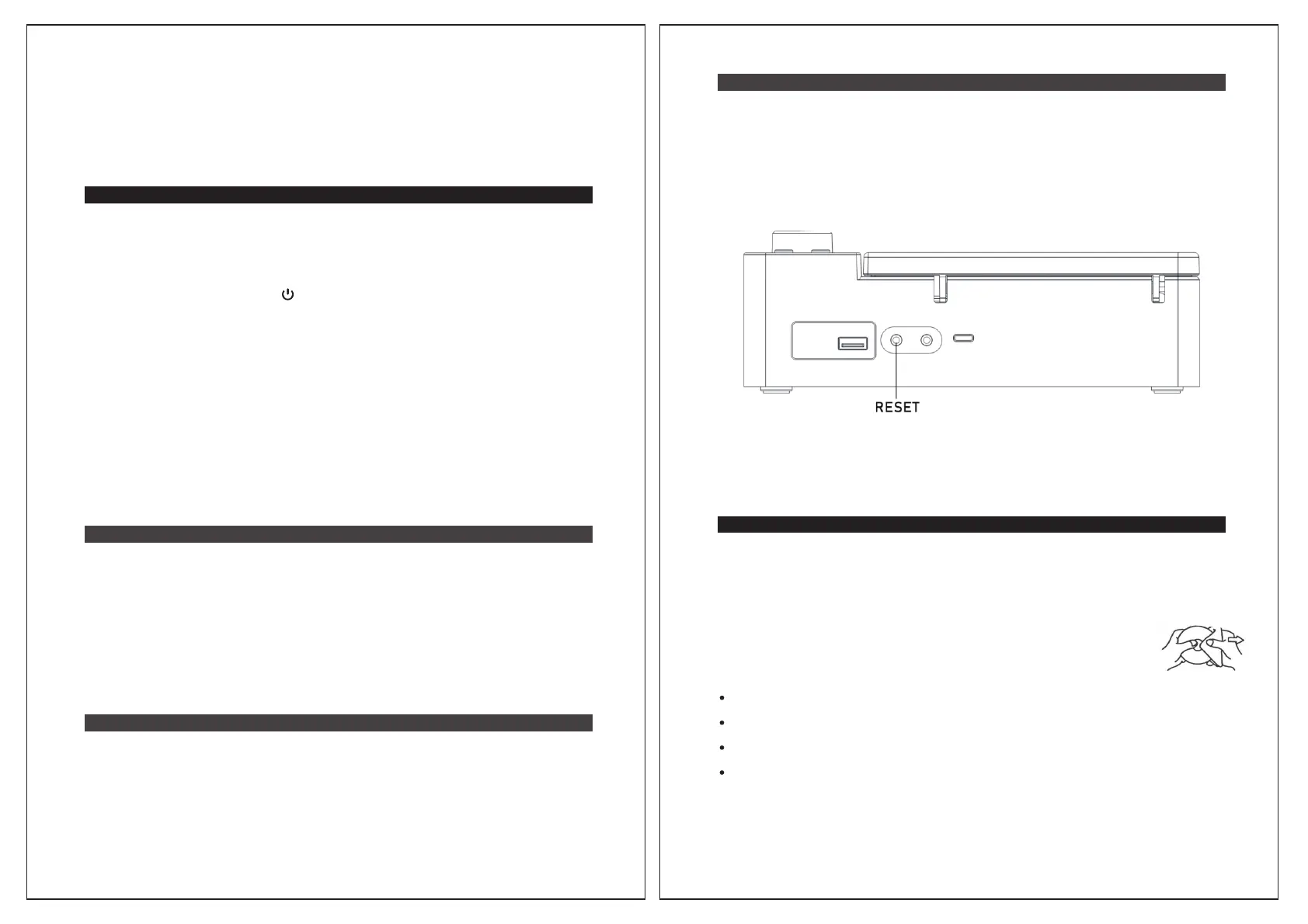
controls. In this event, holding the main unit body, use a long and straightened out paper
clip, toothpick, or similar objects less than 3 mm diameter to press the RESET button which
hidden inside the headphone jack located on the back of the unit (see the below figure).
CAUTION: DO NOT USE A SHARP OR POINTED OBJECT TO PRESS THE RESET
BUTTON. IT MAY DAMAGE THE RESET SWITCH OR INTERNAL COMPONENTS.
AUX IN OPERATION
You can play other music sources (iPod, MP3 or other digital audio players) through the
speakers of the unit by connecting the AUX IN JACK to your external player’s audio out jack
or headphone jack.
Notes:
Factory Reset
In FM mode, press and hold the REPEAT button and the MODE button at same time until
the LCD display shows all characters at once. The unit will enter to power off mode
automatically. The factory reset operation clears the system memory and all of your
previous settings, stations, and memory will be erased.
USE HEADPHONES (NOT INCLUDED)
CARE AND MAINTENANCE
Inserting the plug of your stereo headphones (not included) into the headphone jack
located on the top panel will enable you to listen in private. When using headphones, the
speakers will be disconnected.
Read this Important Information before Using Your Headphones
1.) Avoid extended play at very high volume as it may impair your hearing.
2.) If you experience ringing in your ears, reduce the volume or shut off the unit.
3.) Keep the volume at a reasonable level even if your headset is an open-air type,
3.
4.
Clean your unit with a dry cloth. Solvent or detergent should never be used.
Avoid leaving your unit in direct sunlight or in hot, humid, or dusty places.
5. Keep your unit away from heating appliances and sources of electrical noise such as
fluorescent lamps or motors.
6. If drop-outs or interruptions occur in the music during CD play, or if the
CD fails to play at all, its bottom surface may require cleaning. Before
playing, wipe the disc from the center
outwards with a good soft cleaning
cloth.
designed to allow you to hear outside sounds. Please note that excessively high volume
may still block outside sounds.
CLEANING THE UNIT
To prevent fire or shock hazard, disconnect your unit from the AC power source and
turn off the unit when cleaning.
The finish on the unit may be cleaned with a dust cloth and cared for as other furniture,
use caution when cleaning and wiping the plastic parts.
If the cabinet becomes dusty, wipe it with a soft dry dust cloth. Do not use any wax or
polish sprays on the cabinet.
If the front panel becomes dirty or smudged with fingerprints it may be cleaned with a
s
oft cloth slightly dampened with a mild soap and water solution. Never use abrasive
cloths or polishes as these will damage the finish of your unit.
DECORATION ARM
The decoration arm in this model does not have a function in operation, although you can
rotate it like the tone arm of turntable to have fun. Please gently rotate it to the position above
the CD or return it to its original position to avoid damage. Do not position the arm above
the CD while playing a CD as this may damage your CD. Do not attempt to pull or remove
the arm. It will violate the warranty if you do so.
CAUTION: Never allow any water or other liquids to get inside the unit while cleaning.
13 14
1. Select “SB3720” from the device list on your smartphone or Bluetooth device. The
SB3720 should re-link to your Bluetooth enabled device within 5 seconds.
2. Tap the play button of the music player on your Bluetooth enabled device to resume
playback.
1. Plug one end of a 3.5mm audio cable (not included) into the AUX IN JACK and the
other end of the cable to the headphone jack of your digital audio player.
2. Press and hold the POWER button to turn on the unit. Tap the MODE button
repeatedly to select AUX mode, the indication “AUX” will show on the LCD display.
3. Turn on and start playing the external device you plugged into the AUX IN JACK.
4. Slowly adjust both the volume controls of your unit and the external device until you
reach a comfortable listening level.
5. Turn off both the external audio player and this unit after use. Unplug the audio cable
from AUX IN jack.
• If you connect the unit to the Line-Out Jack of your external device, you only need to
adjust the VOLUME CONTROL of your unit. If you connect to the Headphone Jack of
your external device, you may need to adjust both the volume controls of your external
device and the unit to obtain the desirable listening level.
• Remember to turn off the unit and unplug the AUX in cable from the unit when you
have finished listening. Don't forget to switch off the power of your external audio
device as well.
1. Do not subject the unit to excessive force, shock, dust, or extreme temperature.
2. Do not tamper with the internal components of the unit.


 To Next Page
 Loading...