7
Media Player Description
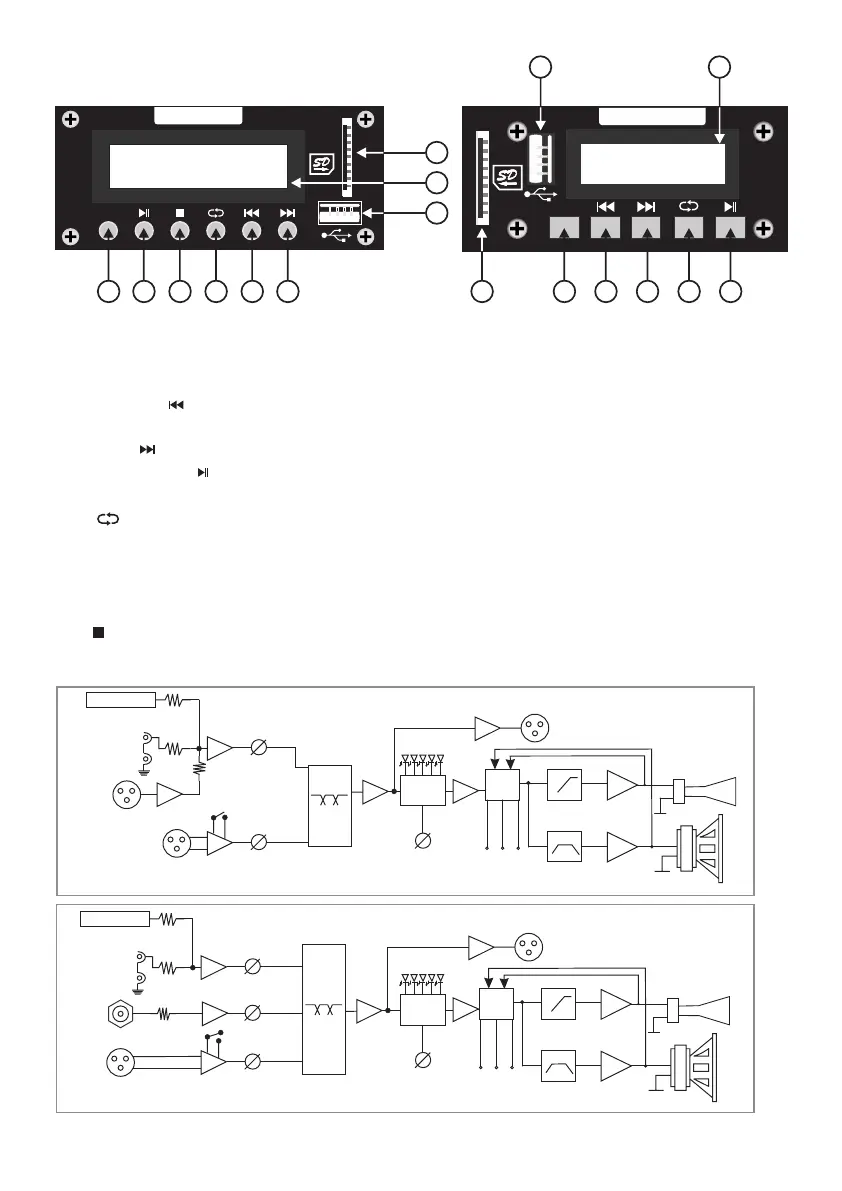
1) USB Input Socket: For inserting the USB drive.
2) SD Card Input Socket: For inserting the SD Card.
3) LED Display: For displaying track Number.
4) Previous ( ): Press button to select previous song & long press of this button will decrease volume
level.
5) Next ( ): Press this button to select next song & long press of this button will increase volume level.
6) Play / Pause ( ): Press this button to Play or pause the MP3 songs.
7) Mode: This button use for either USB or Bluetooth.
8) : This button have four functions showing on display one by one
1. Single : play one song continue again & again (repeat).
2. Folder : To select song from folder, if there is any folder.
3. Random : Select song or track randomly.
4. All : Play all song one by one.
9) : Press this button to stop song & then press play / pause button to play song from start. (Clio 154)
4 567 9 8
2
1
3
4. Block Diagram
Media Player
Mode
2
1
7 4 5 8 6
3
Clio 154 Clio 84
LIM
high-pass filter
band-pass filter
AMP
Line Out
AMP
Volume
Mic/Line sens
LIM
Media Player
Line In
Aux I/P
Line Line
Volume
Mic/Line
Clio 84
1" exit with
1.35” voice coil
8" woofer
with 2" voice coil
Volume
Volume
Volume
EQ
LIM
high-pass filter
band-pass filter
AMP
1" exit with
1.75” voice coil
Line Out
AMP
Mic Line sens
Media Player
Line 2
Aux I/P
Line 1/Mic
Clio 154
15" woofer
with 3" voice coil
Power
Clip
Sig
Power
Clip
Sig
DSP
Control
C
l
u
b
Flat
M
usi
c
S
p
e
ec
h
Live
DSP
DSP
Control
C
l
u
b
Flat
M
usi
c
S
p
e
ec
h
Live
DSP
EQ


 To Next Page