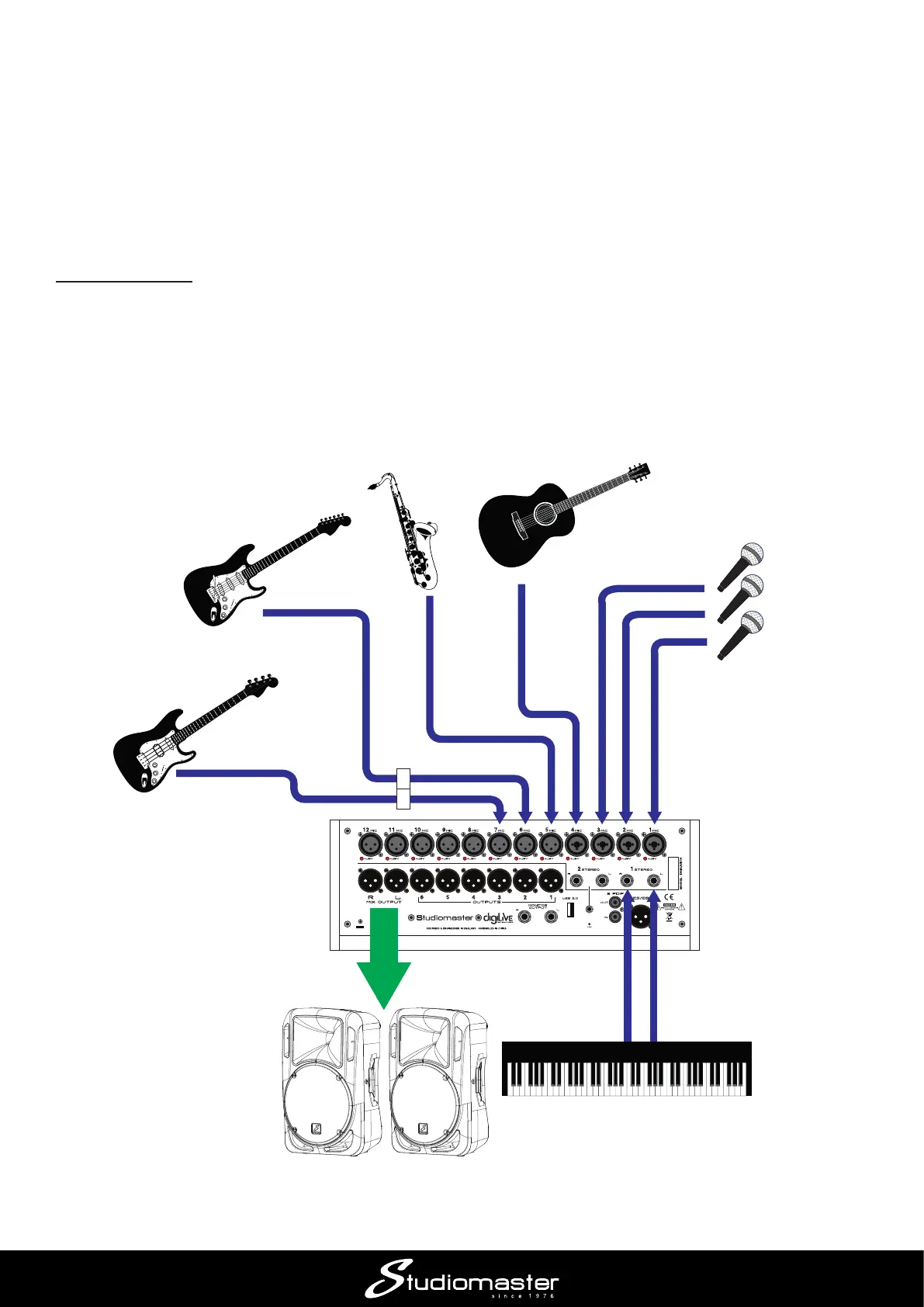
Application Example 2 – small band
Creating a stereo mix for a small band is simply an extension of Application Example 1. This
example would also be suitable for applications such as Houses of Worship.
digiLiVE has 12 mono channels to which microphones or line level sources can be connected
using XLR connectors: the rst four of these can also accept ¼” jack plugs. In addition to these 12,
there are also two stereo channels (accessed via Layer 2).
Connecting up
Amplifying a band will typically involve microphones, DI boxes and line level sources. Connect the
various sources to the rear panel XLR/Combi inputs: bear in mind that Channels 1 to 8 are on the
rst fader layer while Channels 9 to 12 and the stereo channels are on the second, so it may be
convenient for mixing to have critical audio sources on the same layer.
Stereo line sources (such as synths or DJ decks) may be connected to the rear panel inputs
STEREO 1 or STEREO 2.
MICS
DI BOXES
BASS
SYNTH
WORKSTATION
GUITAR
SAX
(MIC)
ELECTROACOUSTIC
GUITAR
POWERED SPEAKERS
(L & R)














 To Next Page