expanders if used with the more powerful EP3 rack mounted
external power supply (available separately).
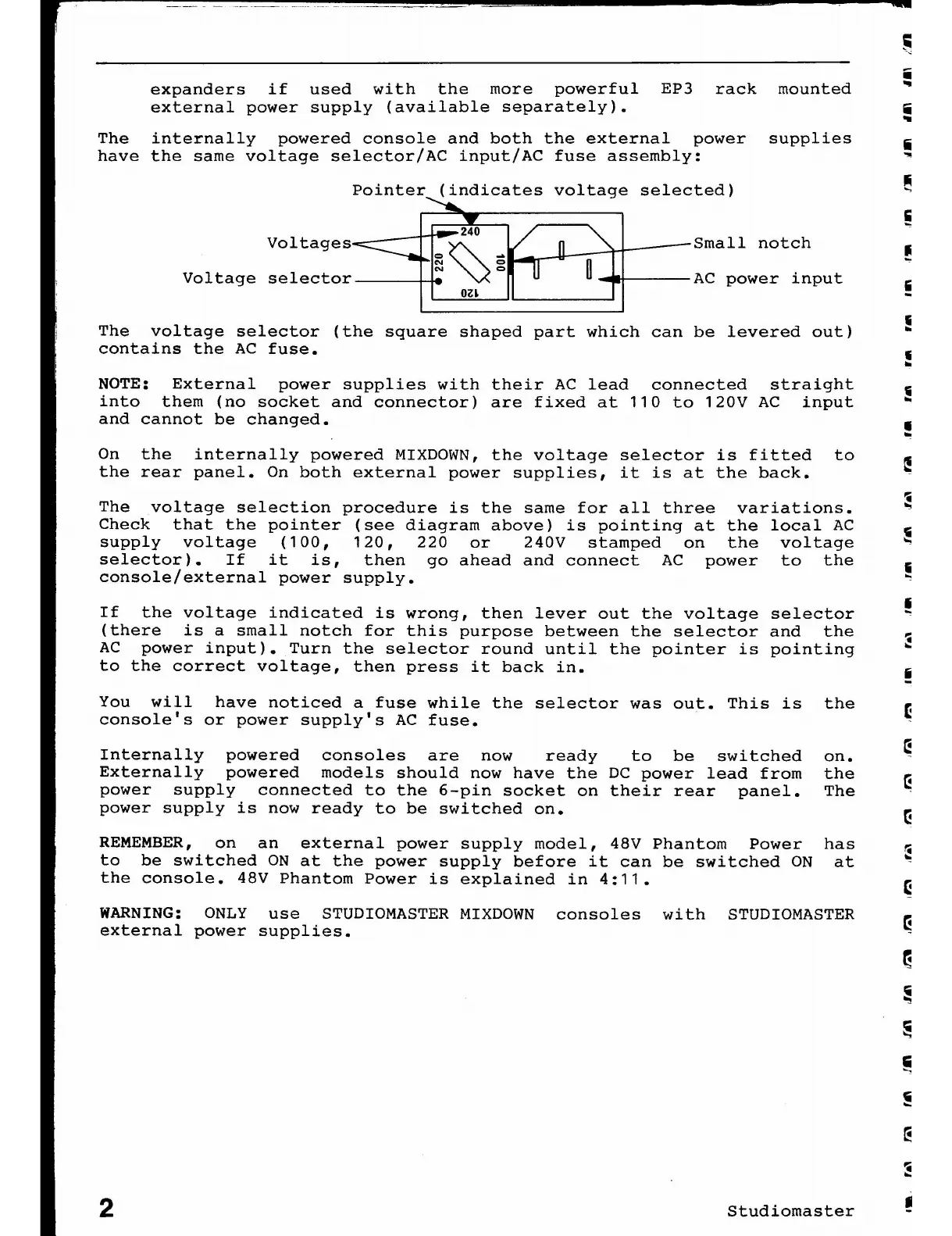
The internally powered console and both the external power supplies
i
have the same voltage selector/AC input/AC fuse assembly: ~
Pointer (indicates voltage selected)
Voltages
Voltage selector
240
=
~
-
N
=
N
=
oz~
Small notch
AC power input
The voltage selector (the square shaped part which can be levered out)
contains the AC fuse.
NOTE: External power supplies with their AC lead connected straight
into them (no socket and connector) are fixed at 110 to 120V AC input
and cannot be changed.
On the internally powered MIXDOWN, the voltage selector is fitted to
the rear panel. On both external power supplies, it is at the back.
The voltage selection procedure is the same for all three variations.
Check that the pointer (see diagram above) is pointing at the local AC
supply voltage (100, 120, 220 or 240V stamped on the voltage
selector). If it is, then go ahead and connect AC power to the
console/external power supply.
If the voltage indicated is wrong, then lever out the voltage selector
(there is a small notch for this purpose between the selector and the
AC power input). Turn the selector round until the pointer is pointing
to the correct voltage, then press it back in.
You will have noticed a fuse while the selector was out. This is
console's or power supply's AC fuse.
Internally powered consoles are now ready to be switched
Externally powered models should now have the DC power lead from
power supply connected to the 6-pin socket on their rear panel.
power supply is now ready to be switched on.
REMEMBER, on an external power supply model, 48V Phantom Power
to be switched ON at the power supply before it can be switched ON
the console. 48V Phantom Power is explained in 4:11.
the
on.
the
The
has
at
WARNING: ONLY use STUDIOMASTER MIXDOWN consoles with STUDIOMASTER
external power supplies •
2
Studiomaster
•














 To Next Page