· 4 ·
Operation Guidance
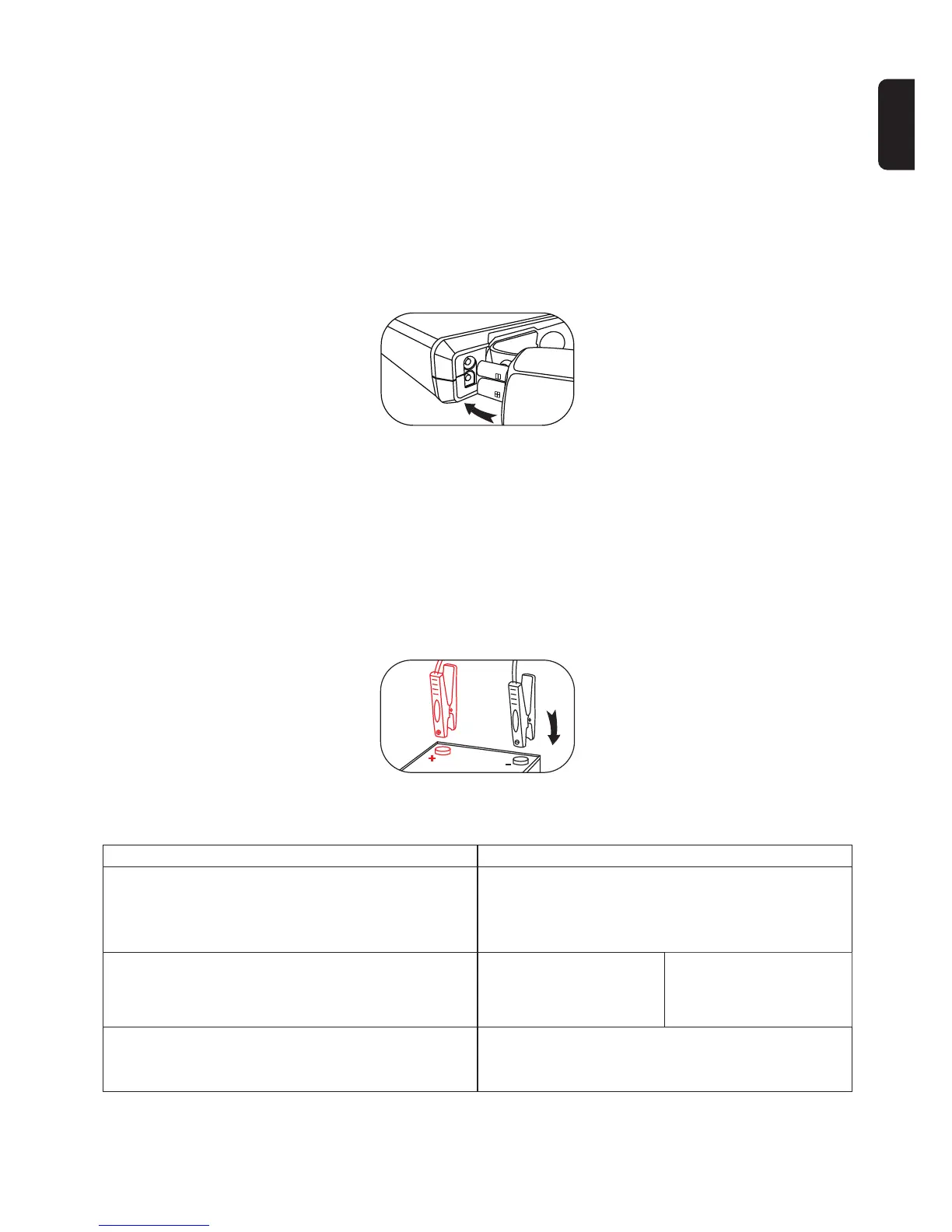
● Step 1
Connect the smart battery clamp to U10 jump starter. If the green and red light
indicators on the battery clamp are flashing alternately, you are safe to move
on to to the next step.
If the red light indicator is on and the built-in buzzer is beeping, it means the battery level is
too low and you need to charge your jump starter.
● Step 2
Connect the red clamp to the positive terminal (+) of the vehicle’s battery and
the black clamp to negative one (-). If the light turns green, you need to start
the car within 30 seconds (see step 3-a).
Otherwise, the green light would turn to red light due to over 30 seconds of inactivity, you
need to disconnect the battery clamp from the vehicle and the jump starter. Wait for at
least 30 seconds, then try again.
If a problem occurs...
Problem
If the red light is on and the built-in buzzer is beeping
Use force start function (see step 3-b)
If the battery clamp is connected correctly, but the red
light is still on and the built-in buzzer keeps beeping.
If the green and red light indicators are still flashing
alternately after you have connected the battery
clamp to the car battery
A. Adjust your clamp for
maximum contact for
both sides of the clamp
B. If Solution A is not
working, use force start
function (see step 3-b)
The battery clamp may be connected reversely.
If so, you need to disconnect the battery clamp
from the vehicle and the jump starter.
Wait for at least 30 seconds, then try again.
Solution
EN


 To Next Page