EasyManua.ls Logo

Sub-Zero SZ-7516-P - User Manual

Sub-Zero SZ-7516-P
5 pages
Print Icon
To Next Page IconTo Next Page
Loading...
OPERATING
INSTRUCTIONS
SZ-7516-P
www.pvrcontrols.com
1
4
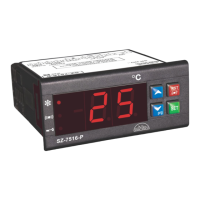
The Sub-Zero Series 7516-P are aesthetically superior
versions of their predecessors. The SZ 7516-P is a single set
point controller with buzzer. They are specifically designed for
blood bank applications wherein the compressor cuts off at set
point and is restarted at a temperature of set point plus
differential, also if the power fails the controller indicates blood
bank temperature for monitoring purpose.
Additionally these controllers offer several protection
features that are easily understood by the examples in the
instructions below. The controller can be used for heating
applications, when the P1 parameter is set to “1”.
A number of parameters are displayed alphanumerically to set
up the instrument for each specific application.
GENERAL DESCRIPTION
The SZ-7516-P controller can be used for several applications
O O
with a measuring range from -50 C to 99 C.
Instructions : SZ 7516-P
INDEX
Para. Page
Description
To set the SET Point of the controller.
How to set other parameters.
To set Heating or Cooling function.
Max High Temp limit & alarm.
Min Low Temp limit & alarm.
To set Differential (Hysterisis).
Probe calibration.
Time Delay (relay restart after cutoff).
Keypad lock.
Alarm-to activate & reset buzzer.
Relay status on probe failure.
Restore factory defaults.
End Programming.
Operating messages.
Technical Data.
Suggested Wiring diagram.
Panel cutout & dimensions.
P1
P2
P3
P4
P5
P6
LP
AL
E1
FS
EP
3
4
5
6
7
8
9
10
11
12
13
14
15
16
17
18
19
2
INDIA
To set other
Parameters
Display will show P1 & flash.
To go to other parameters,
use UP/DOWN keys.
Press & hold
the DOWN(prg)
key for
2 seconds.
prg
-50 C AND 99 C REMOVE
Function: To set the cut out
point of the controller.
Display will change to set value.
The set point value can now be
changed by using the UP/DOWN
key. After setting the desired
value, press the set key and you
will see “- - -” which confirms that
the set point has been stored in
memory.
Set point
Press and hold
the SET
key for
2 Seconds.
P2
P3
O
0 C
Min Max
Fac.
3
SET
Question and Answer IconNeed help?

Do you have a question about the Sub-Zero SZ-7516-P and is the answer not in the manual?

Overview

This document describes the Sub-Zero Series 7516-P, an aesthetically superior, microprocessor-based, single-set point controller with a buzzer, designed for refrigeration applications. These controllers are suitable for both cooling and heating applications, offering a wide temperature differential. If the power fails, the controller indicates blood group and stores the settings in memory.

Function Description

The Sub-Zero Series 7516-P is a versatile controller capable of managing refrigeration systems. It features a single set point for temperature control and a buzzer for alarms. The controller can be used for both heating and cooling applications, making it suitable for a variety of environments. It also includes several protection features, such as time delay for compressor restart and keypad locking to prevent unauthorized changes.

The controller's functions are accessed and configured through a set of parameters:

  • Set Point (SP): This parameter defines the desired temperature. It can be set between -50°C and 99°C.
  • P1 (Set Point): This is the primary set point for the controller.
  • P2 (Maximum Allowable High Temperature Set Point): This parameter sets the maximum allowable high temperature for the set point. It can be adjusted between -50°C and 99°C.
  • P3 (Minimum Allowable Low Temperature Set Point): This parameter defines the minimum allowable low temperature for the set point. It can be adjusted between -50°C and 99°C.
  • P4 (Differential): This parameter sets the temperature differential, which is the difference between the cut-in and cut-out temperatures. It can be set between 1°C and 20°C.
  • P5 (Probe Calibration): This parameter allows for calibration of the temperature probe. It can be adjusted between -10°C and 10°C.
  • P6 (Time Delay): This parameter sets the time delay for compressor restart after a power cut-off. It can be set between 0 and 99 minutes.
  • LP (Lock Keypad): This parameter locks the keypad to prevent unauthorized changes. It can be set to 0 (unlocked) or 1 (locked).
  • AL (Activate Buzzer): This parameter activates or deactivates the buzzer for alarms. It can be set to 0 (deactivated) or 1 (activated).
  • E1 (Relay Status on Probe Failure): This parameter defines the relay status in case of a probe failure. It can be set to 0 (relay is OFF) or 1 (relay performs a duty cycle of 10 minutes ON and 10 minutes OFF).
  • FS (Restore Factory Defaults): This parameter restores all settings to their factory defaults.
  • EP (End Programming): This parameter saves all programmed settings and exits the programming mode.

Important Technical Specifications

  • Model: Sub-Zero Series 7516-P
  • Dimensions:
    • Front: 75 x 34.5 mm
    • Depth: 60 mm (with back lid)
  • Panel Cutout: 71 x 29 mm
  • Mounting: Panel mounting with fasteners
  • Display: 3-digit, 7-segment LED
  • Connections: Screw terminal blocks
  • Probe: NTC type, 2-wire, 1.5-meter cable (max)
  • Data Storage: Non-volatile EEPROM memory
  • Operating Temp: 0°C to 50°C
  • Storage Temp: -20°C to 70°C
  • Humidity: 0 to 95% RH (non-condensing)
  • Output: 1 SPDT relay 8 (3A, 250V AC)
  • Power Supply: 230V AC, 50/60 Hz (10% tolerance)
  • Range: -50°C to 99°C
  • Resolution: 1°C
  • Accuracy: 1°C
  • Probe Tolerance: 0.3°C
  • Power Consumption: 3VA (max)
  • Battery Input for Backup: 9.6V DC, 1800mAh (MAX)

Usage Features

The controller is designed for ease of use with a clear 3-digit LED display and intuitive UP/DOWN keys for setting parameters.

  • Setting Parameters: To set a parameter, press and hold the SET key until the display shows the parameter code. Use the UP/DOWN keys to adjust the value, then press SET again to confirm.
  • Keypad Lock: The keypad can be locked to prevent accidental or unauthorized changes to the settings.
  • Alarm Function: The controller features a buzzer that activates for high temperature alarms, low temperature alarms, and probe failures. The buzzer can be activated or deactivated via the AL parameter.
  • Compressor Protection: The P6 parameter provides a time delay for compressor restart, protecting the compressor from damage due to rapid cycling.
  • Probe Calibration: The P5 parameter allows for fine-tuning of the temperature probe to ensure accurate readings.
  • Display Messages: The display shows various messages to indicate status or errors:
    • HI: Temperature above the maximum limit of the set point (P2).
    • LL: Temperature below the minimum limit of the set point (P3).
    • PP: Probe open/short, circuit open, or probe temperature > 99°C or < -50°C.
    • On/Off: Compressor On/Off status.
    • Alarm: Alarm (HI, LL, or PP).
    • Keypad Locked/Unlocked: Keypad status.
    • Flashing: Time delay in progress (P6).

Maintenance Features

  • Cleaning: The surface of the controller should be cleaned with a soft cloth. Do not use abrasive cleaners, alcohol, or solvents.
  • Probe Installation: The probe should be installed in a place where the temperature is representative of the area being controlled and where ambient temperature does not exceed the controller's operating limits. The probe cable should be routed away from power cables to avoid interference.
  • Wiring: All wiring should be done as shown in the wiring diagram. The electrical wiring should be done as per local regulations. The terminals admit wires of up to 2.5 sq mm.
  • Warning: Incorrect wiring can cause irreparable damage and personal injury. Ensure proper wiring and insulation.

Disclaimer: The manual states that the company reserves the right to make changes to the product and its specifications without prior notice. The company is not liable for incidental, special, or consequential damages arising from the use or inability to use the product.

Warranty: The product is warranted against defects in materials and workmanship for a period of one year from the date of purchase. During this period, the product will be repaired or replaced at no charge. The warranty does not cover damages resulting from accident, abuse, or misuse.

Sub-Zero SZ-7516-P Specifications

General IconGeneral
BrandSub-Zero
ModelSZ-7516-P
CategoryTemperature Controller
LanguageEnglish

Related product manuals