minutes have passed to allow the engine
to heat up sufficiently.
! Vehicle Dynamics Control mode
indicator light (green – WRX STI)
This light illuminates to indicate that the
Traction Control System is in non-opera-
tion mode. This does not constitute failure
of the Vehicle Dynamics Control system.
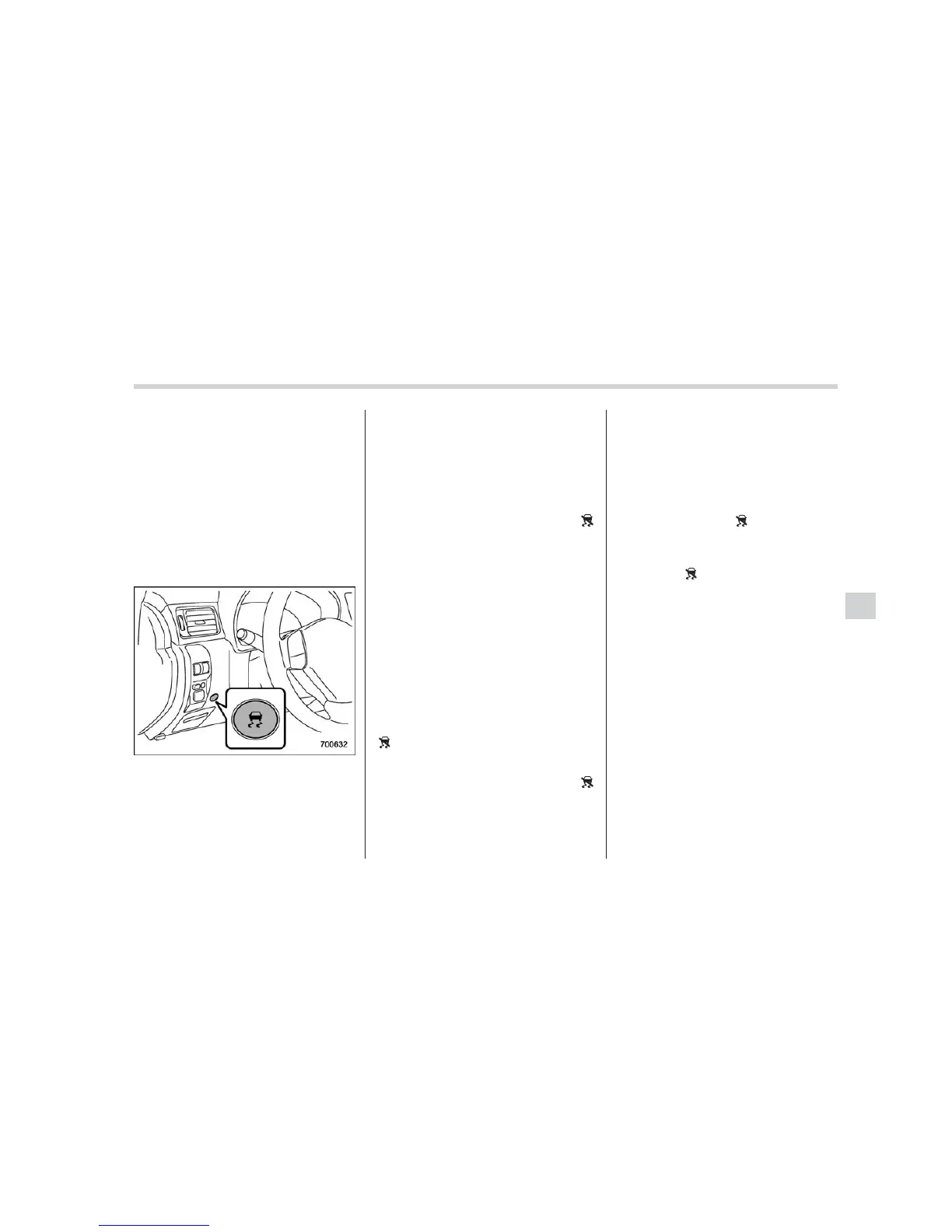
& Vehicle Dynamics Control
mode switch (WRX STI)
When the switch is pressed briefly or for
more than 2 seconds during engine
operation, the mode of the Vehicle Dy-
namics Control System will be changed.
! Vehicle Dynamics Control mode
When the ignition switch is on, this mode
is selected.
This mode enables all controls for ABS,
the Traction Control System, and the
Vehicle Dynamics Control system. Select
this mode for most driving situations.
When this mode is selected, the “
”
indicator light in the combination meter
turns off.
! Traction mode
This mode restricts the functions of the
Traction Co ntrol System and Vehicle
Dynamics Control system and thus delays
utilizing their functions as a reaction to
vehicle behavior in comparison with the
Vehicle Dynamics Control mode. This
mode should be used in driving situations
where the vehicle dynamic performance
will improve without decreasing engine
torque control.
When the switch is pressed for more than
2 seconds during engine operation, the
“
” indicato r li ght in the combination
meter illuminates in green. When the
switch is pressed again to reactivate the
Vehicle Dynamics Control system, the “
”
indicator light turns off.
! Vehicle Dynamics Control OFF
mode
This mode allows only the ABS control.
This mode should be used in an emer-
gency situation such as getting out of
snow or mud.
When the switch is pressed briefly during
engine operation, the “
” indicator light in
the combination meter illuminates in yel-
low. When the switch is pressed again to
reactivate the Vehicle Dynamics Control
system, the “ ” indicator light turns off.
NOTE
. When a mode other than the Vehicle
Dynamics Control mode is selected,
the Vehicle Dynamics Control system
automatically reactivates itself the next
time the ignition switch is turned to the
“LOCK” posi tion and the engine is
restarted.
. If the switch is held down for 10
seconds or longer, the indicator light
turns off, the Vehicle Dynamics Control
system is activated, and the system
ignores any further pressing of the
switch. To make the switch usable
again, turn the ignition switch to the
“LOCK” position and restart the en-
gine.
. When the Vehicle Dynamics Control
OFF mode is selected, the vehicle’s
Starting and operating 7-41
– CONTINUED –













 To Next Page