l International phone calls may not be made depending on the
type of cellular phone you have.
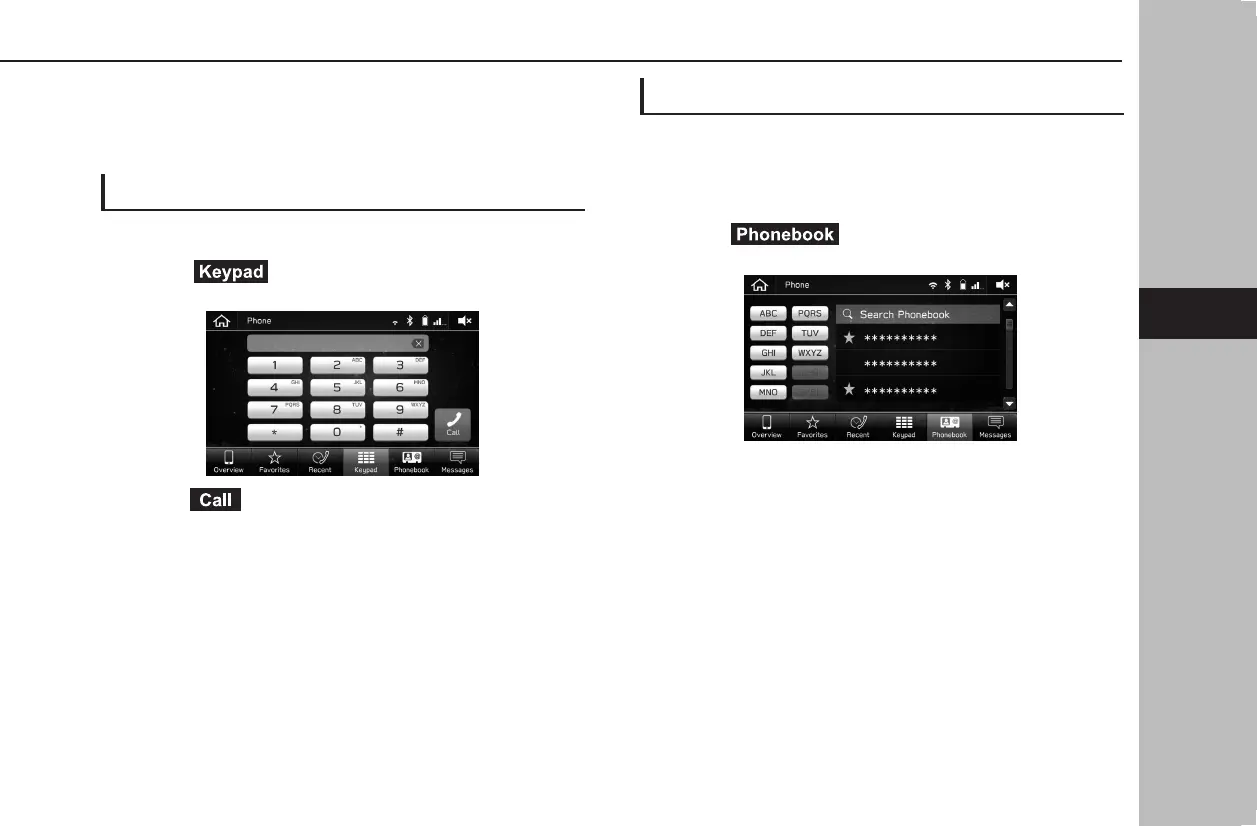
BY KEYPAD
1.
Display the phone screen. (→P.90)
2.
Select (Keypad), and then enter the phone
number.
3.
Select (Call).
4.
Check that the “Calling” screen is displayed.
l Depending on the type of Bluetooth phone being connected, it
may be necessary to perform additional steps on the phone.
BY CONTACTS LIST
Calls can be made by using contact data which is
transferred from a registered cellular phone.
1.
Display the phone screen. (→P.90)
2.
Select (Phonebook), and then select the
desired contact.
● A contact can be searched by entering the contact’s
name.
PHONE OPERATION (HANDS-FREE SYSTEM FOR CELLULAR PHONES)
93
Phone
docstructure.indb 93 2019/05/31 14:15:57











 To Next Page