REVIEWING ANALYZER SETTINGS
.............................
Sievers M500e TOC Analyzer Operation and Maintenance Manual
DLM 78510-02 EN Rev. B 143 SUEZ © 2022
4. Complete the following and click OK.
• Network Path
• Username
• Password
5. In the Name area, select the file to import and click
Import Constants. The
Analyzer imports the new settings and a confirmation message appears.
6. Click OK to confirm and close the message. The system will automatically
restart.
SETTINGS SCREEN — ANALYZER SETTINGS PANEL
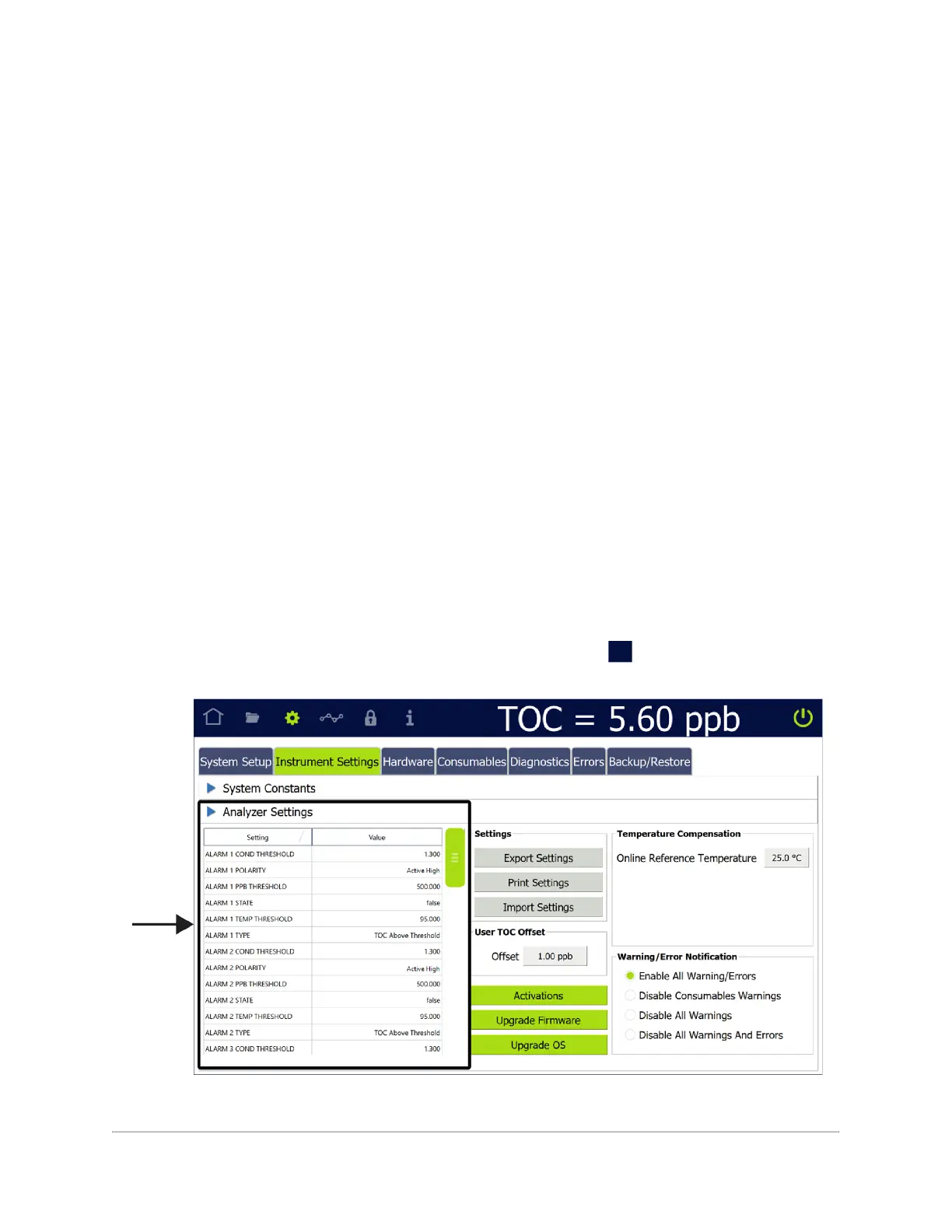
The Analyzer Settings panel includes a scrolling table of each Analyzer setting and its
value. The panel can also be used to export, print, and import settings.
Also included is the configurable TOC Offset field and Analyzer options such as the 3
Minute Analysis.
Reviewing Analyzer Settings
To review Analyzer settings
1. Navigate to the Analyzer Settings panel (Settings s screen > Instrument
Settings tab). The Analyzer settings appear on the left side of the panel.
2. Use the scrollbar to view the various setting values in the table.


 To Next Page