Local Internet Connection Only
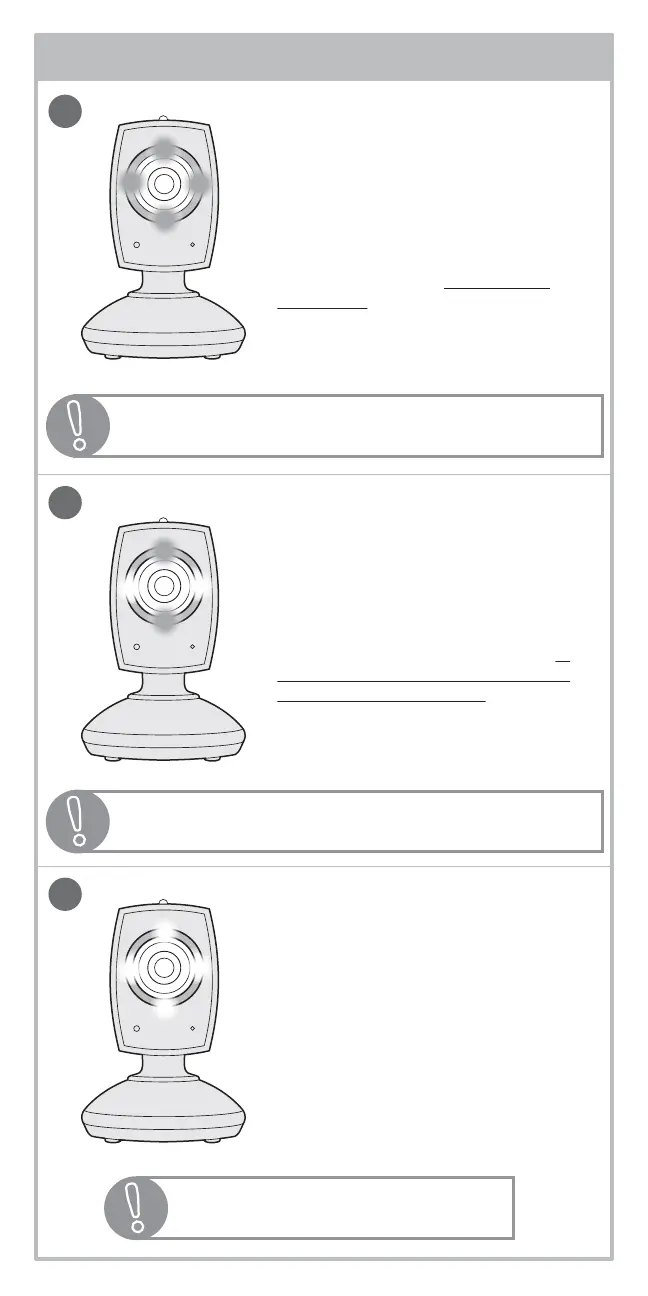
Two green LEDs (north and south
position) and two white LEDs (east
and west position) indicates a
local internet connection. This
means that you can view on your
smartphone, tablet, or computer in
your home but you will not be able
to view out of your home. You will
need to re-configure your camera’s
connection to resolve this issue.
Someone’s Watching Light
When all of the green LEDs on the
front of your camera switch from
green to white, this means that a
user you have given access to has
logged in and begun viewing your
camera from a remote internet
connection. The LEDs will change
back to green when they have
stopped watching.
Remote Internet & Local Internet
Connection
Four solid green LEDs indicates your
camera has a local and remote
internet connection. This means
you can view on your smartphone,
tablet, or computer in and out of
your home.
9
1
2
3
internet status lights:
!
!
Visit www.summerinfant.com/summerwifi/helpcenter
to help troubleshoot.
Requires app upgrade package, see
“upgrading your app” section.
!
Note: You can turn off the lights on the front of the camera by
sliding the Internet Status Light switch on back of camera.


 To Next Page