OPERATING YOUR APPLIANCE
Install the appliance in a place where the ambient temperature is between 50ºF and 100ºF (10º to
38ºC), and ideally about 77ºF (25ºC). If the ambient temperature is above or below the
recommended temperatures, the interior temperatures may fluctuate, and the expected operating
temperature may not be reached.
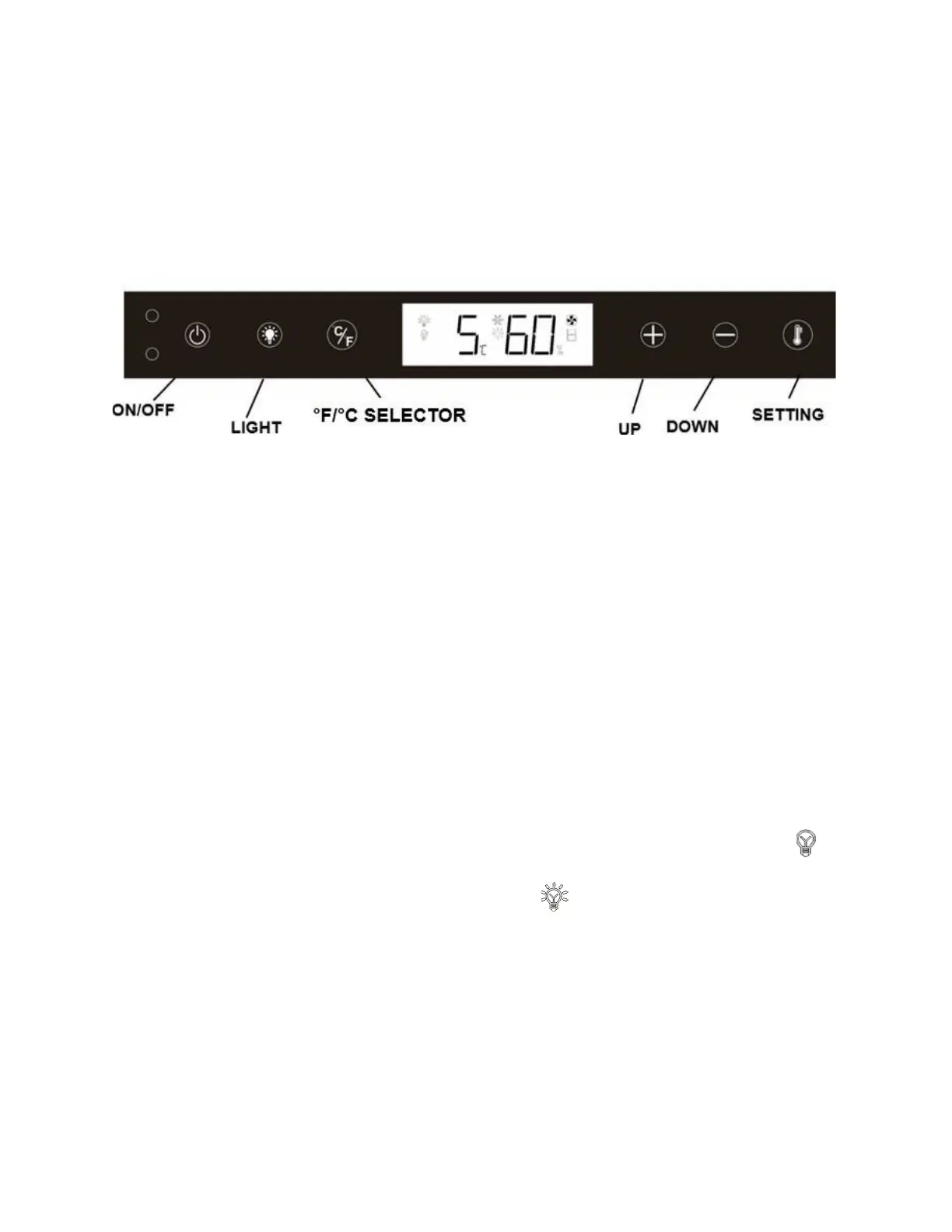
Control Panel for ADRD24
NOTE: Pressing the ON/OFF key once can switch off the audible alarm when the alarm is on.
Setting the Temperature Control for ADRD24
•
The temperature preset at the factory is 38°F or 3°C.
•
The range of set temperatures is from 34°F to 43°F or 1°C to 6°C.
•
Set the temperature by pressing the SETTING symbol and then pressing the UP and DOWN
symbols. When you press the SETTING symbol for the first time, the LED readout will show the
last set temperature.
•
The temperature will increase by 1°C/1ºF each time you press the UP symbol, and will decrease
by 1°C/1 ºF each time you press the DOWN symbol.
•
Press the SETTING symbol to view the set temperature at any time. The set temperature will flash
in the display window for 5 seconds. After 5 seconds, the actual temperature inside the appliance
will reappear in the display window.
Interior Light
•
The interior light makes it easy to view your items. Pressing the LIGHT symbol toggles
between 2 modes of operation for the internal lights: functional (default) mode and showcase
mode.
•
When using functional (default) mode, the lights will turn on, and the LCD screen will show
only when a drawer is open.
•
When using showcase mode, the LCD screen will show and the lights will be on whether
or not the drawer is open. To use showcase mode, press and hold the LIGHT symbol for 3
seconds to enter showcase mode. Press and hold for 3 seconds to exit this mode.



 To Next Page