V07-2014 Page 8 of 24 ©
©
The XP Operators are set in the factory for a “Standard PULL Installation” When the Master
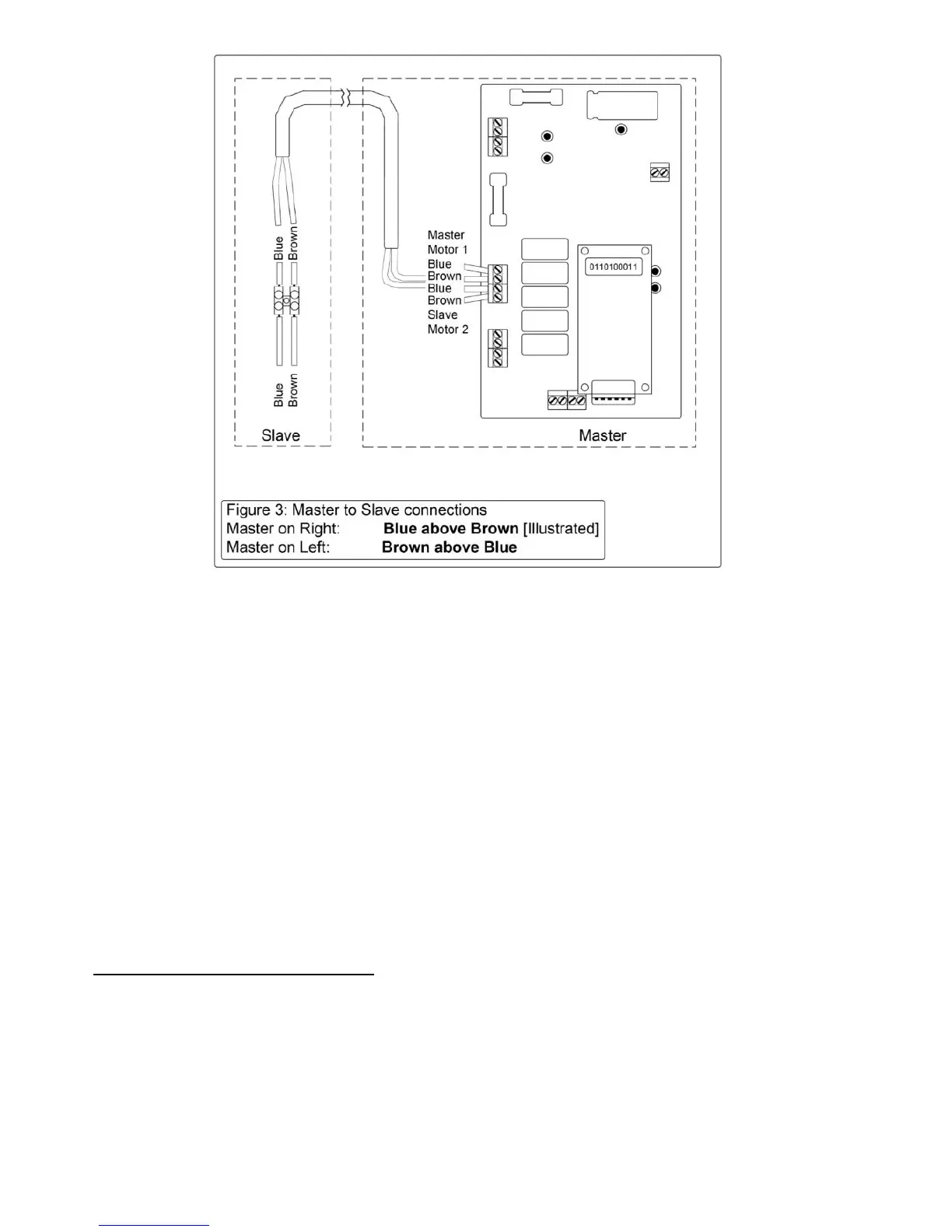
Operator is placed on the LEFT HAND SIDE [from the inside [motor side] – looking out] the wiring
is Brown above Blue [ref. P. 15 - 16]
When the Master Operator is located on the RIGHT HAND SIDE [motor side - from the inside–
looking out] then the motor wires need to be reversed. ie; BLUE above BROWN.
To accomplish this, locate the connection blocks for each motor on the Circuit board.
Swap* the BROWN & BLUE wires for Motor 1 [& Motor 2 if a pair of gates] [See Figure 3
above].
IMPORTANT:
* ALL power including • 240v • 12V • Solar • Battery must be disconnected
before attempting to change motor polarity
5.
Location of Gate Bracket on Gate:
The Gate bracket should be positioned on the gate so that the arms are ALMOST in a
straight line when the gates are closed [Ref. P.9 Fig. 4] To check the location of the gate
brackets, first disengage the Main arm from the drive shaft [Using the spanner provided,
unscrew the bolt until the arm swings freely] Then clamp the gate bracket in position. Open
and close the gate to ensure the gate bracket is appropriately located.



 To Next Page