Document No. 8128000560
Software Revision – N1B (07 Oct 04)
7-38
RT-9000 B
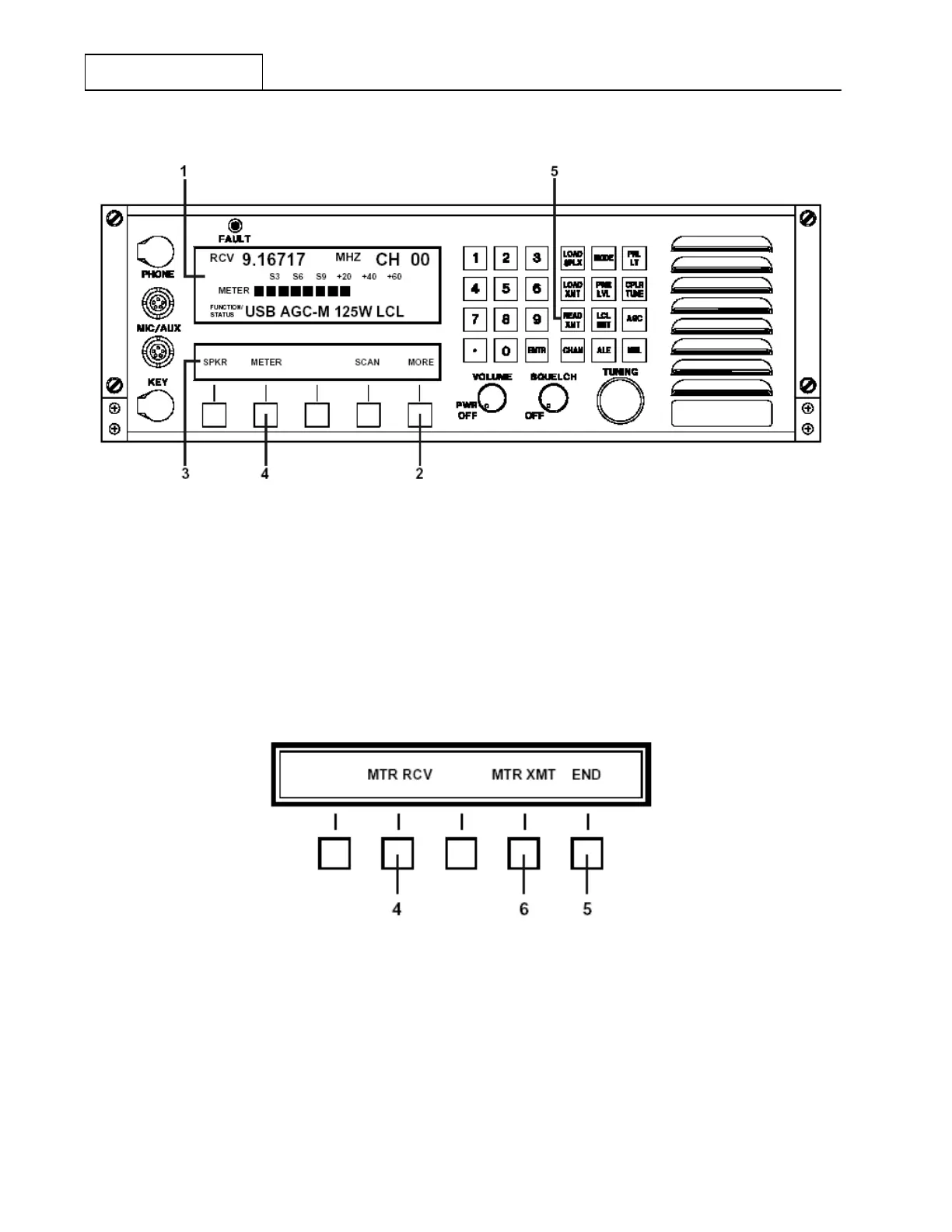
Figure 7.3.3.3 Main Menu containing Meter Selection
To select the desired meter choices, depress the Feature Menu ‘MORE’ key successively at 2 until the
Feature Menu shown in Figure 7.3.3.3 appears. Depressing the ‘METER’ function key at 4 will cause the
Feature Menu shown in Figure 7.3.3.4 to appear.
Depressing the Receive Meter (‘MTR RCV’) key at 4 or Transmit Meter (MTR-XMT’) key at 6 will cause
new and appropriate Feature Menus to appear. The User may make Receive or Transmit Meter selections as
described in following sections 7.3.3.2.1 or 7.3.3.2.2, respectively. After completing these selections, the User
will be returned back to this same Feature Menu.
Figure 7.3.3.4 Meter Select Sub-Menu
After completing the Receive and Transmit Meter selections, the User is returned to the Feature Menu shown
in Figure 7.3.3.4.
Depressing the ‘END’ key at 5 will cause the Meter selection to end and return the User back to the main
menu.
RT-9000 B



 To Next Page