Document No. 8128000560
Software Revision – N1B (07 Oct 04)
7-41
RT-9000 B
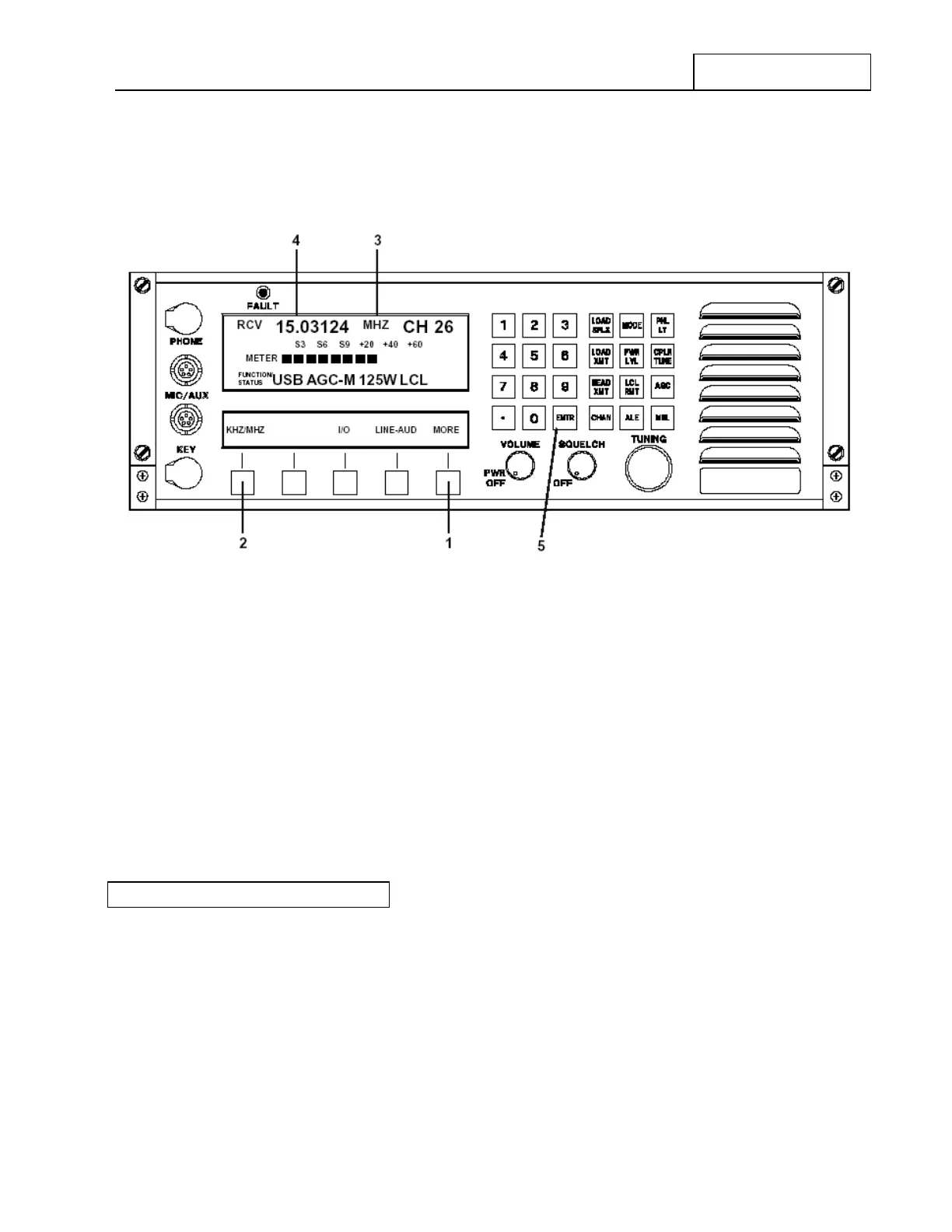
Depress the Feature Menu ‘MORE’ key at 1 successively until the Feature Menu shown in Figure 7.3.3.8
appears.
Figure 7.3.3.8 Main Menu containing MHz – kHz Frequency Display Selection
Depressing the ‘kHz/MHz’ Feature key at 2 will cause the Operating Frequency units in the Operational
Display at 3 to toggle between ‘MHz’ (MegaHertz) and ‘kHz’ (kilohertz). As an example, in Figure 7.3.3.8
note if ‘KHZ’ units is selected that the decimal point at 4 will move three (3) digits to the right and the ‘MHZ’
indication shown at 3 will change to ‘KHZ’.
Depressing the ‘ENTER’ key at 5 will cause this selection to be stored in memory for the currently selected
Channel Number. This Frequency Display MHz/kHz selection is made and stored separately for each Pre-set
Channel. Each Channel may be programmed to display Operating Frequency in the units selected as
described.
7.3.3.5 REMOTE OPERATION
The RT-9000 B Transceiver may be controlled from a remote location using an RCU-9310B Remote Control
Unit.
The control passing relationship between these two units is that the distant unit “takes control” from the other
unit. Thus, if the RT-9000 B Transceiver is currently being controlled by an RCU-9310 B , depressing the RT-
9000 B Local/Remote (‘LCL-RMT’) key will restore Local control to the RT-9000 B . On the other hand,
depressing the RCU-9310 B’s Local/Remote (‘LCL-RMT’) key will cause it to take back control of the RT-
9000 B .
RT-9000 B


 To Next Page
 Loading...
