Document No. 8128000560
Software Revision – N1B (07 Oct 04)
7-42
RT-9000 B
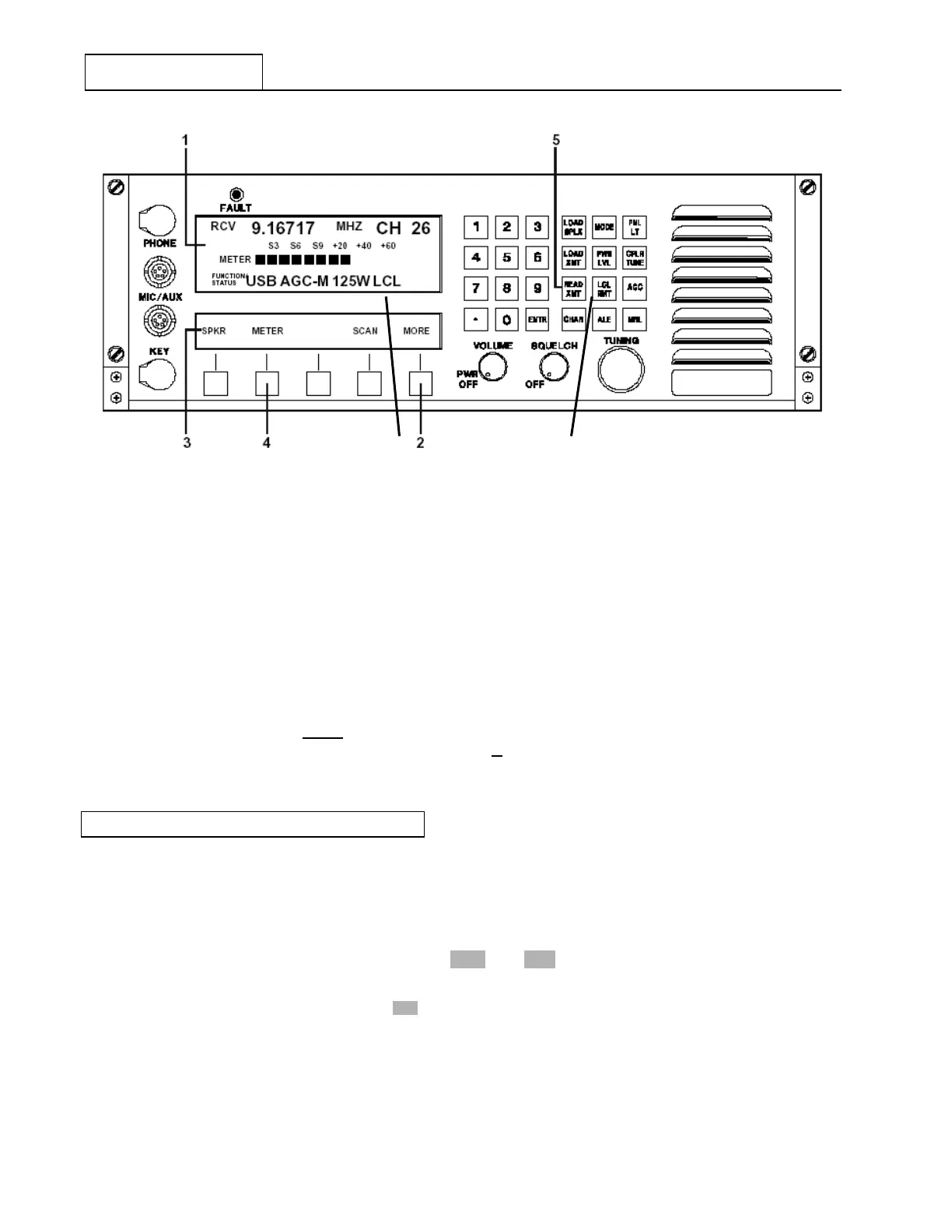
Figure 7.3.3.9 Local/Remote Controls
Refer to Figure 7.3.3.9. If the RT-9000B is currently under remote control, depressing the RT-9000 B ’ s
Local/Remote (‘LCL-RMT’) key at 6 will cause it to take back control. If the RT-9000 B was already in Local
control, depressing this key will have no effect. Local/Remote control status is indicated at 7 in the
Operational Display.
When the RT-9000 B is in Remote control (‘RMT’) operation, all keys in Function Keypad will be disabled
except for the ‘Local/Remote’ or Display Illumination (‘PNL LT’) keys. Any attempt to use these keys will
cause the following two (2) messages to be displayed, ‘FUNCTION DISALLOWED’ followed by ‘UNIT IN
REMOTE MODE’. These messages will automatically clear.
If the RT-9000 B I/O port “A” is not
enabled, depressing the ‘LCL-RMT’ key will cause a ‘NO REMOTE
SYSTEM’ message to briefly be displayed. If the I/O port is enabled, depressing this key will be completely
ignored by the system and have no reaction.
7.3.3.6 SOFTWARE REVISION LEVEL
To view the installed Software Revision Level, depress the ‘MORE’ key from the main menu successively
until the Feature Menu shown in Figure 7.3.3.10 appears. To view the installed Software Revision Level,
depress the ‘REV’ key at 6 . The Software Revision Levels will appear at 3 in the Operational Display and
are formed as follows:
Depressing the ‘REV’ key at 6 again will cause the Operational Display to return to normal.
6
RT-9000 B
‘REV CPU-XXX IO-XXX’
NOTES: 1. XXX = Installed Software Revision Levels.
2. Software Revision Levels are alphanumeric and
may be two (2) or three (3) characters long.
7


 To Next Page
 Loading...
