Document No. 8128000560
Software Revision – N1B (07 Oct 04)
7-54
RT-9000 B
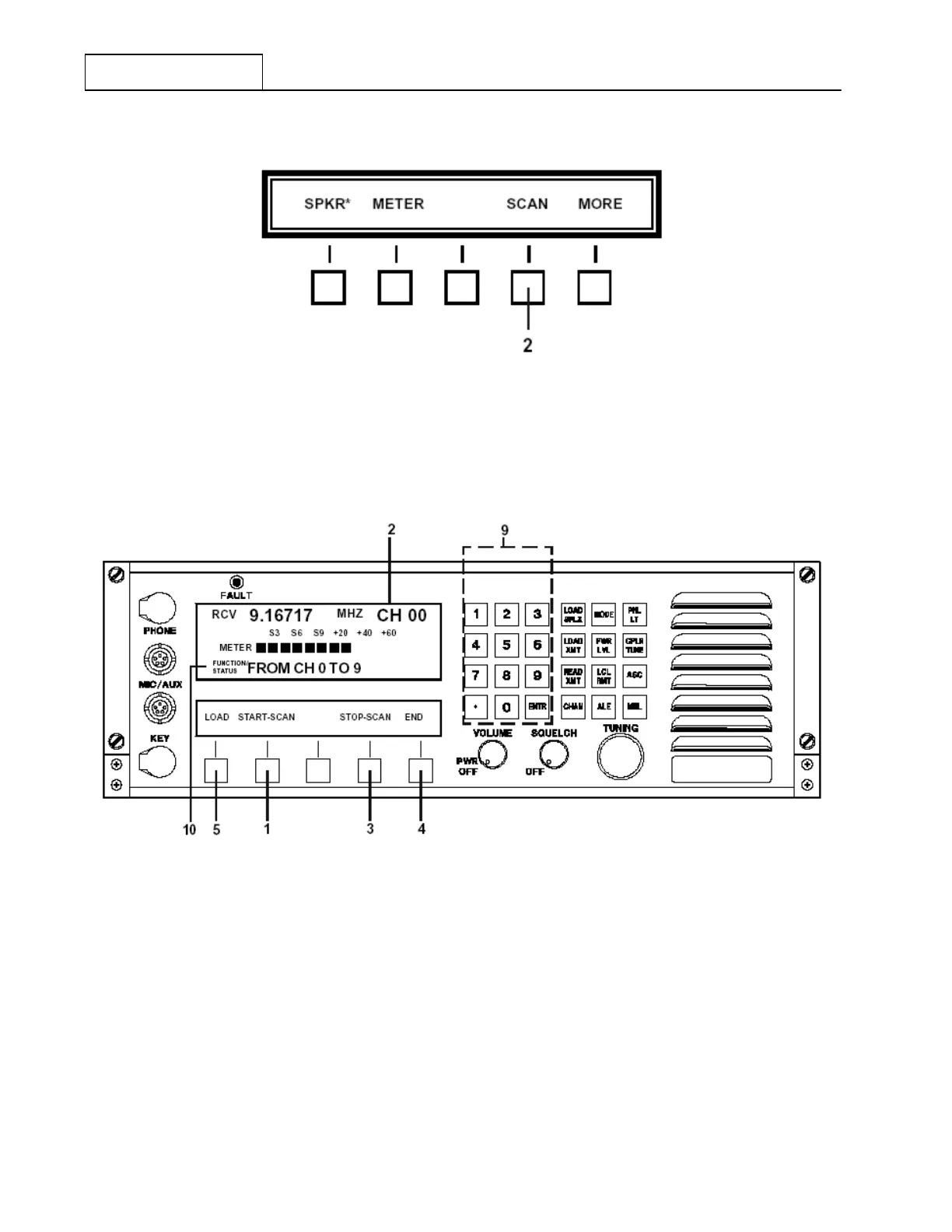
Figure 7.3.4.2 Main Menu containing Scan Selection
Depressing the ‘SCAN’ key at 2 will cause the Operational and Feature Menu displays to change to those
shown in Figure 7.3.4.3.
Figure 7.3.4.3 Scan function Feature Menu
Depress the ‘START SCAN’ key at 1 to actually begin scanning. As scanning proceeds, the instantaneous
operating frequency and Channel number will appear at 2 in the Operational Display. To stop the scanning
process, simply depress the ‘STOP SCAN’ key at 3 . To leave the Receiver Scanning function, depress the
‘END’ key at 4 . The User will be returned to Pre-set Channel operation.
NOTE: The dwell time on any given frequency has been kept to a minimum,
about 2 sec., consistent with recognizing the presence or absence of a
signal in order that a relatively continuous monitoring occurs. If for some
reason, longer or shorter dwell times are required, please contact Sunair.
RT-9000 B



 To Next Page