Document No. 8128000560
Software Revision – N1B (07 Oct 04)
7-62
RT-9000 B
7.3.4.2.2.3 Entering SELF ID Name
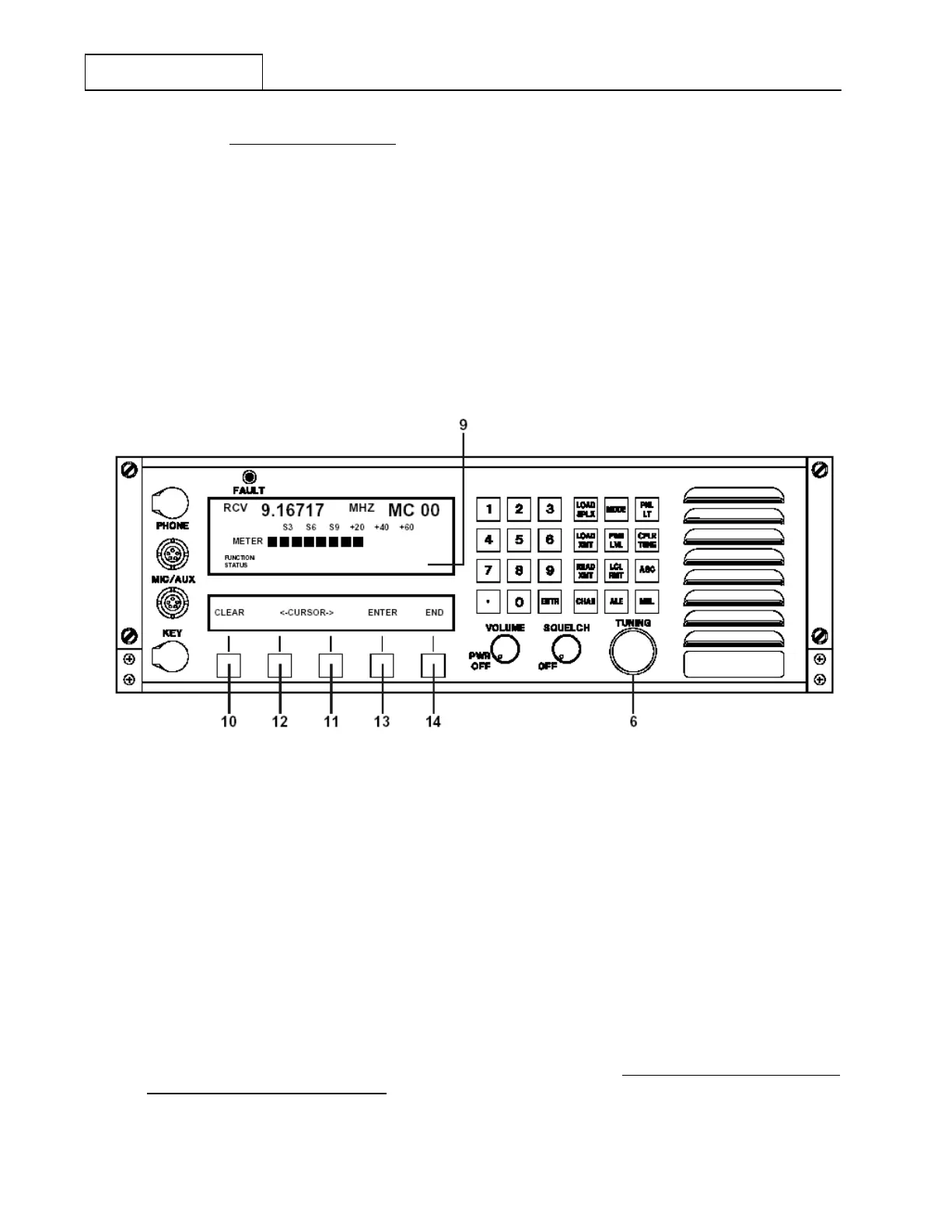
Referring to Figure 7.3.4.6, depress the ‘SELF ID’ key at 8 . The Feature Menu and Operational
Display shown in Figure 7.3.4.10 will appear and briefly display an ‘ENTER CODE WITH DIAL’
message at 9 . This message will automatically clear and be replaced with the following display.
'S ID
-- -- -- -- -- -- -- -- -- -- -- -- -- -- --'
A sequence of fifteen dashes (
-- --) or alphanumeric characters, representing the SELF ID ('S ID')
Name will appear following 'S ID'. Any combination of up to fifteen alphanumeric characters may be
used.
If there is information other than dashes
(--) in SELF ID Name positions or the user is changing a
current SELF ID Name, depress the 'CLEAR' feature select key at 10 to clear the positions and
ease new name entry.
Figure 7.3.4.10 SELF ID Selection Displays
The first character position, or dash (
--), will flash to indicate the specific position where a user
selected character is to be entered. If the first character is satisfactory as is, depressing the right
arrow (—>) key at 11 will move the flashing cursor one position to the right. Alternately, depressing
the left arrow (<—) key at 12 will move the cursor one position to the left.
As each character position is selected , characters ‘0’ through ‘9’ and ‘A’ through ‘Z’ may be selected
by rotating the ‘TUNING’ knob at 6 either clockwise or counter-clockwise. Once the desired
character appears in view, depress the right arrow key (—>) at 11 . The flashing cursor will move to
the next character position. This character selection process is repeated until the desired SELF ID
('S ID') “Name” has been formed.
Once all characters for the SELF ID (‘SID’) “Name” have been selected, depress the Enter (‘ENTR’)
key at 13 to enter the SELF ID (‘S ID’) “Name” into the RT-9000 B ’s memory. Depress the ‘END’
key at 14 to exit the SELF ID (‘S ID’) Name entry process and return to the Feature Menu shown in
Figure 7.3.4.6. The user may now proceed to paragraph 7.3.4.2.2.4 Entering Network Station CALL
IDs (Time Slot Position and Name)
RT-9000 B
S ID
-- -- -- -- -- -- -- -- -- -- -- -- -- -- --


 To Next Page
 Loading...
