25
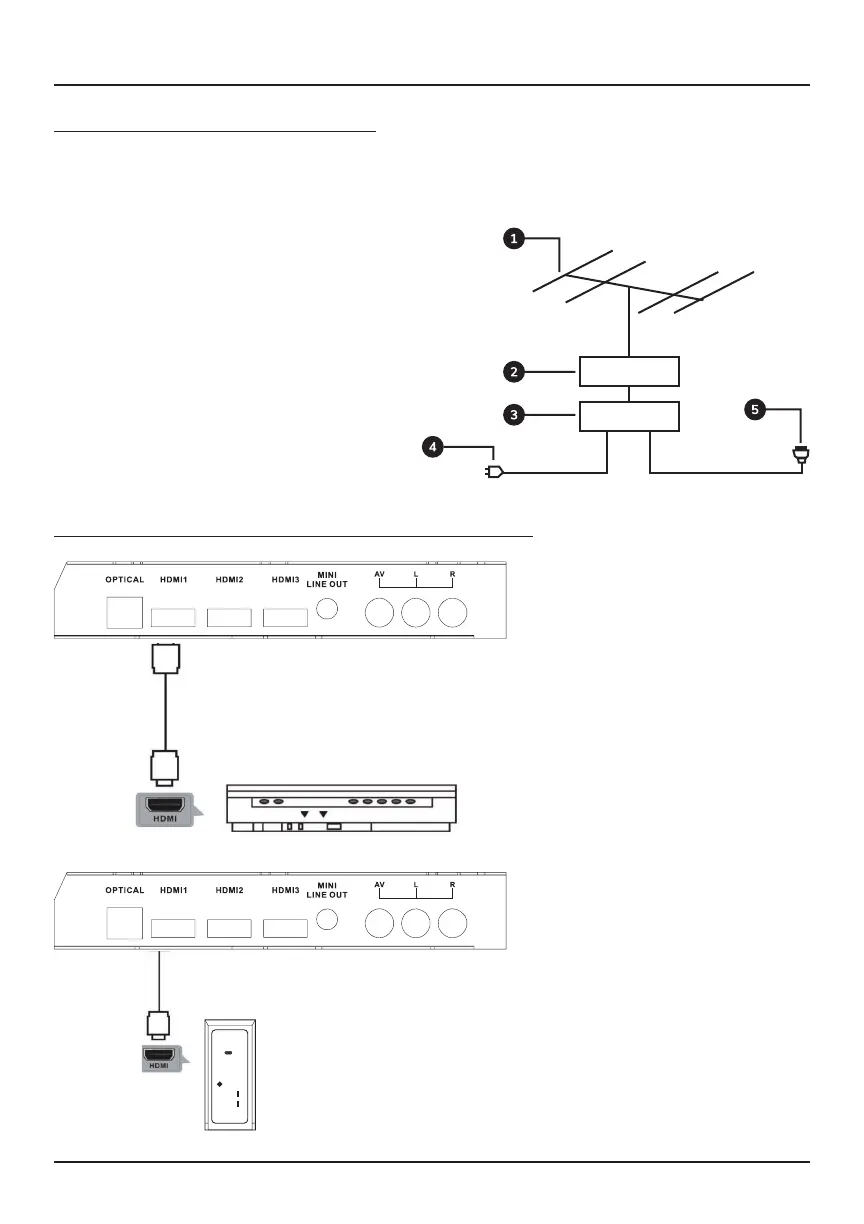
Use an HDMI cable (sold
separately) to connect an
external device, such as a
laptop or DVD player, to your
TV.
Press the TV remote’s
SOURCE button until you
reach “HDMI”. Be sure to
select the specific HDMI
source (HDMI 1/2/3) that
matches the input to which the
cable is connected.
Connecting an External Device to Your TV via HDMI
HDMI cable
(sold separately)
Back of DVD/VCR
Connecting an Antenna to Your TV
Connect your antenna’s output cable to the TV’s antenna input to access over-the-air
channels. Refer to your antenna’s user manual for further instructions. Press the TV
remote’s SOURCE button until you reach “TV”.
1 - Antenna (sold separately)
2 - Amplifier Antenna (external)
3 - Amplifier Antenna (internal)
4 - Antenna Amplifier Power Plug
5 - Plug Antenna (75 Ω)
Connecting External Devices



 To Next Page