TS7-Pro 7-inch Touch Screen
cp -r /home/pi/ts7-pro/iot/
*
/home/pi/cloud4rpi-raspberrypi-python
Temperature and Humidity Acquisition
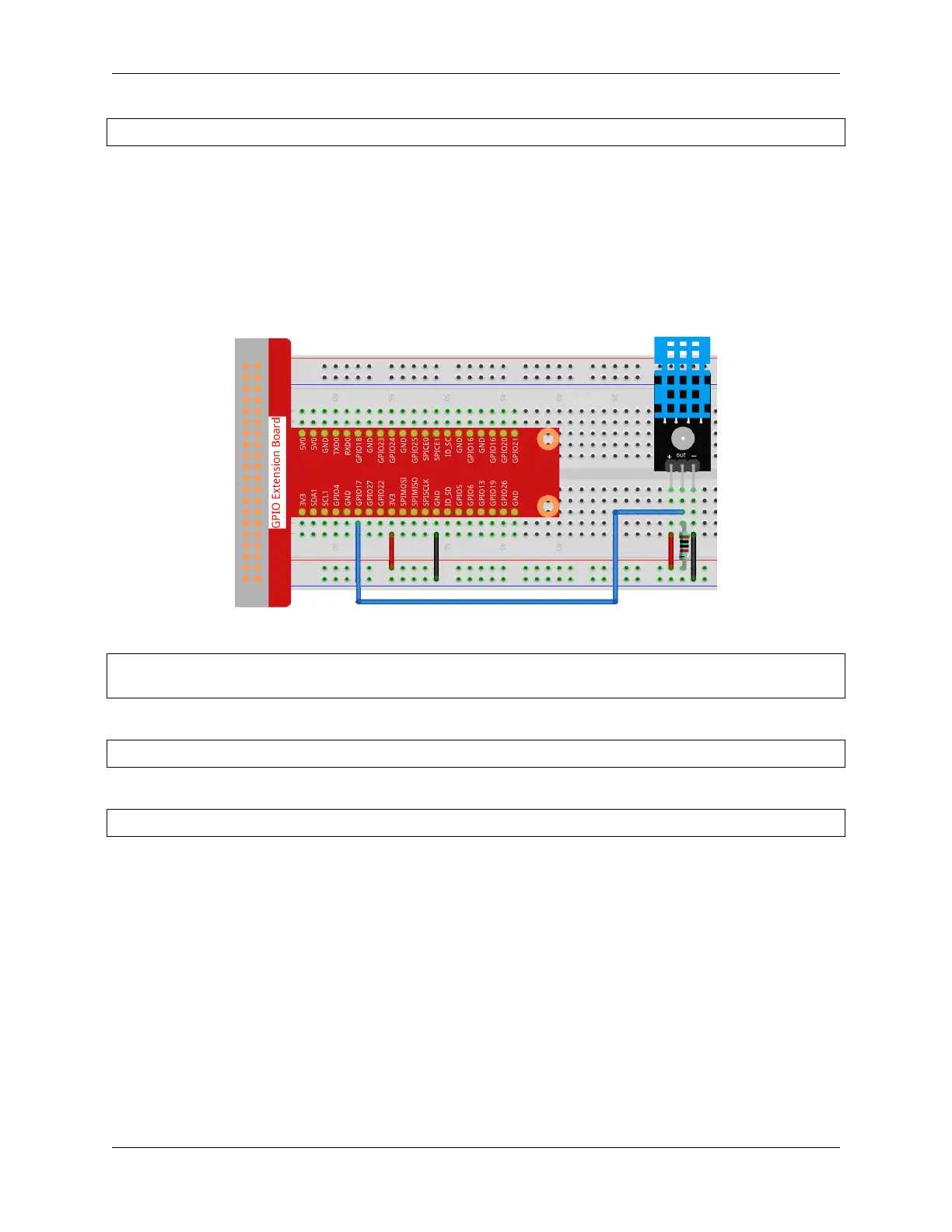
In this project, we use DHT11 to read the surrounding temperature and humidity, and then display them on Cloud4RPi.
Experimental Procedures
Build the circuit.
Open the code.
cd /home/pi/cloud4rpi-raspberrypi-python
sudo nano temperature_and_humidity_acquisition.py
Find the line below and fill in the correct device token.
DEVICE_TOKEN = '__YOUR_DEVICE_TOKEN__'
Run the code.
sudo python3 temperature_and_humidity_acquisition.py
Go to Cloud4RPi, add a new Control Panel named project1, and click Add Widget.
110 Chapter 5. PROJECTS AND ACTIVITIES



 To Next Page