User Manual 5 Electrical Installation
37
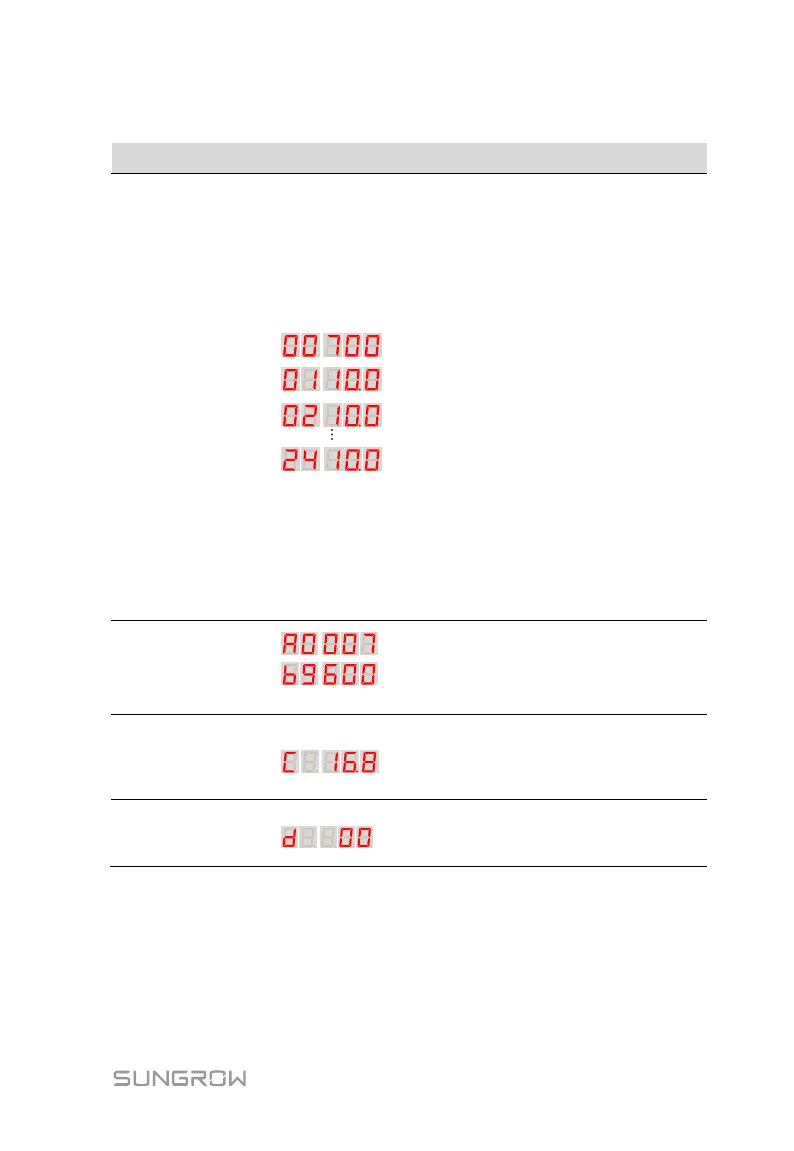
Tab. 5-2 Function description of the key buttons (using 24 inputs as example)
Voltage and
current display
Press K1 to turn screen
24
th
current: 10A
2
nd
current: 10A
1
st
current: 10A
Display voltage:
700V
The LED display can be
divided into the first two digits
and last three digits.
The first two digits are used to
display the parameter type; the
last three digits are used to
display the corresponding
values.
For example: 0110.0 means
that the current of the 1
st
input
is 10A.
But when the first two digits are
00, the last three digits are the
voltage. For example: 00700
means that the present voltage
is 700V.
Communication address
A0 007
Baud rate
b9600
Press K2 to turn screen once
Ambient
temperature
display
Ambient temperature
C 16.8
Press K2 to turn screen twice
PLC
communication
quality display
d 00
Press K2 to turn screen three times
Larger number indicates higher
communication quality.
5.6.2 Setting Communication Address
Step 1 Press and hold K1 for 2s until "A=001" is displayed on the LED.
Step 2 Press K1 to add address number; and press K2 to reduce address
number. The communication address can be set to 1-247.


 To Next Page
 Loading...

