ANDROID CONTROL PAD & SUNLIGHTEN APP GENERAL OPERATING INSTRUCTIONS
11
WELCOME SCREEN
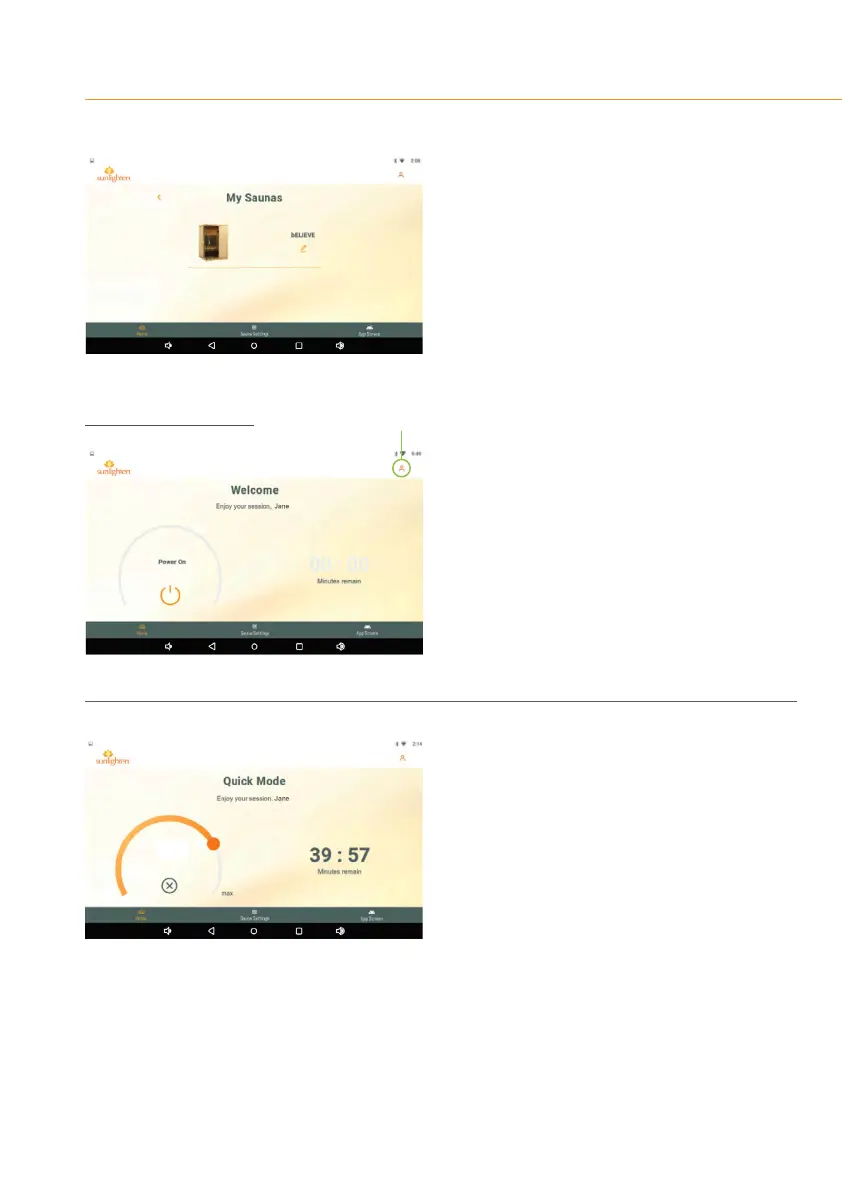
SCREEN 13
•
Tap update model and an image of your
unit will appear.
•
Tap the left-facing arrow to return to the
Home Screen.
SCREEN 14
The WELCOME SCREEN is where to begin using
the Sunlighten App.
•
Hit the power icon to engage Quick Mode,
described in the next section.
•
In the upper right corner, you’ll see the user
icontoaddtooreditexistingornewprole
registrations.
SCREEN 15
QUICK MODE
The most commonly used, easily accessible, and
quickstarting mode of operation, Quick Mode
is ideal for a basic high-temperature experience
that utilizes the fullspectrum wavelengths at
maximum intensity to increase the temperature
of the cabin.
The maximum duration for Quick Mode use is
one hour. For longer sessions, in a commercial
use case for example, utilize the multi-segment
custom programs detailed on page 12.
user icon
0°
60°
28°C









 To Next Page