9
We value your experience using Sunny Health and Fitness products. For assistance with
parts or troubleshooting, please contact us at support@sunnyhealthfitness.com or 1-877-
90SUNNY (877-907-8669)
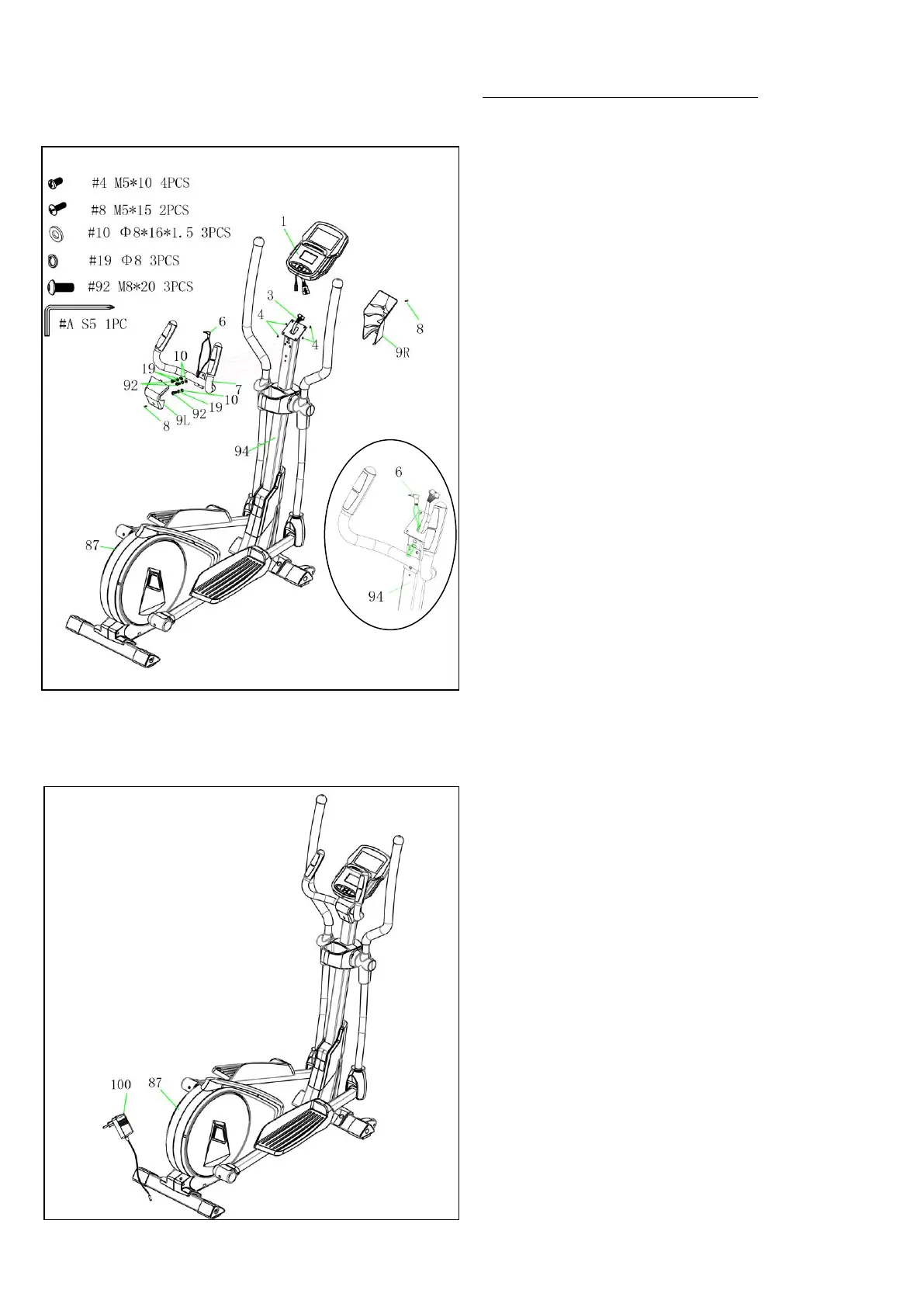
STEP 7:
Attach Handlebar (No. 7) to the Handlebar
Post (No. 94) with 3 Spring Washers (No.
19), 3 Washers (No. 10), and 3 Bolts (No. 92).
Tighten and secure with Allen Wrench (No.
A).
Insert the Hand Pulse Cable (No. 6) into the
front hole of Handlebar Post (No. 94) and pull
up the Hand Pulse Cable (No. 6) from the top
hole the Handlebar Post (No. 94).
Remove 4 Screws (No. 4) from the back of the
Computer (No. 1).
Connect the Upper Computer Cable (No. 3)
and Hand Pulse Cable (No. 6) to the wires of
Computer (No. 1).
Attach the Computer (No.1) onto the top end
of Handlebar Post (No. 94) using 4 Screws
(No. 4) that were removed. Tighten and secure
with Allen Wrench (No. A).
Remove 2 Screws (No. 8) from the Handlebar
Post (No. 94).
Attach the Left & Right Console Racks (No.
9L & No. 9R) to the Handlebar Post (No. 94)
using 2 Screws (No. 8) that were removed.
Tighten and secure with Allen Wrench (No.
A).
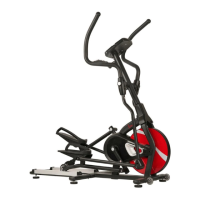
STEP 8:
Before plugging in the elliptical, make sure to
check the specifications carefully on the
Adapter (No. 100).
Plug one end of the Adapter (No. 100) into the
power plug at the end of Main Frame (No. 87).
The assembly is complete!


 To Next Page