OPERATING INSTRUCTIONS
ENGLISH ENGLISH
3
4
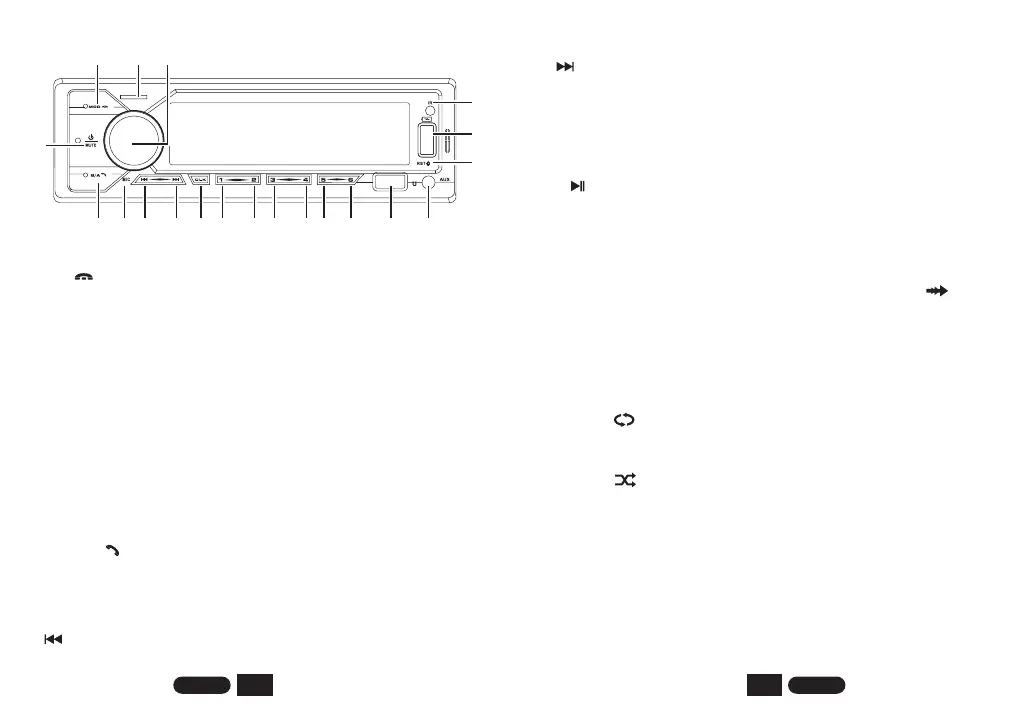
Insert the Micro SD card in the slot. Select SD with the mode selector. Audio
will begin playback automatically.
4. VOLUME / SELECT CONTROL
Rotate the volume knob to control the volume ; Press the select button
shortly until the desired function is shown on the display: AUTO(colorful
switch: auto-red-green-blue-yellow-cyan-purple-white)--BASS--TREBLE-
-BALANCE--FADER--EQ (classic-rock-pop-flat-jazz-tech-optimal-country-
dance-eq off)--LOUD(on/off)--DX/LOC--STEREO(mono)--AF(on/off) --
TA(on/off)--PTY(on/off)--EON(DX/LOC)--12/24--"10:51"(clock)--DSP(on/off,
on 30Hz~20KHz to gain ±18).
AUDIO RECORDING:
In radio mode, Bluetooth mode, and AUX mode, long press the VOL button
to start recording the audio being played. (You need to insert a USB device
or TF card to start recording and save.)
6. MIC HOLE
Microphone pickup.
Push this button repeatedly and the lcd will display the following sequence:
RADIO--USB--SD--AUX IN--BT. In bluetooth mode, short press to end call.
7. BUTTON
2. MOD/
3. Micro SD CARD SLOT
Short press turn on, Short press again to MUTE; Long press to turn off.
5. BND/AMS/
In radio mode, press the band to browser station (FM1-FM2-FM3-AM1-
AM2), long press to automatically search for and store radio stations; In
bluetooth mode, short press to answer call.
In playback mode, it is the function of the previous track; Long press to
1. POWER/MUTE
1
2
3
4
5
6
7
8
9
10
11
12
13
14
15 16
17
18
19
20
rewind the track.
In radio mode, this function can search backward for radio stations.
18. IR RECEIVER
8. BUTTON
9. CLK: Clock display
10. 1/ BUTTON
Pressing this key will playback a snippet of each track. Press again to stop
snippet and listen to the full track. While this mode is activated “ ” will
be displayed.
Pressing this key will activate Repeat mode. They current track will be
continually repeated until repeat is deactivated. When this mode is
activated " " will appear.
Pressing this key will activate Random playback mode. When this mode is
activated " " will appear.
In radio mode, this function can search forward for radio stations.
16. USB PORT
Connect your external device via USB (not included) to playback audio.
17. AUX IN JACK
Short press CLK to display the clock. Then long press CLK to set the hour
and rotate the VOL button, then short press the VOL button to set the
minute and rotate the VOL button.
In playback mode, short press to +10, long press to choose next folder.
In Radio mode press to play preset station #1.
11. 2/INT BUTTON
In Radio mode press to play preset station #2.
In USB/SD mode press to start music playback, Press again to pause
playback.
13. 4/RDM BUTTON
In Radio mode press to play preset station #4.
VOICE ASSISTANT:
14. 5/-10 BUTTON
In Radio mode press to play preset station #5.
In playback mode, short press to -10, long press to choose previous folder.
12. 3/RPT BUTTON
In Radio mode press to play preset station #3.
15. 6/+10 BUTTON
In Radio mode press to play preset station #6.
In Bluetooth mode, short press can wake up the phone's voice assistant.
Insert your portable player into the jack, in AUX mode, audio will come
through the car speaker.
In playback mode, it is the function of the next track; Long press to forward
the track.


 To Next Page
 Loading...