BLUETOOTH INSTRUCTIONS
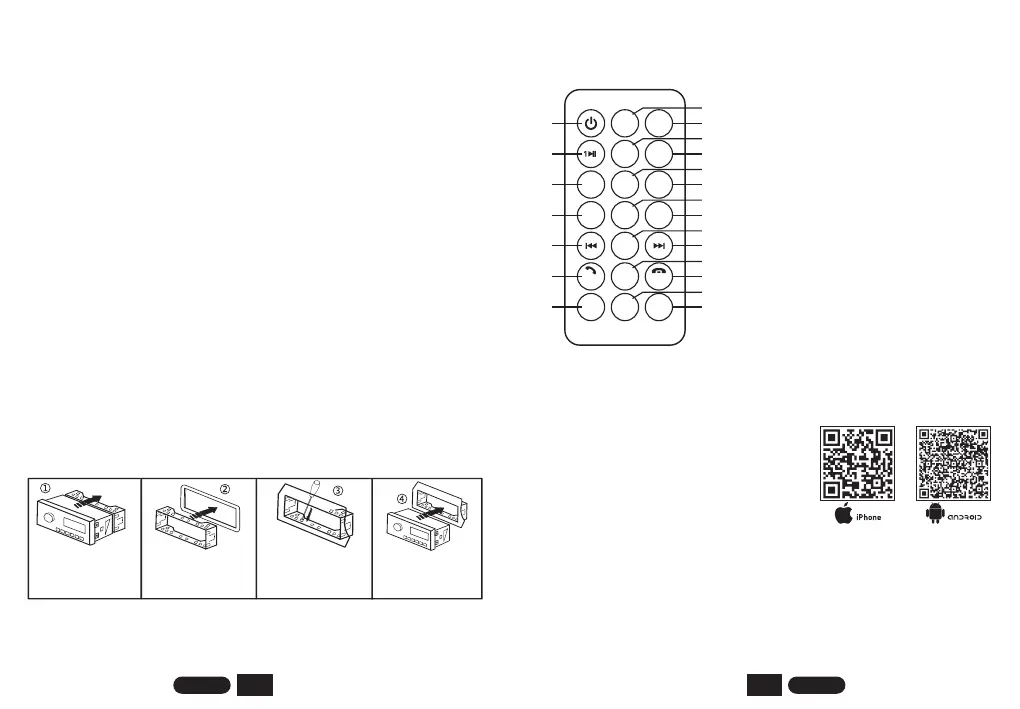
Press the main unit into
the iron frame and let
the machine snap into
the iron frame.
INSTALLATION STEP DESCRIPTION
Insert the iron frame into
the car radio installation
window
Separate the iron frame
from the host
Fix the iron frame to the
car with a screwdriver.
ENGLISH ENGLISH
5
6
Device Name: “SWL-BT”
PIN Number: “0000" (If need)
Bluetooth play mobile music : After the Bluetooth connection is successful,
open the music player software on the mobile phone to play music,
increase the volume of the mobile phone, and press the MODE button
repeatedly until the [BT] (Bluetooth mode) is displayed, it is already
playing.
Bluetooth connection method : When the machine is powered on, the phone
turns on the Bluetooth function, click on the search device. When [SWL-
BT] is displayed in the list, click [SWL-BT] to connect.
20. RESET BUTTON
Press to restore the unit to factory defaults.
Plug in the data cable to charge for mobile devices with 5V_2.1A.
Remote control infrared signal receiving window.
19. USB CHARGING HOLE
REMOTE CONTROL FUNCTION
18. Band(FM1-FM2-FM3-AM1-AM2); End Call
8. Number 5 ; Track-10
11. Volume +
6. Number 3 ; Loop Playback
13. Previous Track
15. Next Track
16. APS(automatically Search For Stored
Stations) ; Answer Call
10. Loudness On/off
19. Stop Music
14. Set Up
7. Number 4 ; Random Playback
12. EQ
20. Switch Mono/stereo
17. Volume -
9. Number 6 ; Track+10
21. Clock Display
1. Power On/off
2. Mute On/off
3. Mode: Switch mode
4. Number 1 ; Play / Pause
5. Number 2 ; Intro to Music
MUTE MODE
2
3RPT
4RDM
5
10-
6
10+
LOUD VOL+ EQ
SEL
APS
VOL-
BAND
STOP MO/ST
CLOCK
1
4
7
10
13
16
19
2
3
5
6
8
9
11
12
14
15
17
18
20
21
1. Scan the QR code to install the software;
4. When the car is turned off (ACC OFF), the APP will remember the
coordinates and location information at that time (Bluetooth must be
connected before turning off);
5. After walking far, open this APP, click the search button, and select the
map software of the mobile phone to start navigating to the parking
position.
2. Start the software to search for the device, and select "CAR APP" in the list;
3. Then you can remote control the phone;
iPhone, scan the QR code on the left to
download the APP [SWT Car Link];
Android, scan the QR code on the right
to download the APK [iCar Link].
MOBILE APP REMOTE CONTROL AND CAR SEARCH


 To Next Page