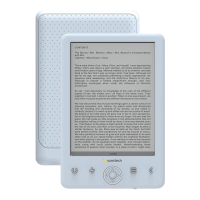
V. Functional Diagram:
1 2 4 5 633
9 10 11 12
7 8
Explanations for Keys:
1. : zoom in/out the image when you read a text;
2.M: When you are reading a book or looking at a picture if you press the knob
"M", it can access a submenu with different options.
3. Direction keys: in music playing: up key: increase volume; down key: decrease
volume; left key: press it to play the previous song, or long press it to rewind; right
key: press it to play the next song, or long press it to fast forward; in text reading:
page up/down.
4. OK/ENTER.
5. :Please it to return to the music interface, press it again to the current interface.
6. : switch between portrait mode (vertical) and landscape mode (horizontal) in
text reading.
7. Power key: slide it to “ ” to turn on/off your unit about 5 seconds later.
8. Lock key: slide the power key to “ ” to lock the keyboard, and slide it to the middle
position to unlock the keyboard.
9. Earphone jack.
10. TF card slot: to expand the capacity.
11. USB port: connect your unit to the computer through the USB port and USB cable.
12. RESET key: press this key to reset it when your unit has no response for long.
4



 To Next Page