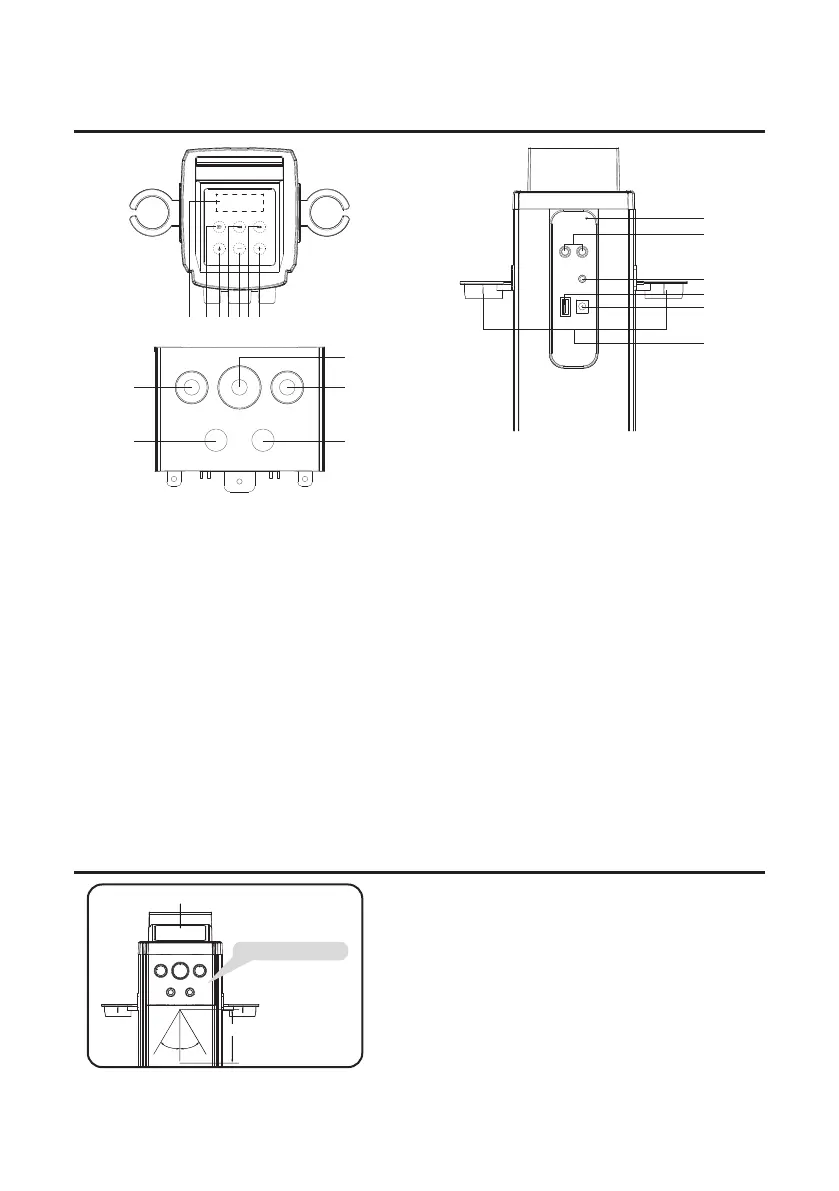
1. LED display
2. SOURCE button: Touch repeatedly to select the
audio inputs to BT (Bluetooth receiver), USB,
AUX, LINE in or FM.
3. POWER button: • Hold 3 second to select 12 or
24 hour in the standby.
• Touch to turn the tower speaker o or on.
4. TUN-: • In FM mode, one touch to navigate
down radio frequency. Touch and hold a second
to switch to auto-search radio station.
• In USB mode and in bluetooth mode, one
touch to backward track.
5. VOLUME -: Touch to decrease the volume.
6. TUN +: • In FM mode, one touch to navigate
down radio frequency. Touch and hold a second
to switch to auto-search radio station.
• In USB mode and bluetooth mode, one touch
to forward track.
7. VOLUME +: Touch to increase the volume.
8. BLANCE: Rotate the BALANCE knob to adjust L/R
track volume.
9. MIC VOL: Rotate the MIC knob to adjust the mic
volume.
10. ECHO: Rotate the ECHO knob to adjust the echo
level.
11. MIC 1 jack.
12. MIC 2 jack.
13. FM antenna.
14. AUX L/R IN jacks.
15. 3.5mm LINE IN jack.
16. USB IN port.
17. DC jack in. (20V)
18. Microphone bracket.
1 2 34 56 7
BALANCE
MIC1 MIC2
MUSIC
VOCAL MIN MAX
MIN MAX
MIC VOL
ECHO
8
11
9
10
12
FM ANT
AUX
L R
LINE IN
USB
DC 20V
13
14
15
17
18
16
EFFECTIVE DISTANCE OF REMOTE TRANSMITTER
TOP PANEL- LOCATION OF CONTROLS
NOTES:
5
1. When there is an obstacle between the unit
and the transmitter, the transmitter may not
operate.
2. When direct sunlight, an incandescent lamp,
uorescent lamp or any other strong light
shines on the REMOTE SENSOR of the unit,
the remote operation may be unstable.
Remote Sensor
LCD DISPLAY
Approx. 4M
30˚30˚


 To Next Page