7
6
9
8
11
10
13
12
15
14
18
17
2
1
3
4
5
16
MUTE/
PAIR
SOURCE
POWER
ALARM
MUSIC
TREBLE+ BASS+ VOLUME+
VOLUME-BASS-TREBLE-
MOVIE VOICE
SLEEP
MEM/
CLOCK
TUN-/
CLOCK-
TUN+/
CLOCK+
TUN/
MEM
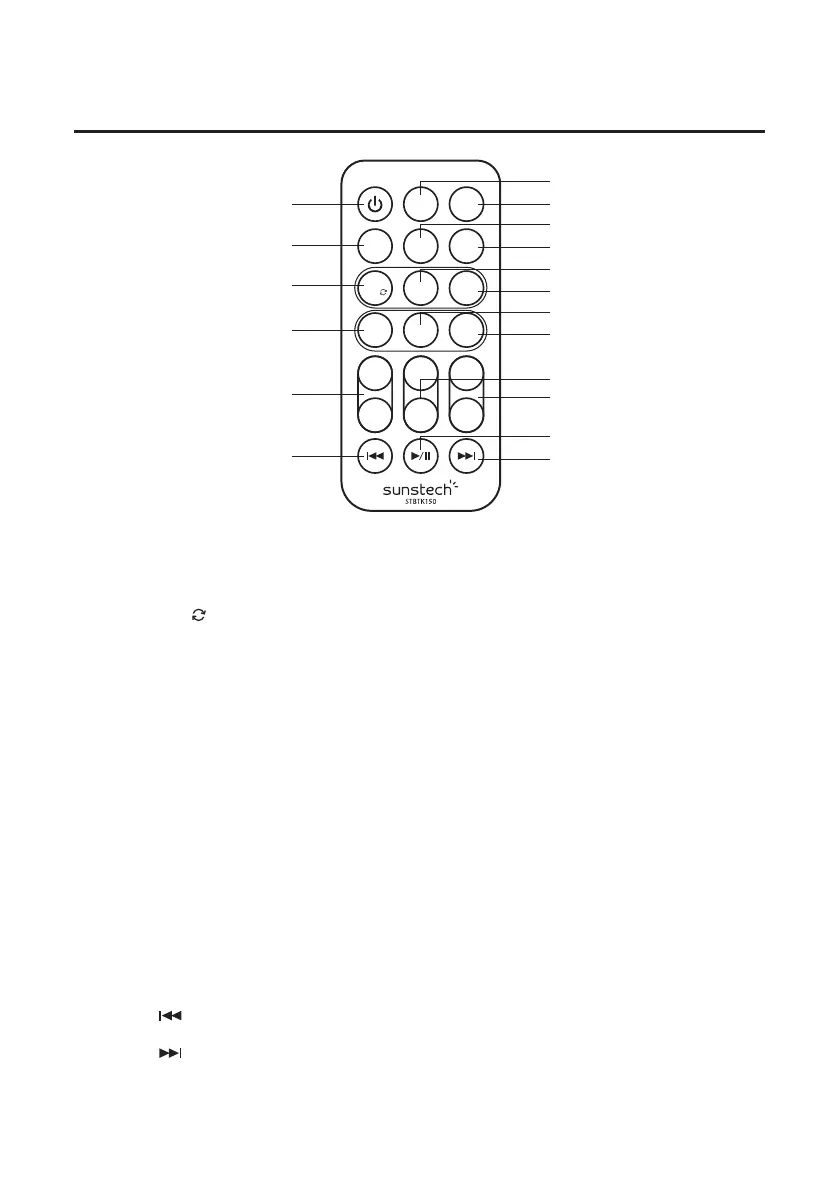
1. POWER button: Press to turn the unit on or o.
2. MEM/CLOCK button (In standby):
• Press to cycle through saved radio stations.
• Press to set the time.
3. TUN/MEM button:
• Press 3 seconds to search automatically and save FM stations.
• Press key enter call-out saved radio stations.
4. MUSIC button: Press to switch to the EQ optimized for music.
5. TREBLE buttons: Press to adjust the treble up or down at MUSIC mode.
6. SOURCE button: Press to switch to Bluetooth, USB, AUX in, LINE in or FM.
7. MUTE/PAIR button: Press to mute the sound, press again to resume, press 3 seconds to exit
bluetooth.
8. ALARM button:
• Press to set the alarm. (In standby) • Hold press to on alarm icon or off alarm icon.
9. SLEEP button: Press repeatedly to set the sleep time.
10. TUN-/CLOCK- button:
• Press backward to adjust radio frequency. • Press backward to adjust the time.
• Press backward to select those saved stations.
11. TUN+/CLOCK+ button:
• Press to navigate up radio frequency. • Press to navigate down the time.
• Press forward to select those saved stations.
12. MOVIE button: Press to switch to the EQ optimized for movie sound.
13. VOICE button: Press to switch to the EQ optimized for dialogue.
14. BASS buttons: Press to adjust the bass up or down at MUSIC mode.
15. VOLUME buttons: Press to adjust the volume.
16. SKIP : In Bluetooth mode and in USB mode, press to skip forward track.
17. Play/Pause: In Bluetooth mode, press to play or pause a track.
18. SKIP : In Bluetooth mode in USB mode, press to skip backward track.
REMOTE CONTROL – LOCATION OF CONTROLS
6


 To Next Page