Select 207 XLS User / Installation Instructions Page 4 of 8
If your programme gets ‘scrambled’, or if you want to start again, press the reset button using
a non metallic tool to re-load the default programmes, then press any button to clear the DIP
switch configuration code. The unit should revert time setting mode ready for programming.
USING ADVANCE
This function is only available when programme is in AUTO or ALLDAY operating modes.
To advance central heating
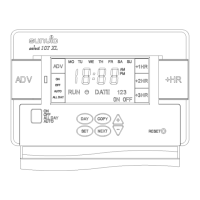
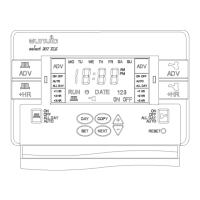
Press the CH 1 channel ADV button. This will turn the Central ON if it’s in an OFF period and
OFF if it’s in an ON period. It will stay in this state until either ADV is pressed again, or until a
programmed ON/OFF period commences. The word ADV will appear in the top left hand
corner of the MODE box
USING +Hrs.
For +Hrs. Central heating, press the left hand + Hr. button. One press of the button will give
one extra hour of heating. Two presses of the button will give two extra hours of heating.
Three presses of the button will give the maximum of three hours extra heating.
If the Central heating mode is OFF, then it will switch on for the extra hours selected. If the
Central heating mode is AUTO or ALLDAY, then during an OFF period it will switch on for the
extra hours selected. If during an ON period, then it will temporarily extend that programme by
the number of hours selected.
For +Hrs. Hot water. Press the right hand +Hrs. button. One press of the button will give one
extra hour of Hot water, two presses of the button will give two extra hours of heating and
three presses of the button, will give the maximum 3 extra hours.
To advance Hot water, press Hot water ADV button.
This will turn the Hot water ON if it’s in an OFF
period and OFF if it’s in an ON period. It will stay in
this state until either ADV is pressed again, or until a
programmed ON/OFF commences.
The word ADV will appear in the top right hand
corner of the MODE box.


 To Next Page